8 9
EN Manual FlinQ Smart Outdoor Gaia
Mode
When powered ON by the ON button the default factory setting mode is
“auto motion detection sensor mode”. We suggest this mode to use at all
times for the most convenient use of this lamp as it stays o and charge
up during daytime and will be ON at night/evening. When press the MODE
button 1x the lamp will go into “manual” mode, this means the lamp will be
always ON (without motion detection sensor) at all times and it will be only
OFF when switched o by app or when the battery is fully empty. When
press the MODE button for 2nd time it will cancel the “manual” mode and
switch o the lamp completely.
Auto motion detection sensor use
You can change the motion detection sensor settings inside the app, like
sensor distance, time, sensitivity to make it convenient in your own personal
use and location setting where the lamp will be used. Try several settings to
see what is the most favorable setting to use.
Note
When the “manual mode” is selected to turn on the light, the auto motion
detection sensor and solar light sensitivity sensor cannot control the light.
This means you need to turn OFF the light through the “manual mode
ON/OFF button” inside the APP, or switch the mode back to turn OFF
the light through the “mode” button on the product.” When press MODE
button again it will go back into “auto motion sensor mode”.
Tip
During solar charge the red charging indicator will be ON if there is
enough sun received by the solar panel. When the red light is OFF and
GREEN is ON it means the battery is fully charged. Battery level can be
checked by the FLINQ app.
Choose a stable, solid and supportive ground surface like paths, driveways,
gardens, etc and make sure the lamp is used and faced towards the
direction of the sun (most south location).
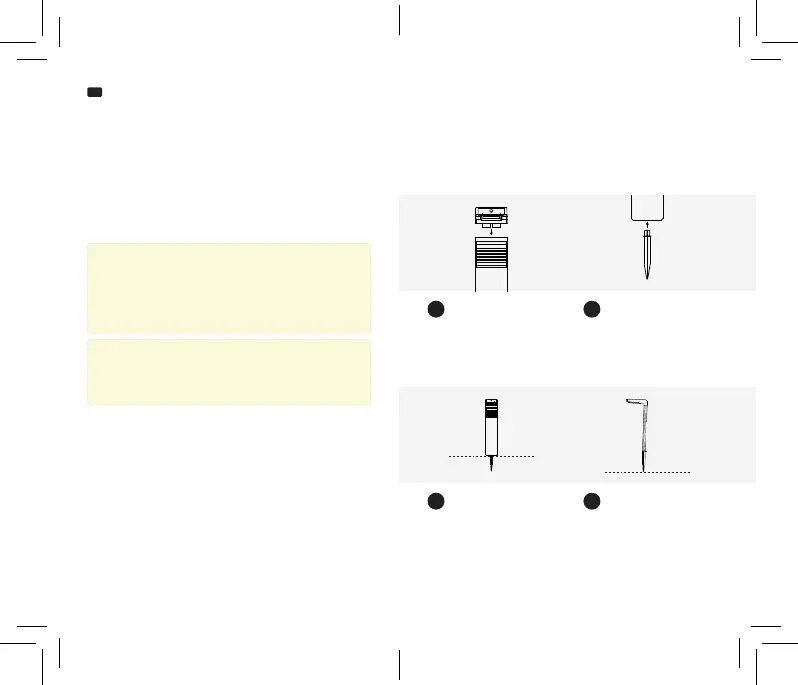
Install the FlinQ Gaia lamp
Align the ground stake holder
inside the lamp part (connect
them together as an 90 degree
angle) as shown on the picture.
Click the cross tted ground pin
upwards into the main housing
and make sure it ts tight and
straight.
Connect pole and lamp
Place lamp
Place ground pin
Water drainage
1
3
2
4
Flip it over and install and push
downwards in the desired
location. Place it in the best sunny
location possible while installing
on a soft ground location.
Make sure you place the lamp
slightly backwards so that no
water can collect on the solar
panel.
+/- 2°


 To Next Page
 Loading...