The Raymarine Dragonfly series, including Dragonfly-4, Dragonfly-5, Dragonfly-7, and Wi-Fish models, are standalone fishfinder and/or chartplotter products designed for marine navigation and fish targeting. This document provides comprehensive installation and operation instructions for these devices.
Function Description:
The Dragonfly series offers a range of functionalities depending on the specific model. All models provide core fishfinding capabilities, while Pro and M variants add chartplotter functions and satellite-based navigation. The Wi-Fish model is a standalone Wi-Fi sonar module that streams sonar data to compatible smart devices.
Key Features:
- CHIRP DownVision™: This technology provides a wide-angle side-to-side beam and a thin fore-to-aft beam, offering a detailed, high-resolution view of underwater structures and objects directly beneath and to the sides of the vessel. It operates at a centered 350 KHz ping frequency and is effective at lower vessel speeds. DownVision™ uses monochrome palettes for target differentiation.
- CHIRP Sonar: Available on DVS and Pro variants, CHIRP Sonar produces a conical shaped beam, covering the water column directly beneath the vessel. It operates at a centered 200 KHz ping frequency, offering greater depth range than DownVision™ but with less detail. Sonar uses different color palettes to differentiate target strengths, with weaker targets typically shown in blue and stronger ones in red.
- Chartplotter (Pro and M variants): Provides a 2D graphical view of charts for navigation, waypoint, and track management. These variants are pre-loaded with LightHouse™, Navionics®, and C-MAP by Jeppesen® world base maps. Chart cards can be inserted for additional cartographic detail.
- Built-in GNSS (GPS / GLONASS) Receiver (Pro and M variants): Enables satellite-based navigation, providing vessel position, speed, and course over ground (COG) data. It supports WAAS, EGNOS, and MSAS SBAS compatibility and offers a 10 Hz refresh rate for accurate positioning.
- Wi-Fi Connectivity (Pro and Wi-Fish™ variants): Allows connection to compatible smart devices (Android 4+ and iOS 7+) via the Wi-Fish™ mobile app. This enables control of the sonar module and streaming of sonar data to the smart device.
- Display: Models vary in display size (4.3”, 5”, 7”) but all feature bright, all-weather LED-backlit TFT displays with 24-bit color depth. Resolutions vary by model (480 x 272 WQVGA for Dragonfly-4, 800 x 480 WVGA for Dragonfly-5 and -7).
- Mounting: Easy ball and socket display mounting is standard across the series. Dragonfly-7 Pro also supports RAM® mounts.
- User Interface: Intuitive controls include a directional trackpad, Zoom in/out buttons, Back/View switcher button, and Power/Shortcuts page button. The Shortcuts page provides quick access to brightness control, PowerSave mode, sonar enable/disable, SD card eject, and screen capture.
- Data Management: Supports MicroSD cards for software updates, electronic charts, and archiving user data (waypoints, tracks, settings).
- Alarms: Configurable alarms for deep water arrival, shallow water arrival, fish detection (DVS/Pro), and water temperature (DVS/Pro).
- Simulator Mode: Allows users to practice operating the display without live GPS or transducer data.
Important Technical Specifications:
- Nominal Supply Voltage: 12 V dc
- Operating Voltage Range: 10.8 V dc to 15.6 V dc
- Power Consumption (Full Brightness):
- Dragonfly-4 DV: 3 W RMS
- Dragonfly-4 DVS: 3.9 W RMS
- Dragonfly-4 Pro: 4.3 W RMS
- Dragonfly-5 DVS: 4.7 W RMS
- Dragonfly-5 M: 2.9 W RMS
- Dragonfly-5 Pro: 5.3 W RMS
- Dragonfly-7 Pro: 9 W RMS
- Wi-Fish™: 2.7 W RMS
- Power Consumption (PowerSave Mode):
- Dragonfly-4 DV: 2.2 W RMS
- Dragonfly-4 DVS: 3.2 W RMS
- Dragonfly-4 Pro: 3.5 W RMS
- Dragonfly-5 DVS: 3.5 W RMS
- Dragonfly-5 M: 1.4 W RMS
- Dragonfly-5 Pro: 4 W RMS
- Wi-Fish™: N/A
- Fuse and Thermal Breaker Ratings:
- Dragonfly-4/5: 2 A slow blow in-line fuse (not supplied), 3 A thermal breaker
- Dragonfly-7: 3 A slow blow in-line fuse (not supplied), 4 A thermal breaker
- Wi-Fish™: 2 A slow blow in-line fuse (not supplied), 3 A thermal breaker
- Depth Range (Sonar/DownVision™): 0.6 M (2 ft) to 183 m (600 ft), depending on water conditions.
- Transducer Cable Length: CPT-DV: 4 m (13.1 ft); CPT-DVS: 6 m (19.7 ft). An optional 4 m (13.1 ft) extension cable (A80312) is available.
- Maximum Transducer Cable Length: CPT-DV: 8 m (26.2 ft); CPT-DVS: 10 m (32.8 ft).
- GNSS Receiver Channels: 72
- GNSS Cold Start: <2 minutes
- GNSS Refresh Rate: 10 Hz
- Position Accuracy (without SBAS): <= 15 meters 95% of the time
- Position Accuracy (with SBAS): <= 5 meters 95% of the time
- Operating Temperature: 0 ºC to +55 ºC (32 ºF to 131 ºF) for displays; 0 ºC to +40 ºC (32 ºF to 104 ºF) for transducers.
- Storage Temperature: -30 ºC to +70 ºC (-22 ºF to 158 ºF) for displays; -20 ºC to +70 ºC (23 ºF to 158 ºF) for transducers.
- Waterproof Rating: IPX6 and IPX7 (displays and transducers).
- Relative Humidity: Maximum 75%.
- MicroSD Card Compatibility: MicroSDSC, MicroSDHC (up to 32 GB), formatted to FAT or FAT32. Class 10 or UHS cards recommended for best performance.
- Waypoint/Track Storage: 3,000 waypoints (up to 100 groups), 15 tracks (up to 10,000 points each).
Usage Features:
- Installation Planning: Detailed guidance on selecting optimal locations for the transducer and display, considering factors like turbulence, aeration, electrical interference, and GPS signal reception.
- Transducer Mounting: Step-by-step instructions for transom mounting, including initial testing and adjustment for optimum performance.
- Cable Routing: Recommendations for proper cable routing to minimize interference and prolong cable life, including minimum bend radius and securing methods.
- Initial Setup Wizard: Guides users through language selection, unit configuration, and tutorial upon first power-up or system reset.
- Depth Offset: Allows adjustment of depth readings to represent depth from the keel or waterline instead of the transducer.
- Sonar/DownVision™ Modes:
- Scrolling Mode: Default mode where the image scrolls from right to left.
- Cursor/Pause Mode: Pauses the scrolling image and allows cursor movement (not available on DV/DVS variants).
- Zoom: Magnifies a specific area of the image for more detail.
- Range: Adjusts the displayed depth range (Auto or Manual).
- Scrolling Speed: Adjustable from 10% to 100% of default speed.
- A-Scope Mode (Sonar only): Displays a split screen with the standard view and a live image of the water column directly beneath the transducer, providing precise target strength indication.
- Display Options: Customizable overlays for target depth ID, depth lines, and white line (bottom indicator).
- Color Palettes: Various color options for Sonar and DownVision™ applications to suit different conditions and preferences.
- Sensitivity Adjustments: Controls for Gain, Contrast, and Noise Filter to optimize image clarity and target identification.
- Chart Application (Pro and M variants):
- Motion Mode: Boat symbol remains centered, chart moves around it.
- Cursor Mode: Allows moving the cursor around the chart area for panning.
- Waypoints: Create, manage (groups, symbols, names), move, edit, erase, import, and export waypoints.
- Tracks: Create, save, rename, change color, and erase tracks.
- Navigation: Guide to cursor location or a specific waypoint, with waypoint arrival alarms.
- Chart Settings: Options for chart selection (LightHouse, Navionics, Jeppesen), detail level, orientation (North Up, Course Up), text/symbol size, boat position (Center, Offset), community layer (User Generated Content), sonar logging, COG vector, and deep water shading.
- Wi-Fish™ Mobile App: Enables remote control and viewing of sonar data on smart devices.
Maintenance Features:
- Routine Checks: Regular examination of cables for damage, wear, and secure connections.
- Product Cleaning:
- Display Case: Wipe with a clean, soft cloth and mild detergent. Avoid solvents or detergents on the screen.
- Display Screen: Rinse with fresh water, allow to dry naturally, then gently wipe with a clean microfibre cloth. Avoid dry cloths or abrasive/acid/ammonia-based products.
- Transducer Cleaning: Clean with a soft cloth and mild household detergent. For severe fouling, use a green scotch brite™ pad. Wet sand paddlewheels with fine grade wet/dry paper if applicable. Antifouling paint (water-based) can be applied, but consult the dealer for smart transducers. Avoid ketone-based paint and spray paint.
- Software Updates: Raymarine periodically releases software updates to improve performance and add features. Updates can be downloaded from the Raymarine website and installed via MicroSD card.
- Backup and Reset:
- Save/Retrieve Data: Save waypoints, tracks, and user settings to a MicroSD card for backup and transfer.
- Erase Data: Erase files, waypoints, and tracks from the system or MicroSD card.
- Settings Reset: Resets menu options to factory default without affecting waypoints or tracks.
- Settings and Data Reset: Resets all settings and removes all waypoint and track data.
- Sonar Reset: Resets sonar settings to default.
- Power on Reset: A last resort for display products to revert to factory defaults, deleting all settings and user data.
Troubleshooting:
The manual includes extensive troubleshooting guides for power-up issues, GPS acquisition, sonar/DownVision™ performance, Wi-Fi connectivity, and general erratic behavior, with possible causes and solutions for each. Raymarine technical support and online resources (manuals, FAQs, videos, forums) are available for further assistance.

 Need help?
 General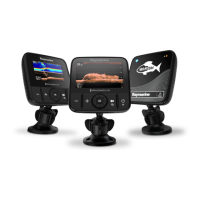

 To Next Page