17
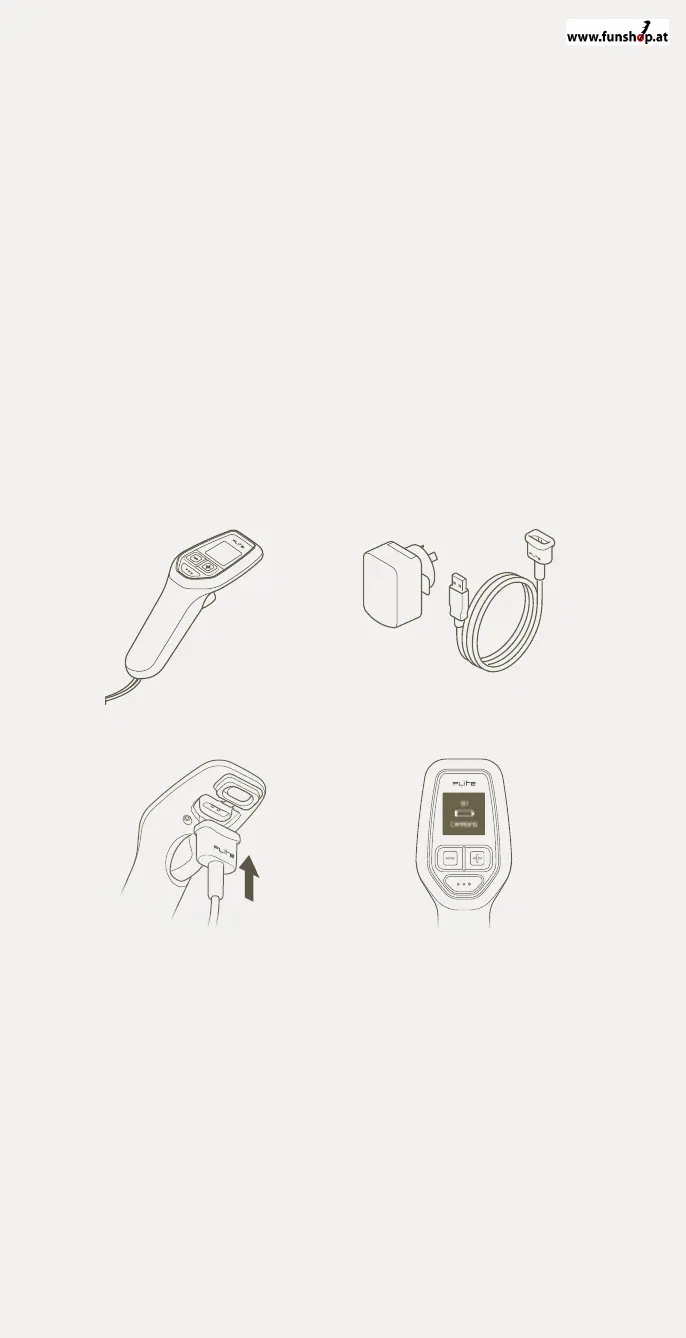
Charging Flite Controller
1 Remove Flite Controller from the accessories pouch.
(Located in the eFoil bag).
2 Remove Flite Controller USB Wall Charger and Charging Cable
from the accessories pouch.
3 Carefully peel out the rubber cover on the underside of Flite
Controller. Attach the magnetic charging plug, ensuring the
charging pins are connected.
4 Plug in the USB Wall Charger and turn on. When the Flite Controller
is charging correctly, the screen will show a charging message. After a
few minutes the screen will hibernate to speed the charging process.
Be careful not to disconnect the magnetic charging plug whilst
charging. Always check to ensure the Flite Controller is at least 50%
charged before each use.
1
3
2
4


 To Next Page