370542 D/GB
23
GB
Operation
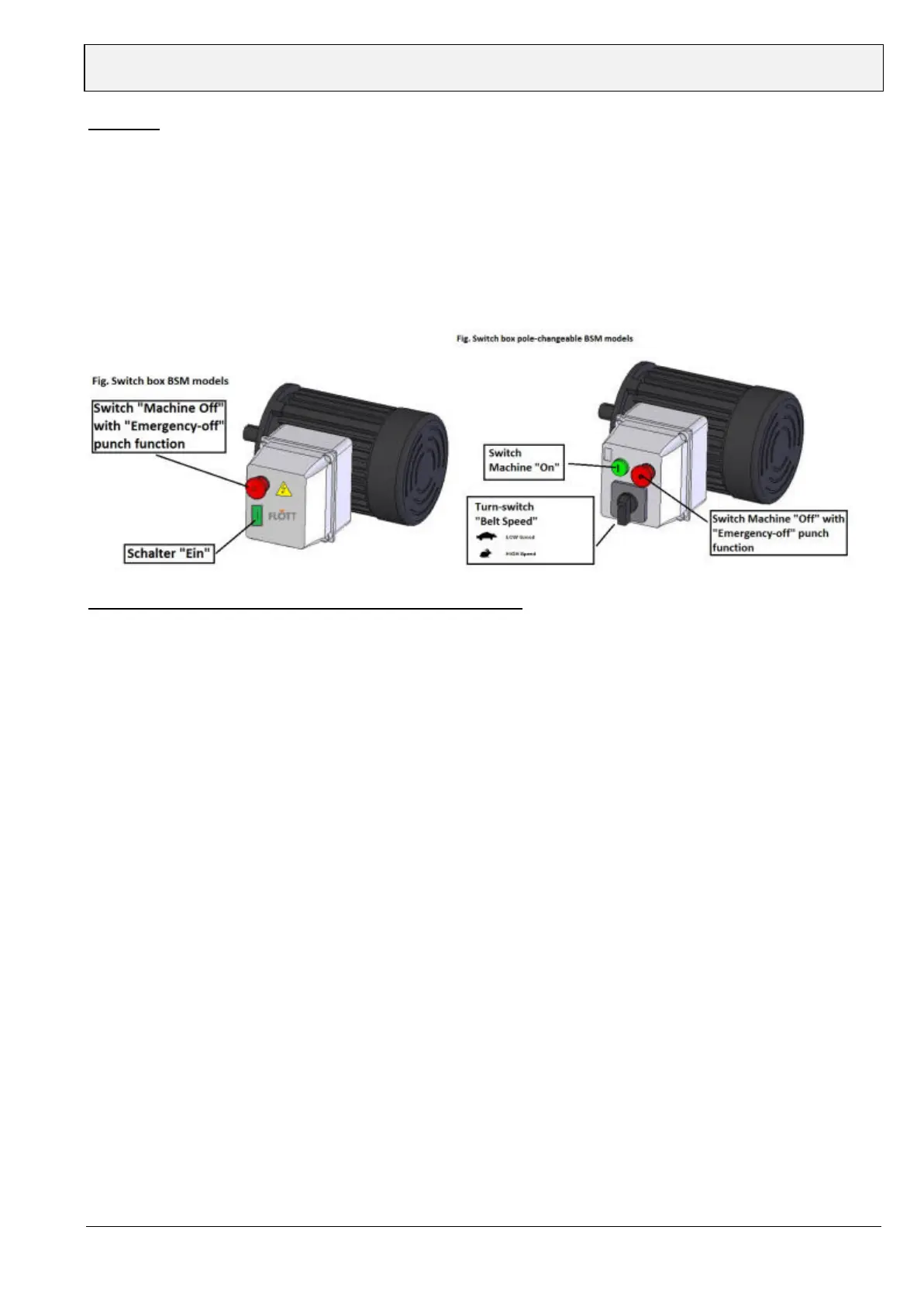
1. “START”:Push the button marked with “1”.
2. “STOP”:Push the button marked with “Stop”. This button is designed to be used as an “Emergency Stop”
and is clearly marked in red colour.
3. The pole-changing BSM machines allow the user to operate the machine in slow- (15 m/ sec.) and high speed
(30m/sec.) For slow speed turn the speed switch that is mounted on the control panel to the symbol “turtle” and
for high speed please select the symbol “rabbit”.
Attention: Do not change the speed of the machine during operation. Please press the “STOP” button and
wait till the machine comes to complete stop, then select the desired speed and start the machine with the
“START” button again. Failure to observe this rule may lead to the destruction of the drive motor and/ or
the electrical system of the machine!
Reset of the overload protection after possible interruption
1. After an interruption caused by overload, the reset switch should be pushed to reset machine.
2. Before resetting the overloading device, the power should be disconnected from source.
3. Do not change the rating of overload protection in any situation.



 To Next Page