Need help?
Do you have a question about the Floureon FC100 and is the answer not in the manual?
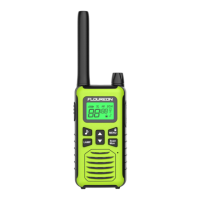
This document describes the FC100 Two-Way Radio, a portable communication device designed for ease of use and reliability.
The FC100 is a two-way radio that allows for communication over short distances. It features 9 channels, with a range of up to 1.5km. Key functions include call tone selection, Roger Tone, and a keypad lock to prevent accidental changes. It also incorporates a low battery alert and a battery save feature to extend usage time. The device supports VOX (Voice Operated eXchange) for hands-free operation and a TOT (Time Out Timer) to prevent continuous transmission.
Support Frequency Range:
Rated Output Power: 0.5W Modulation Type: FM (Analog) Emission Designator: 11K0F3E Antenna Type: Integral Antenna Gain: 1.1dBi
The device is powered by 3 AAA Alkaline Batteries. It complies with Part 15 of the FCC Rules, ensuring it operates without causing harmful interference and accepts any interference received. The device is designed for residential installation and should not be modified without authorization.
Turning Radio On and Off:
Keypad Control and Function:
Selecting the Channel:
Talking and Listening:
Talk Range: The radio is designed to maximize performance and improve transmission range. For best results, do not use the radio closer than five feet apart.
Setting and Transmitting Call Tones:
Roger Tone: The radio transmits a unique tone when you finish transmitting. It is like saying "Roger" or "Over" to let others know you have finished talking.
Keypad Lock: To avoid accidentally changing your radio settings:
VOX (Voice Operated eXchange): This feature allows for hands-free operation. When enabled, the radio will automatically transmit when it detects your voice.
TOT (Time Out Timer): This feature prevents accidental transmissions and saves battery life. If the radio emits a continuous warning tone and stops transmitting, it means you've pressed the [Talk] key for 60 seconds continuously.
Installing the Batteries:
Setting the Volume:
Auto Power Off: If there is no response in 1.5 hours, the radio will turn off automatically.
Battery Save: This function works automatically to save battery life. Your radio is idle (inactive for 5 seconds), it will enter battery save mode automatically. Under this mode, the walkie-talkie can receive incoming calls.
Low Battery Alert: When the battery power is low, the radio chirps periodically (Low Battery Alert). In battery low status, the radio will sound the alert every 5 minutes or after releasing the [Talk] key. NOTE: Remove the battery from radio for storage purposes.
FCC Statement: This device complies with Part 15 of the FCC Rules. Operation is subject to the following two conditions: (1) This device may not cause harmful interference, and (2) This device must accept any interference received, including interference that may cause undesired operation. NOTE 1: This equipment has been tested and found to comply with the limits for a Class B digital device, pursuant to part 15 of the FCC Rules. These limits are designed to provide reasonable protection against harmful interference in a residential installation. This equipment generates, uses and can radiate radio frequency energy and, if not installed and used in accordance with the instructions, installed and used in accordance with the instructions, may cause harmful interference to radio communications. However, there is no guarantee that interference will not occur in a particular installation. If this equipment does cause harmful interference to radio or television reception, which can be determined by turning the equipment off and on, the user is encouraged to try to correct the interference by one or more of the following measures:
SAR Warning: This transmitter may operate with the antenna(s) documented in this filing in Push-to-Talk and body-worn configurations. RF exposure compliance is limited to the specific belt-clip and accessory configurations as documented in this filing and the separation distance between user and the device or its antenna shall be at least 2.5 cm. All qualified end-users of this device must have the knowledge to control their exposure conditions and/or duration to comply with General Population / Uncontrolled Exposure limit and requirements. The highest reported SAR values for Face-held, body-worn conditions are 0.186 W/Kg, 0.330 W/Kg.
 General
| Brand | Floureon |
|---|---|
| Model | FC100 |
| Category | Two-Way Radio |
| Language | English |


 To Next Page