FREQUENTLY ASKED QUESTIONS
What is the purpose of the speaker wire inputs?
The speaker wire inputs can be used as an alternative to connect your DB10 to your home theater
receiver, however, Fluance recommends using the LFE/Low Level input connected via subwoofer cable.
LFE (Low Frequency Effect) refers to a channel specifically intended for deep, low-pitched sounds
ranging from 3-120Hz.
How do I adjust the volume / change the crossover settings?
The volume/crossover settings can be adjusted via the volume/crossover knob located on the back
panel of the DB10. The crossover setting changes the cut off frequency for the subwoofer.
What is the auto setting and what are the parameters?
By selecting the auto setting the DB10 will automatically turn on when it detects a signal from the home
theater receiver. The auto setting turns the subwoofer on when the frequency signal reaches a required
voltage. A 100Hz signal requires 3mV and a 1KHz signal requires 5mv.
What is the phase setting and what is the optimal setting?
If your speaker system or DB10 is out of phase. It means that the driver/woofer is moving in the
opposite direction of the other drivers/woofers. This causes frequencies to be canceled out, which can
result in a poor listening experience. By adjusting the phase setting of the DB10, you can ensure the
DB10’s woofer is moving in the same direction as your other speakers, which will result in a more
pleasant listening experience.
What does the LED behavior mean?
Green LED = Power On
Red LED = Protection Mode
What is Protection Mode?
Amplifier Protection Mode is a shutdown state that amplifiers can enable to prevent serious damage to
the unit or other components in the system. Protection Mode can be activated in two scenarios:
1. Unit is overheated – Ensure the area surrounding the DB10 is at room temperature, power off and
unplug the power adapter.
2. The unit is not installed properly – consult the included quick start guide and manual, ensure no wires
are touching.
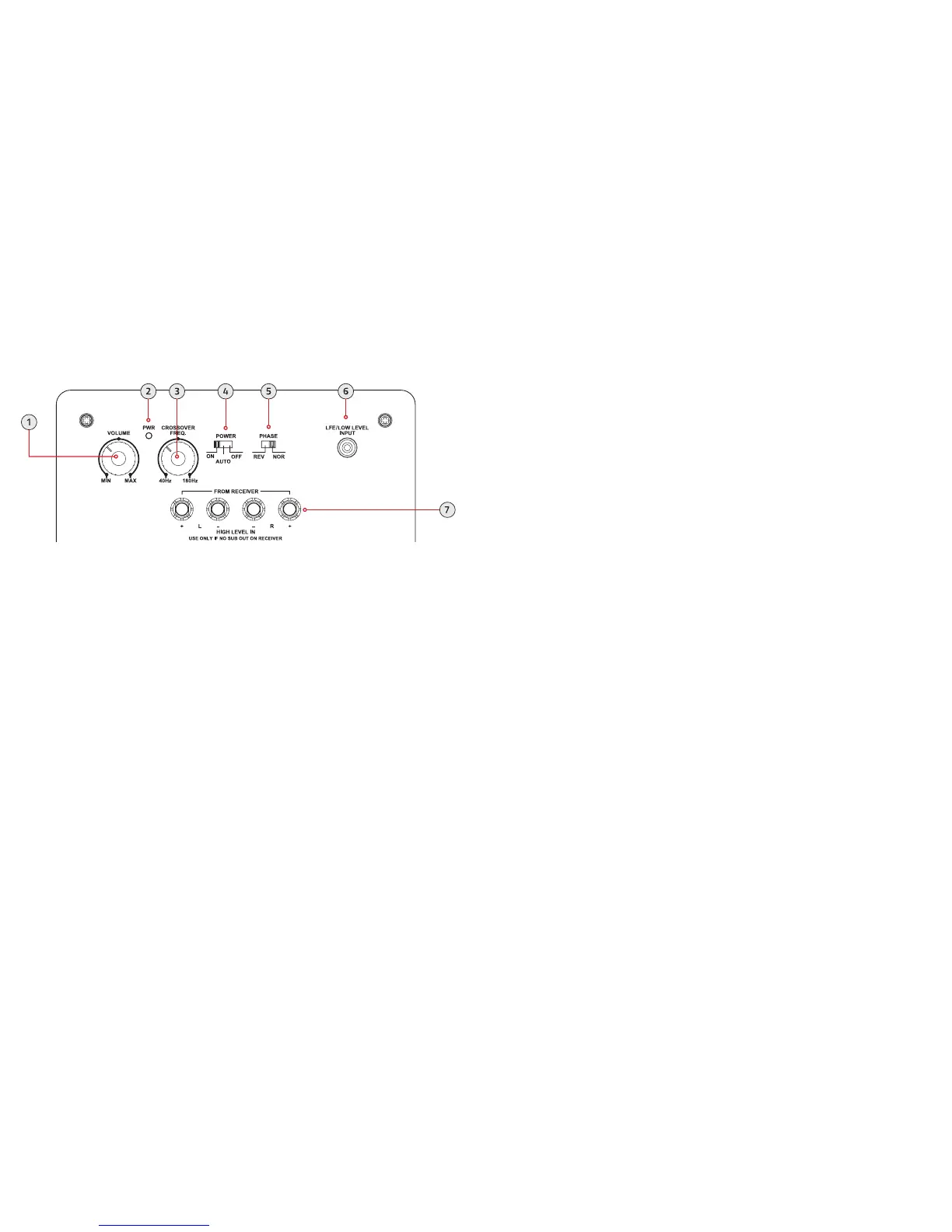
BACK PANEL LAYOUT
1. Volume - Adjust to reduce/increase the intensity of the sound emitted from the DB10.
2. PWR – Power LED indicator.
3. Crossover – Adjust to reduce/increase the frequency range of the DB10. The frequency range is less
than 40Hz to 180Hz.
4. Power – ON / AUTO ON / OFF (AUTO ON: The subwoofer will power on automatically when it
detects a signal from the home theater receiver.)
5. Phase – REVERSE / NORMAL (Adjust to ensure the DB10 is in phase with the rest of your speaker
system. The DB10 will be in phase if the bass response sounds full and balanced.)
6. LFE/Low Level Input – Connect subwoofer cable to receive signal from home theater receiver.
7. Speaker Inputs – Connect speaker wire to receive signal from home theater receiver.


 To Previous Page
 Loading...