EasyManua.ls Logo

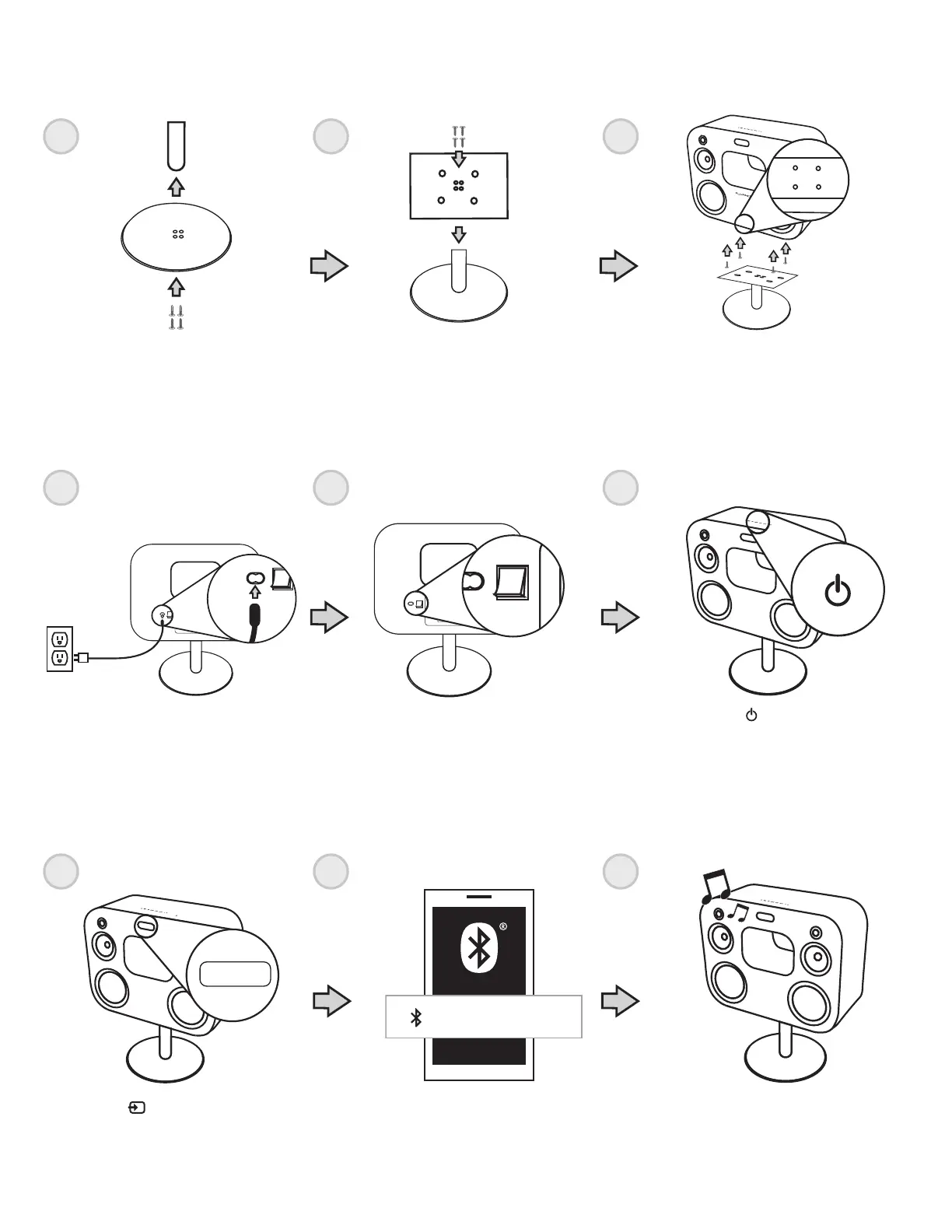
Fluance Fi70W - ASSEMBLING THE STAND TO THE CABINET; Stand Assembly Steps; POWERING THE UNIT; Initial Power Setup

Fluance Fi70W
16 pages
Print Icon
To Next Page IconTo Next Page
To Previous Page IconTo Previous Page
Loading...
- 6 -
1
1
1
2
2
2
3
3
3
VOL
VOL
BAS
TRE
TRE
TREBLE
BASS
BAS
ok
slOo
MEM
TIME
on
alm
pm
am
buzz
OR
OR
am
Fm
OR
ok
mem
alm
buzz
am
on
time
sloo
bt
bt
am
PM
OR
am
VOL
VOL
BAS
TRE
TRE
TREBLE
BASS
BAS
ok
slOo
MEM
TIME
on
alm
pm
am
buzz
OR
OR
am
Fm
OR
ok
mem
alm
buzz
am
on
time
sloo
bt
bt
am
PM
OR
am
VOL
VOL
BAS
TRE
TRE
TREBLE
BASS
BAS
ok
slOo
MEM
TIME
on
alm
pm
am
buzz
OR
OR
am
Fm
OR
ok
mem
alm
buzz
am
on
time
sloo
bt
bt
am
PM
OR
am
ASSEMBLING THE STAND TO THE CABINET
POWERING THE UNIT
SETTING UP BLUETOOTH
VOL
VOL
BAS
TRE
TRE
TREBLE
BASS
BAS
ok
slOo
MEM
TIME
on
alm
pm
am
buzz
OR
OR
am
Fm
OR
ok
mem
alm
buzz
am
on
time
sloo
bt
bt
am
PM
OR
am
Plug power adapter into an outlet
and into your cabinet
Press the button until you see
“BT” on the LED screen
Play music
Press the button on the
remote or cabinet
VOL
VOL
BAS
TRE
TRE
TREBLE
BASS
BAS
ok
slOo
MEM
TIME
on
alm
pm
am
buzz
OR
OR
am
Fm
OR
ok
mem
alm
buzz
am
on
time
sloo
bt
bt
am
PM
OR
am
Flip power switch on
FLUANCE Fi70
VOL
VOL
BAS
TRE
TRE
TREBLE
BASS
BAS
ok
slOo
MEM
TIME
on
alm
pm
am
buzz
OR
OR
am
Fm
OR
ok
mem
alm
buzz
am
on
time
sloo
bt
bt
am
PM
OR
am
VOL
VOL
BAS
TRE
TRE
TREBLE
BASS
BAS
ok
slOo
MEM
TIME
on
alm
pm
am
buzz
OR
OR
am
Fm
OR
ok
mem
alm
buzz
am
on
time
sloo
bt
bt
am
PM
OR
am
VOL
VOL
BAS
TRE
TRE
TREBLE
BASS
BAS
ok
slOo
MEM
TIME
on
alm
pm
am
buzz
OR
OR
am
Fm
OR
ok
mem
alm
buzz
am
on
time
sloo
bt
bt
am
PM
OR
am
Attach pole to the base
(washers and large screws)
Attach pole to the bracket
(small screws)
Attach assembled stand to the
cabinet (bolts)
Connect to Fluance Fi70 from your mobile
device’s Bluetooth settings

Related product manuals