6
Settings & operation
CAUTION
Do not touch the heat sink whilst the device is operating, or until 30 minute after the device
has been switched off. It is normal for the heat sink to get hot during standard operation.
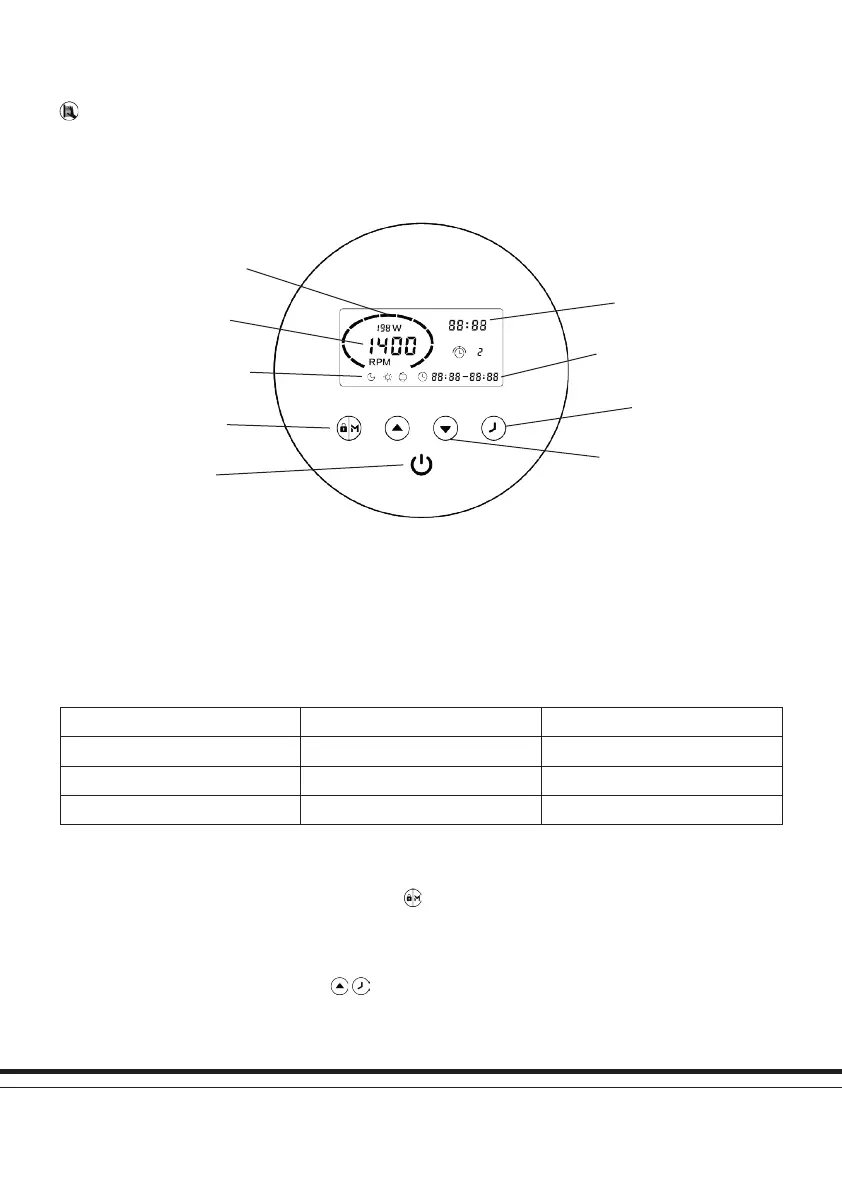
Display control panel contents
Fig 4: Display control panel contents
Current time
Timer On/Timer Off
Timer
Increase/Decrease
Power consumption
Speed in rpm
Day/Night/Backwash
Lock/Mode
On/Off
Pre-set modes
The iSaver+ includes three pre-set modes (speed ranges) as shown in the table below. The pool pump can be run at a constant
speed by choosing one of these modes via the ‘M’ function, or it can be run via the setting up of four timers for daily operation, each
with an individual speed.
Mode (M) Speed Range Default Speed
Night (slow) 1200-1650rpm 1400rpm
Day (medium) 1700-2400rpm 2000rpm
Backwash (high) 2450-2900rpm 2900rpm
Useful notes on general operation
If inactive for 1 minute, the screen will lock automatically. Hold for 3 seconds to unlock the device.
The device has a ‘power off memory’. In the event of power interruptions settings will be retained and resume upon power
restoration.
To restore factory settings, with the unit OFF, hold
together for 3 seconds.


 To Next Page
 Loading...