8
External control
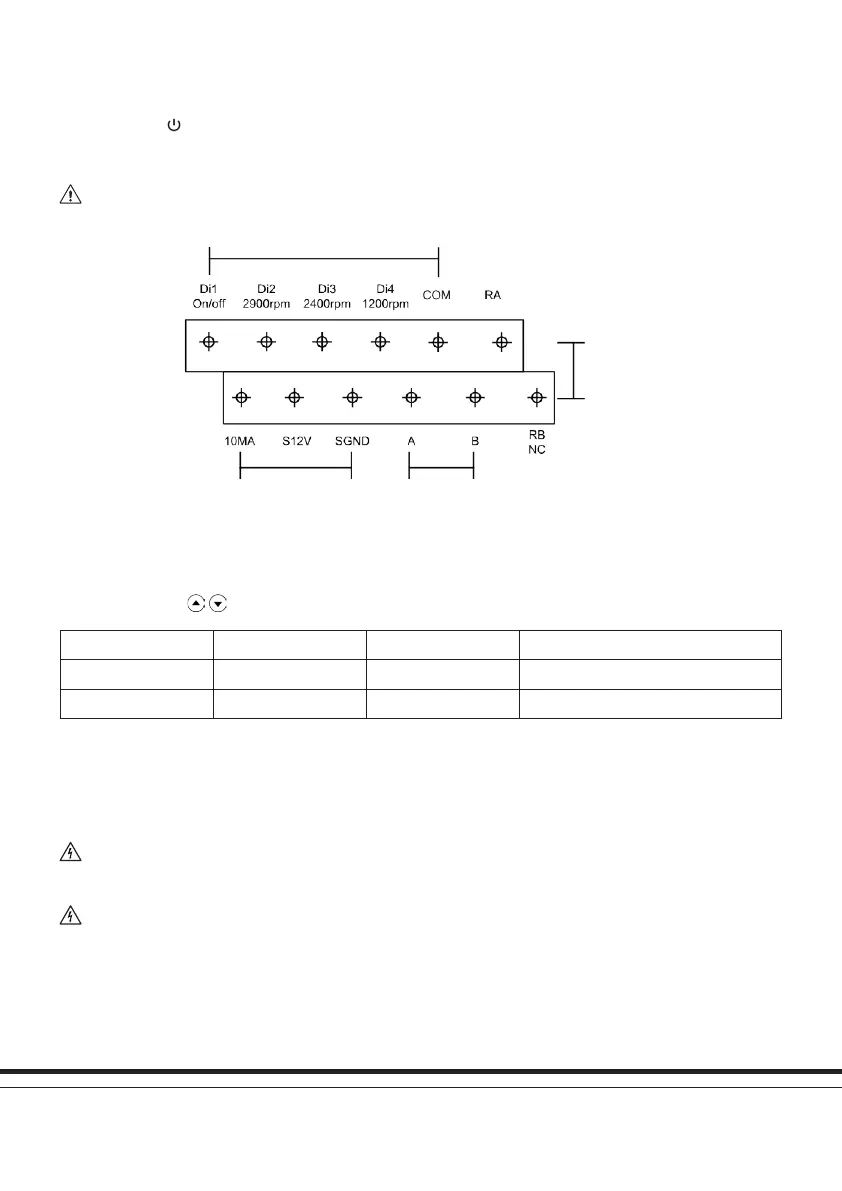
External control can be enabled via the contact shown in Fig. 5 below. However, even if the device is working via an external
controller, pressing
can stop the device.
For example – to enable external speed control via digital input, connect one of the digits from Di2/3/4 to COM
NOTICE
Do not apply voltage to these input contacts.
Fig. 5: External control inputs
Digital Input
Analog Input RS485
Relay Output
(not supplied)
Parameter settings
When turned OFF, hold for 3 seconds to enter parameter settings.
Parameter Description Default Setting Setting Range
1 Priming time 1 minute 1-10 minutes, by 1 minute increments
2 Minimum rpm 1200rpm 1200-2000rpm, by 100rpm increments
Maintenance
This device carries no serviceable or maintenance needing parts. In the event of a fault or failure which cannot be resolved via these
instructions, please contact your supplier.
WARNING
Because of high voltage conversion components contained within this device, do not try to
disassemble the device or replace any components in the event of a malfunction or failure.
WARNING
Before disconnecting the device from mains power, always wait until the power light has
turned off OR wait at least three minutes after power has been disconnected – whichever is the longer.


 To Next Page
 Loading...