EasyManua.ls Logo

Fluke 6062A - Page 37

Fluke 6062A
86 pages
Print Icon
To Next Page IconTo Next Page
To Previous Page IconTo Previous Page
Loading...
4.
In remote,
the bright
digit is positioned
within
a
display field using a decade value and
associated unit.
Minus signs are
ignored.
5.
in remote,
the bright
digit
is
moved to the
corresponding field and
is
increased or
decreased
by the signed
integer
following the
“iCF,KA,KD,KP”
messages. The
generic edit
command “KB” may
also be used to
edit
up
or down the current
bright-digit position.
Positive integers do
not require a sign.
Related
Operations:
Relative Function
Amplitude
Fixed Range
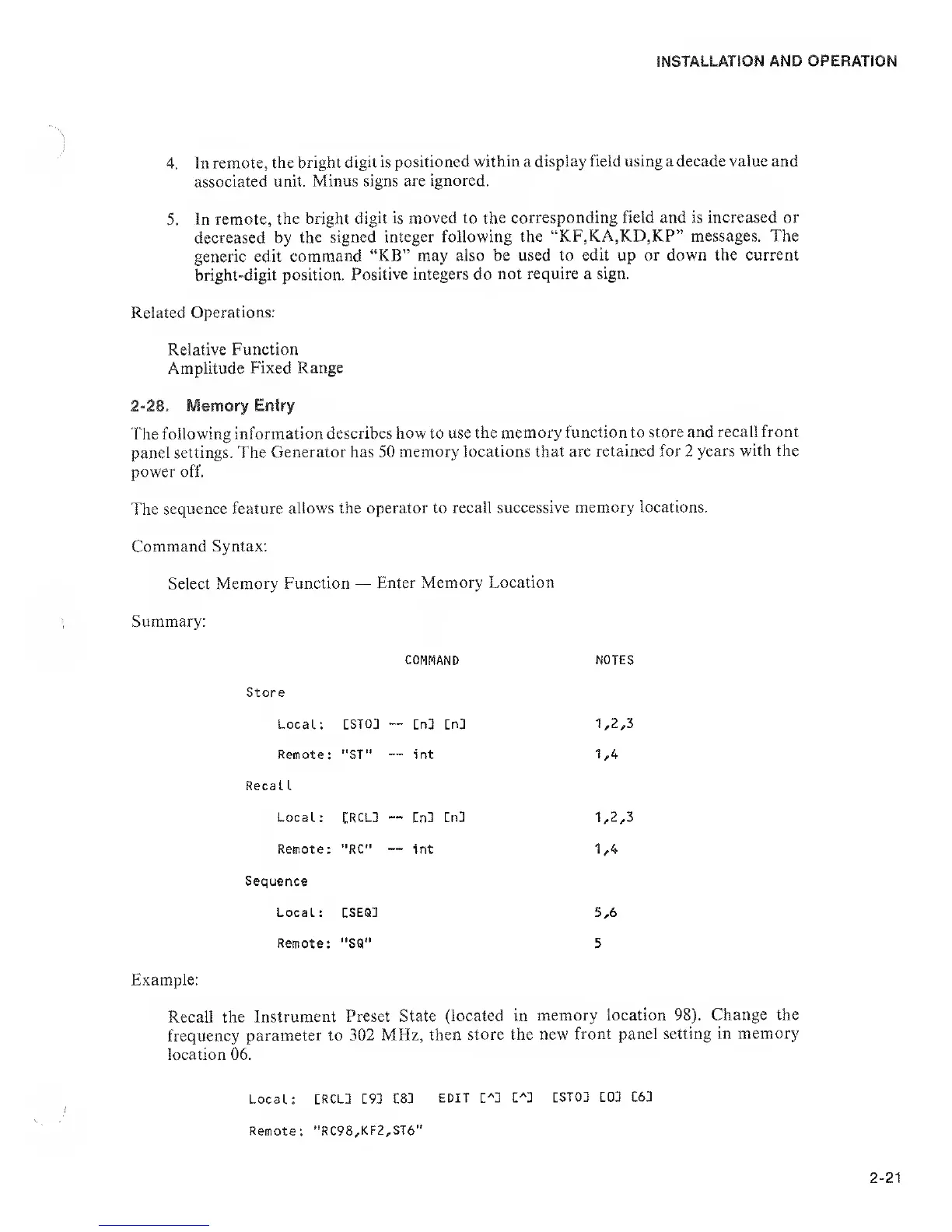
2-28. Memory Entry
The following
information
describes how to use
the memory function to
store and recall front
panel settings. The
Generator has 50
memory locations
that are retained for
2
years
with the
power off.
The
sequence feature
allows the operator
to recall successive
memory locations.
Command Syntax;
Select
Memory Function
Enter Memory
Location
Summary:
COMMAND NOTES
Store
Local
:
[ST03
-
-
Cn3 Cn3 1,2,3
Remote
:
"ST"
-
-
int 1,4
Reca 1
1
Local
;
CRCL3
'
-
En3 Cn3 1,2,3
Remote
:
"RC"
-
int 1,4
Sequence
Local
:
[SEQ3
5,6
Remote;
SQ" 5
Example:
Recall the
Instrument Preset State
(located in
memory location
98).
Change the
frequency
parameter to
302 MHz, then
store the new
front panel setting
in memory
location 06.
Local: CRCU [93 C83
EDIT
C^3
C^3
CST03 101 161
Remote:
''RC98,KF2,ST6"

Related product manuals