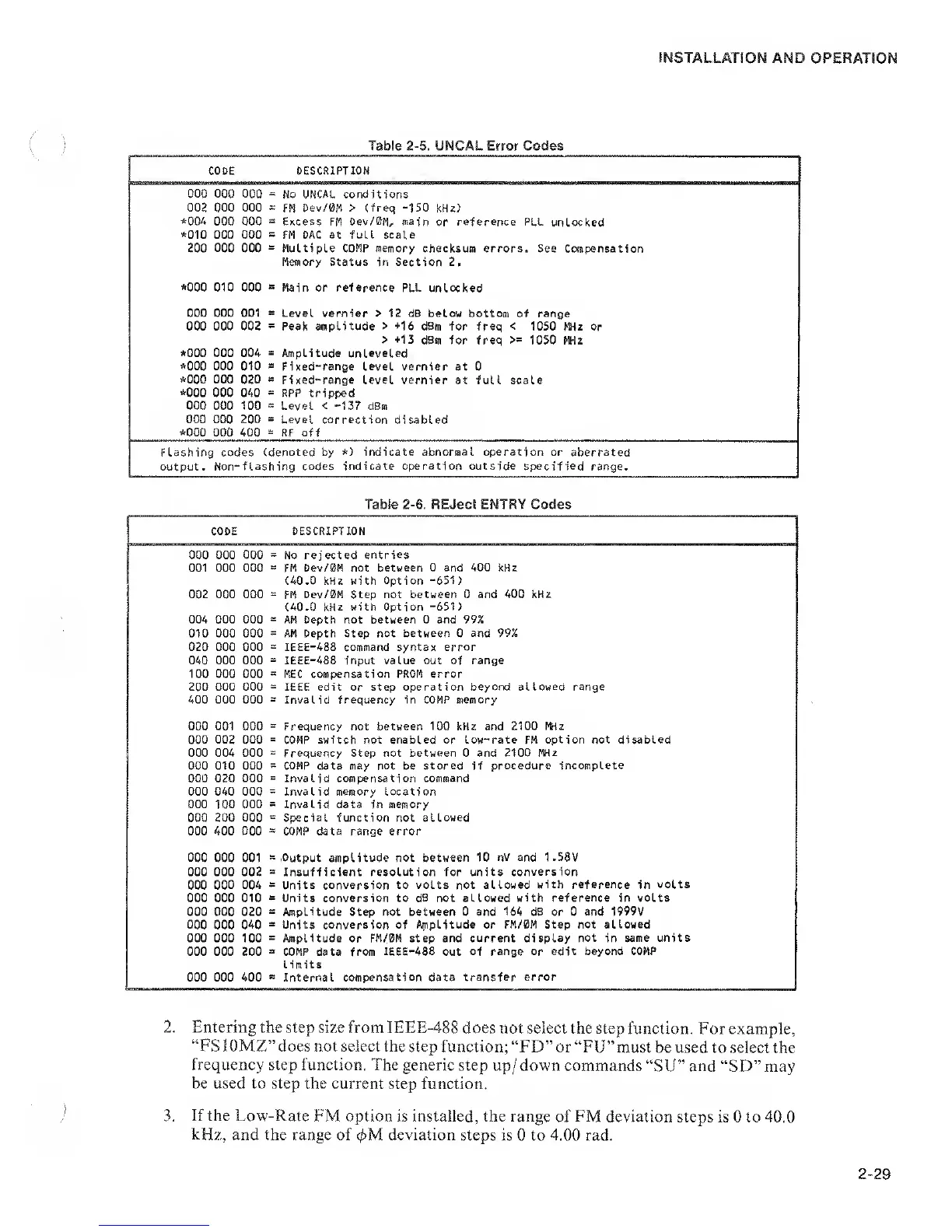
Table
2-5.
UNCAL Error Codes
CODE DESCRIPTION
000 000 000
=
No UNCAL conditions
002 000 000
=:
FM Dev/0M > (freq
-150
kHz)
*004
000 000
=
Excess FM Dev/0M, main or reference
PLL unlocked
*010
000 000
=
FM DAC
at full scale
200
000
000 Multiple COMP memory checksum errors. See Compensation
Memory Status in Section 2.
*000
010 000
=
Main or reference PLL unlocked
000 000 001
s
Level vernier
>
12 dB below bottom
of range
000 000 002
-
Peak amplitude
> +16
dBm for freq
<
1050 FWz or
>
+13
dBm for freq
>=
1050 MHz
*000
000 004
a
Amplitude unleveled
*000 000 010
a
Fixed-range level
vernier at 0
*000
000 020
s
Fixed-range Level vernier at full scale
*000
000 040
-
RPP tripped
000 000 100
a
Level
<
-137
dBm
000 000 200
=
Level correction
disabled
*000
000
400
=
RF
off
Flashing codes
(denoted by
*)
indicate
abnormal
operation or aberrated
output . Non-
-flashing codes indicate operation outside specified
range.
Table
2-6.
REJect ENTRY Codes
CODE DESCRIPTION
000 000 000
=
No rej ected
entries
001 000 000
s:
FM Oev/0M not
between 0 and 400 kHz
(40.0 kHz with
Option
-651)
002 000 000
=
FM
Dev/0M Step not between 0 and
400 kHz
(40.0 kHz with Option
-651)
004 000 000 AM Depth not between 0 and 99%
010 000 000 AM Depth Step not
between
0
and 99%
020 000 000
=
IEEE-488 command syntax error
040 000 000 IEEE-488 input value out of range
100 000 000
=
MEC compensation PROM error
200 000 000
=
IEEE edit or step operation beyond
allowed
range
400 000 000
=
Invalid frequency in COMP memory
000 001 000
=
Frequency not between
100
kHz and
2100 Miz
000
002 000
=
COMP
switch
not
enabled or low-rate
FM
option not disabled
000 004 000
=
Frequency Step not between 0 and 2100
MHz
000 010 000
=
COMP data
may not
be
stored
if
procedure incomplete
000 020 000
=
Invalid compensation command
000 040 OOQ
=
Invalid memory location
000 100 000
=
Invalid data in
memory
000
200 000
8
Special function not allowed
000 400 OQO
=
COMP data range
error
000
000 001
B
,
Output amplitude
not between
10
nV and 1.58V
000 000 002
B
Insufficient resolution for units
conversion
000
000 004
=
Units conversion to volts not allowed
with reference
in
volts
000 000 010
s
Units
conversion to dB not allowed with reference in volts
000 000 020
s
Amplitude Step not between 0 and 164 dB or 0 and 1999V
000
000
040
=
Units conversion of A^npLitude or FM/0M Step
not allowed
000 000 100
=
Amplitude or FM/0M step and current display
not
in
same units
000 000 200
s
COMP data from
IEEE-488
out
of range or edit beyond COMP
limits
000 000 400
a
Internal
compensation
data
transfer error
2. Entering the
step size from IEEE-488
does not select the step
function. For example,
“FS 10MZ”does not select the
step function; “FD” or “FU”must
be used
to select the
frequency step function. The
generic step up/down
commands
“SU”
and
“SD”may
be used to step the current
step function.
3.
If the Low-Rate
FM option is installed, the range
of
FM
deviation steps is 0 to 40.0
kHz,
and the range of 0M deviation
steps is 0 to 4.00 rad.


 To Next Page
 Loading...
