EasyManua.ls Logo

Fluke 6062A - Page 81

Fluke 6062A
86 pages
Print Icon
To Next Page IconTo Next Page
To Previous Page IconTo Previous Page
Loading...
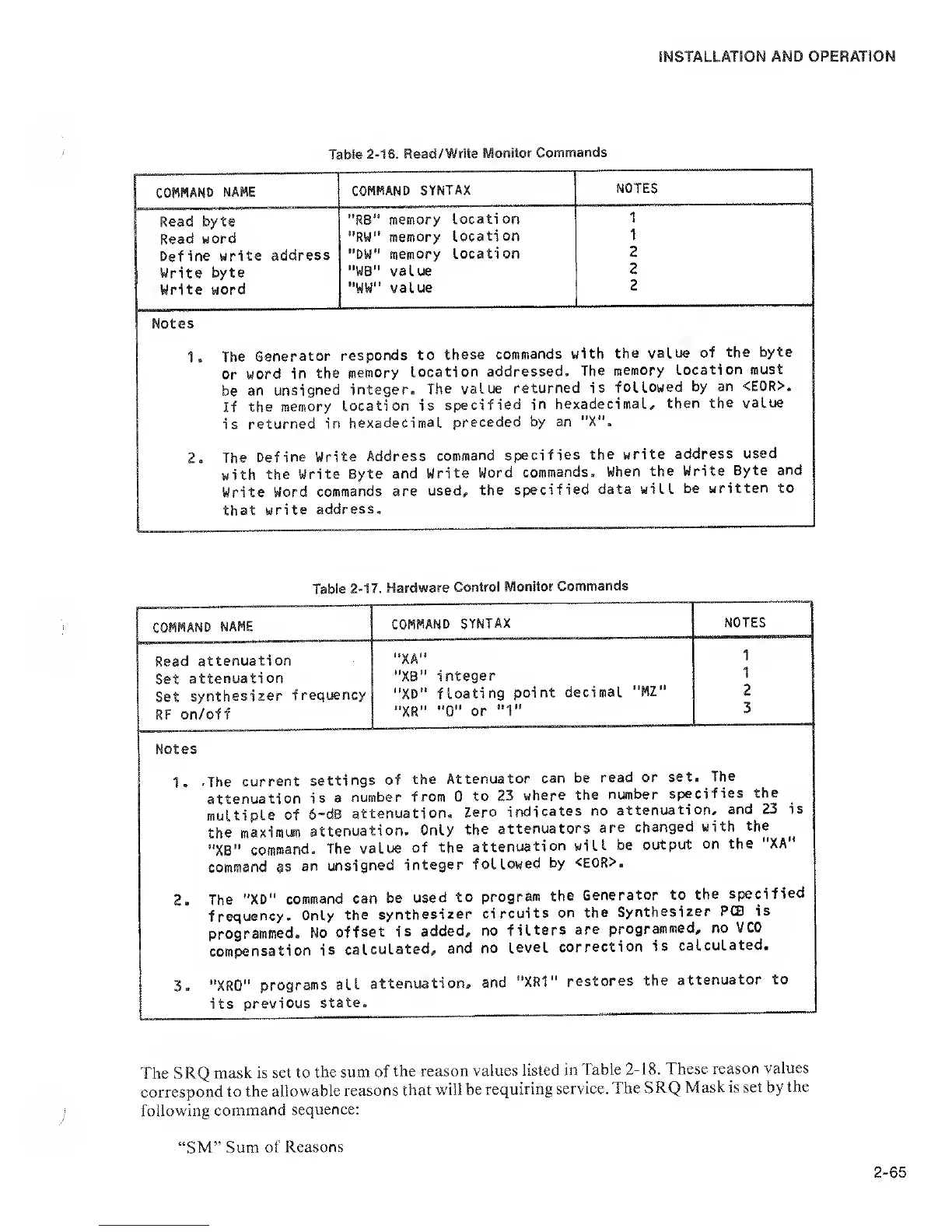
Table
2-16. Read/Write
Monitor
Commands
COMMAND
NAME
COMMAND SYNTAX
NOTES
Read
byte
Read word
Define write
address
Write
byte
Write
word
"R8"
memory
locati on
*'RW" memory
locati
on
"DW" memory
locati on
"WB” value
W
value
1
1
2
2
2
Notes
1 .
The
Generator
or
word in
the
be an
unsigned
If
the
memory
is
returned in
responds
to
these
commands
with
the value of
the
byte
memory
location
addressed.
The
memory
location
must
integer.
The value
returned
is fol
lowed by
an
<E0R>.
Location is
specified
in
hexadecimal,
then
the value
hexadecimal
preceded by
an "X".
2.
The
Define
Write Address
command
specifies
the write
address
used
with
the Write
Byte
and Write
Word
commands.
When
the Write
Byte
and
Write
Word
commands are
used,
the
specified
data will
be
written to
that
write
address.
Table
2-17. Hardware
Control
Monitor
Commands
COMMAND
NAME
COMMAND
SYNTAX
NOTES
Read
attenuati on
"XA"
1
Set
attenuati on
"XB"
integer
1
Set
synthesizer
frequency
"XD" f
loati
ng
point
decimal
"MZ"
2
RF on/off
"XR"
"0"
or
"1"
3
Notes
1 .
.The
current
settings
of
the
Attenuator
can
be
read or
set.
The
attenuation
is a
number
from 0
to
23
where
the
number
specifies
the
multiple
of
6-dB
attenuation.
Zero
indicates
no
attenuation,
and
23 is
the
maximum
attenuation.
Only
the
attenuators
are
changed
with
the
"XB"
command.
The
value
of
the
attenuation
will
be
output
on
the "XA"
command as
an
unsigned
integer
followed
by
<E0R>.
2.
The
"XD"
command can
be
used
to
program
the
Generator
to
the
specified
frequency.
Only
the
synthesizer
circuits
on
the
Synthesizer
PCS is
programmed.
No
offset
is added,
no
filters
are
programmed,
no
VCO
compensation
is
calculated,
and no
level
correction
is
caUulated-
3
. "XRO"
programs
all
attenuation,
and
"XR1"
restores
the
attenuator
to
its
previous
state.
The
SRQ mask is
set to
the sum of
the
reason values
listed
in Table
2-18. These reason
values
correspond
to the
allowable
reasons
that will
be
requiring service.
The
SRQ
Mask is set by
the
following
command
sequence;
SM” Sum
of Reasons

Related product manuals