©
2015 大疆创新 版权所有
Designed by DJI. Printed in China.
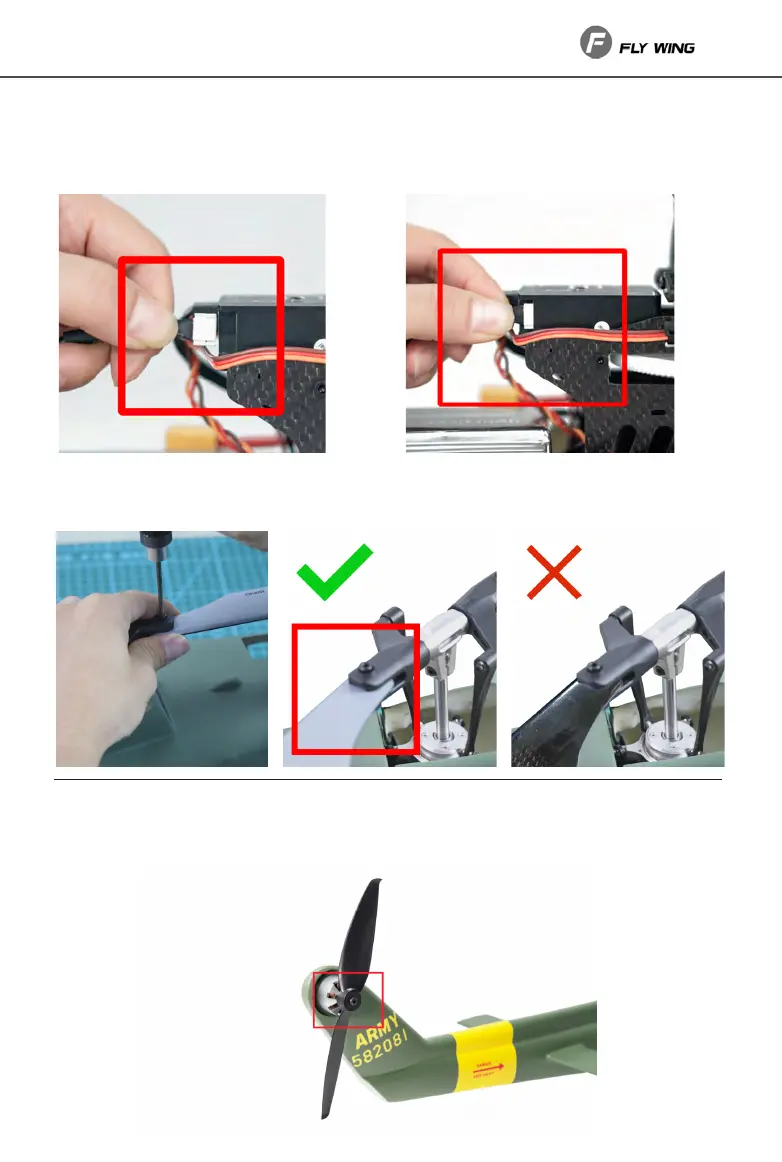
ssemble UH-1 Scale Helicopter
1.Insert
Insert the wire into the flight control interface correctly, confirm that the selflocking bayonet
is in place, and confirm that the unit is fixed on the tail pipe.
固件升级以及了解产品全部信息,请访问官网产品专页下载
《Phantom 3 Advanced 用户手册》
http://www.dji.com/cn/product/phantom-3-adv
●
遥控器信号正常时,智能返航过程中可使用遥控器
控制飞行航向。
智能返航:
长按遥控器的智能返航按键可使飞行器自动返航。
再短按一次该按键即可终止返航。
● 返航功能
智能低电量返航:
当智能电量系统分析出当前电量仅足够返航和降落时,
飞行器将自动返航。
失控返航:
当遥控器信号丢失时,飞行器将自动返航。
App一键返航按键智能返航按键
※本指南内容如有更新,恕不另行通知。
附 录
拍 摄飞行器状态指示灯
. . . 绿灯慢闪,GPS定位开启(P-GPS)
. . . 黄灯慢闪,姿态模式(P-ATTI/ATTI)
黄灯快闪,无遥控器连接
. . . 红灯慢闪,低电量报警
红灯快闪,严重低电量报警
—— 红灯常亮,严重错误 红黄灯交替快闪,
需校准指南针
. . . 绿灯双闪,视觉定位开启(P-OPTI)
未连接到飞行器
工作正常
B-B-B... 低电量或异常报警
B—B—... 闲置5分钟及以上
遥控器状态指示灯
●
通过遥控器的相机设置转盘可远程设置相机
拍摄参数;通过拍照、录影和回放按键控制
相机进行拍照、录影和回放;云台俯仰控制
拨轮可调整相机拍摄的俯仰角度。
●
使用 DJI GO App 可设置相机参数、控制
相机拍照、录影及回放。
●
通过 DJI GO App 相册将相机Micro SD
卡的拍摄素材同步到移动设备中,也可以
通过使用SD读卡器将拍摄素材导入电脑。
X2
2. Install blae
Install the blade as shown in the figure until there is slight resistance when the blade folds.
●
在飞行过程中,切勿停止电机,否则飞行器将会坠毁。除非发生特殊情况(如飞行器可能撞向人群),需要紧急停止电机以最
大程度减少伤害。
●
严重低电量报警时飞行器将无法起飞。
●
电池低温报警:如果电池温度过低,DJI GO App 将提示未达到起飞条件,需先将电池预热后才能起飞。
●
启动飞行器电机后螺旋桨将高速旋转,具有危险性。操作者应与飞行器保持一定距离,同时应使飞行器远离人群与建筑物、树
木或其它遮挡物,以免发生撞击。
●
降落后请先关闭飞行器,再关闭遥控器。
● 手动起飞/降落
油门杆 / 向下 (缓慢)
降落:
缓慢向下拉动
油门杆,飞行器降低飞行高度直至降落
至地面。将
油门杆拉至最低位置以停止电机。
起飞:
同时向内(或向外)拨动左右摇杆,电机启动后松
开摇杆。缓慢向上推动油门杆(默认左摇杆),飞行
器起飞。
油门杆 / 向上 (缓慢)启动 / 停止电机
或
3. Maintenance-Replace the tail blade
If the tail rotor is damaged or has obvious cracks, please replace it in a timely manner. When
replacing, insert the grabbing disc into the motor and install the fixing screws.


 To Next Page
 Loading...