When need to download software
· Upgrade software to higher version. Bugs of function and performance will appear during
Using the handset. To improve the function and performance of the handset, the
Manufacturer will improve the software and release new software version. Users can
download new version to improve the function and performance of the handset.
· Program errors or disorder because of improper setting by users, e.g. the handset can’t
power on, or being locked, and so on.
· In principle, it is not allowed to download a software lower than the current version, unless
It’s specified.
Caution: Before downloading software, please save all information and phone numbers in the
handset. After the software is downloaded, the handset will delete all the information and
restore to the factory default software environment.
5.3 CKT maintain software introduction -META
5.3.1 META-RF TOOL
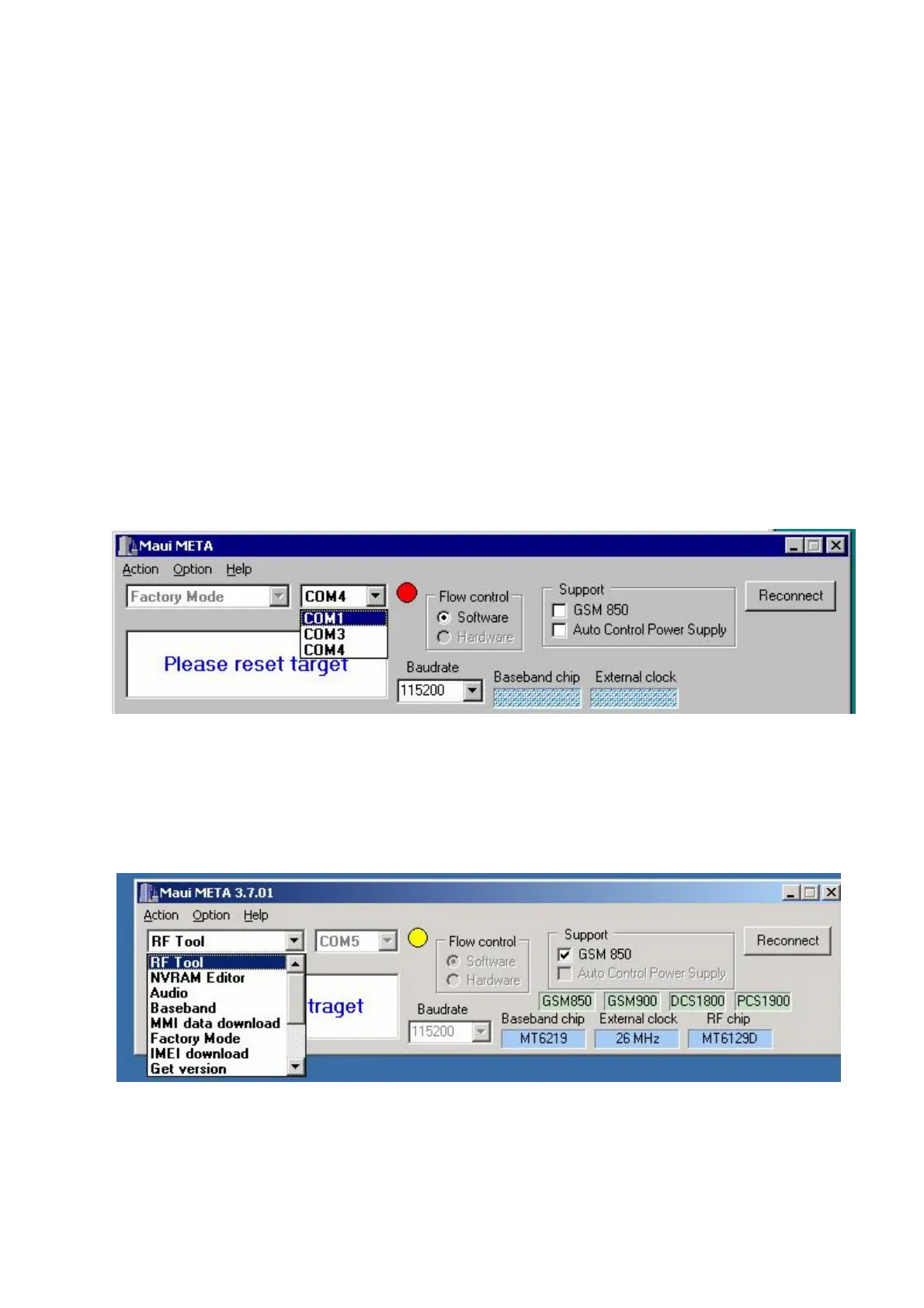
Step 1. Open Maui META and select correct COM port ,META status window shows’ Please
reset target’ ,otherwise if it is in’ Connect with target’ status, please click ‘Reconnect’。
Step 2: Connect the download cable between the corresponding computer COM port and the target
MS. Then power on the mobile .At this time META will detect the mobile and order the mobile
into META mode. The META status window will then change to ‘Connect with target’.And then
You may select RF Tool from the pull down menu.
Just pop up the RF tool option group as below:


 To Next Page
 Loading...


