1 0 1 1
5 . 5 . 8 gten
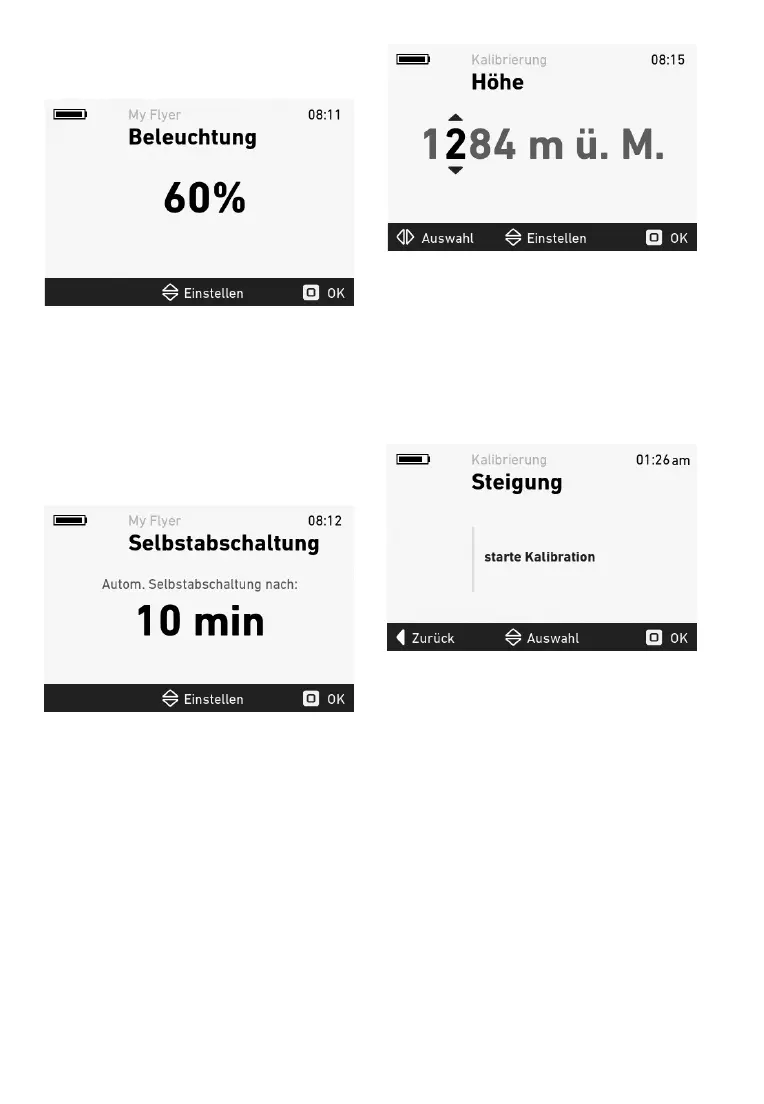
In te ackligt enu, u can aust te isla
ackligting in te range r 10 t 100.
Fi g u re 1 5 : B ackl i g ht m enu
Press te stick t al te ne settings ater
cnratin see .3.
5 . 5 . 9 ttpeen
In te autatic er enu, u can set te
au t o m at i c p o w er o f f t i m e i n t he rang e f ro m 1 0 t o
60 inutes. Te sste ill sitc autati
-
cally i f t he b i cy cle i s no t m o v ed and no b u t t o n i s
resse itin te csen tie.
Figure 16 Autatic er enu
Press te stick t al te ne settings ater
cnratin see .3.
5 . 5 . 1 0 etntnen
Yu can crrect te actual eleatin in te elea
-
tin caliratin enu. e te stick u an
n t cange te nuers. e te stick
let an rigt t sitc eteen nuers.
Fi g u re 1 7 : Eleva t i o n cali b rat i o n m enu
Press te stick t al te ne settings ater
cnratin see .3.
5 . 5 . 1 1 nnetn
B ef o re i ncli ne cali b rat i o n can b e s t art ed, t he
e-ike ust e sitine urigt n a at, ri
-
ntal surace. I ur e-ike as susensin, tis
ust rst e crrectl cngure an te user
ust e sitting n te e-ike uring caliratin.
5 . 5 . 1 2 R e s e t t i n g t r i p d a t a
A ar aears en u e te stick u
see gure 1. Yu can use te stick t sitc
eteen ancel an Reset. Pressing te stick
alies te selecte unctin. I Reset is selecte,
t he f o llo w i ng t ri p dat a i s res et :
• T ri p di s t ance
• Aerage see
• aiu see
• Ri de t i m e
• C alo ri es
Ater te stick is resse, te ar isaears.



 To Next Page