16
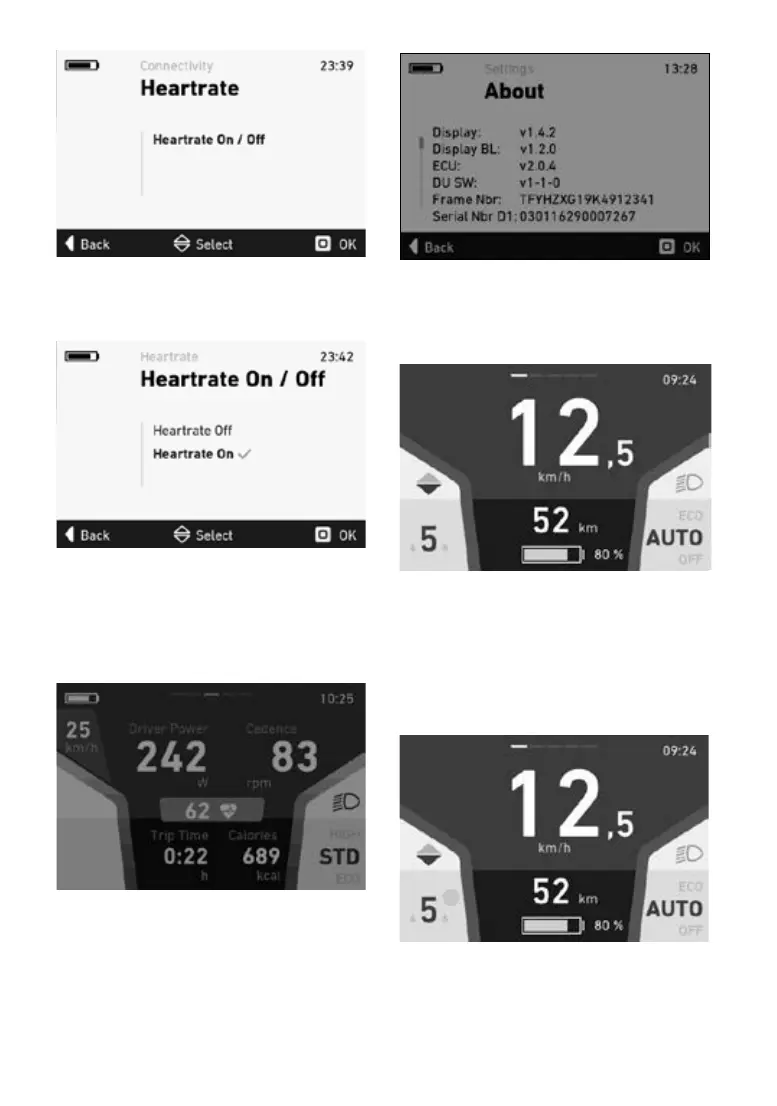
Inthe“PulseOn/O”menu,selectthesub-menu
“Pulse On” by pressing the “OK” button. The pul
-
se function is now activated.
When the pulse function is activated, the FLYER
e-bike automatically searches for the nearest
Bluetooth pulse band or pulse watch and estab
-
lishes a connection.
To deactivate the pulse function, select the sub-
menu“PulseO”bypressingthe“OK”button.
If a pulse measuring device is connected to the
FLYER e-bike, the pulse values are shown on the
tnessscreen.
5.5.20 Aboutmenu
The About menu shows the current software
versions of the individual components.
5.5.21 ShimanoDi2menu
If the e-bike has an electronic Shimano speed
gear (Shimano Di2), the corresponding gears are
shown on the display.
1. Currently selected gear in the Shimano gear
hub.
5.5.22 Rohlomenu
If your FLYER e-bike has a Rohlo electronic
speed gear, the gears are shown on the display.
You can use the toggle switch to change gear at
any time.
1.
1.CurrentlyselectedgearintheRohlogearhub.



 To Next Page