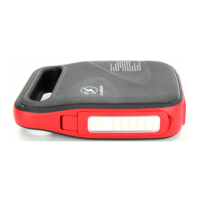
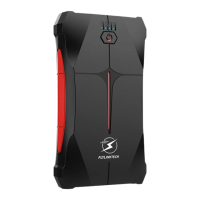
This document provides a user manual for the FLYLINKTECH Battery Jump Starter, model CF100, with a capacity of 22000 mAh.
Function Description
The FLYLINKTECH Battery Jump Starter is a versatile device designed primarily for jump-starting 12V vehicles (all gasoline cars and diesel cars under 7.0L). It also functions as a portable power bank for charging electronic devices.
Key functions include:
- Jump Starting: Provides power to a dead car battery to start the vehicle.
- Power Bank: Features two USB output ports (Output 1 QC 3.0 and Output 2 QC 3.0) for charging mobile phones, tablets, cameras, and other USB-powered devices.
- Flashlight: Equipped with a flashlight function offering Normal, SOS, and Strobe modes.
- Charging Indicator Lights: Four LED lights indicate the charging progress (25%, 50%, 75%, 100%) and remaining battery capacity.
- Smart Clamp Protection: The included smart clamp provides various safety protections, including reverse connection, short-circuit, reverse charging, over-temperature, and low voltage protection.
- Force Start Function: An optional function to bypass certain safety checks when the car battery voltage is too low, allowing for a forced start.
Important Technical Specifications
- Model: CF100
- Capacity: 22000 mAh
- Micro Input: DC 5V / 2A Max
- Type-C Input: 5V / 2A
- Output 1 (QC 3.0): 5V/3A, 9V/2A, 12V/1.5A Max, USB 3.0
- Output 2 (QC 3.0): 5V/3A, 9V/2A, 12V/1.5A Max, USB 3.0
- Peak Current: 1800A (for 0.2s)
- Dimensions (L * W * H): 183 x 88 x 36mm
- Overload / Discharge Fuse: ≤ 13v ± 0.3v
- Working Temperature: 65°C ± 5°C
- Backflow Protection: ≥ (12.6v ± 0.3v)
- Short Circuit Fuse Protection: Yes
- Reverse Polarity Protection: Yes
- Lithium Content: Equivalent of 2.4g of lithium
- Watt Hours: 74 watt hours
Usage Features
Checking Capacity:
- Press the ON/OFF button once to check the remaining capacity. The indicator lights will show 25%, 50%, 75%, or 100%.
Charging the Jump Starter:
- At Home: Plug the USB cable into a computer or any USB 2A wall adapter (not included) and connect the micro USB cable to the jump starter.
- In Car: Plug the USB car adapter (included) into a 12V socket and connect the micro USB cable to the jump starter.
- Note: It is recommended to recharge the jump starter every 3-4 months to maintain efficiency and prolong battery life, even if unused.
Charging Electronic Devices:
- Plug the original manufacturer's USB cable into Output 1 (QC 3.0), Output 2 (QC 3.0), or the Type-C port.
- Connect the other end to your mobile phone or tablet.
- Press the ON/OFF button once to begin charging. The power level indicator will show the battery level.
Using the Flashlight:
- Long press the ON/OFF button to turn the flashlight on/off.
- Short presses will cycle through Normal, SOS, and Strobe modes.
Jump Starting a Car:
- Preparation: Ensure the vehicle is in park (or neutral for manual transmission) and the emergency brake is engaged. The jump starter should have at least 3-4 indicator lights illuminated (battery level above 50%).
- Connect Smart Clamp to Jump Starter: Insert the smart clamp plug completely into the jump starting port. If green and red lights flash alternately, it's safe to proceed.
- Connect Clamps to Car Battery:
- Connect the RED clamp to the positive terminal (+) of the car battery.
- Connect the BLACK clamp to the negative terminal (-) of the car battery.
- If green and red lights flash alternately, it's safe to proceed.
- Troubleshooting Red Light: If the red indicator light is solid, check for reverse connection or adjust clamps for maximum contact.
- Start the Car: Start your car.
- Force Start (Optional): If the car fails to start after 2 attempts (wait 30 seconds between attempts), ensure clamps are connected correctly, then press and hold the "Force Start Button" for 3 seconds. When the smart clamp indicator light is solid green, start the vehicle within 30 seconds.
- Disconnect: Once the car is started, remove the battery clamp from the car battery and the jump starter within 30 seconds.
Smart Clamp Protection Indicators:
- Red/Green LED Flash: Ready to work.
- Green Light Always On: Work status.
- Red Light Always On with Long Audio Alarm:
- Battery clamp reversely connected (check connection).
- Clamp short-circuited (check if clamps are touching or connected to the same metal piece).
- Red Light Flashes with Short Audio Alarm: Reverse charging protection (car battery voltage > 12.6V, no jump starter needed).
- Red Light Always On with Long Audio Alarm: Clamp temperature exceeds 65°C ± 5°C (remove clamp until red/green light flashes).
- Red Light Always On with Short Audio Alarm: Jump starter voltage too low (replace or charge the jump starter).
Maintenance Features
General Maintenance:
- Recharging: Recharge the jump starter every 3-4 months to maintain battery efficiency and prolong its service life, even if not used.
- Cleaning: Ensure battery clamps are free from rust and dirt for optimal connection.
- Storage: Store in a well-ventilated area. Do not store in locations where the temperature may exceed 104°F (40°C).
- Ventilation: When charging the internal battery, ensure adequate ventilation and do not restrict airflow.
Safety Precautions (Important Warnings):
- Always wear safety glasses and gloves when handling the battery.
- Ensure the blue plug is securely fitted into the jump start socket.
- Do not allow the product to become wet or immerse it in water.
- Do not operate in explosive atmospheres.
- Do not modify or disassemble the product. Servicing should be performed by a qualified repair person using identical replacement parts.
- Avoid contact with battery leakage. If contact occurs, rinse immediately with clean water and seek medical attention.
- Do not expose to fire or excessive temperatures above 130°C (266°F).
- Do not drop, hit, or apply excessive force to the unit, as this can cause damage, loss of operation, electrical fire, or serious injury.
- Do not allow the output clamps to touch each other.
- This jump starter is for 12V vehicles only. Using it on non-12V vehicles can cause serious damage or injury.
- Do not place the jump starter on the floor or at a height less than 18 inches (457mm) above the floor during use in a repair facility.
Battery Disposal:
- The battery is self-contained and not user-replaceable.
- Dispose of the battery properly when it no longer holds a charge.
- For battery recycling information, call toll-free 800-822-8837.
- For air travel safety information regarding batteries, refer to https://www.phmsa.dot.gov/safe-travel/batteries.

 Need help?
 General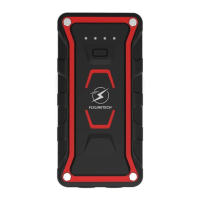

 To Next Page