START UP
1. Place the boat on a flat road and turn on the power of the boat
2. Turn on the power of the remote control, the green light of the remote control indicator is always on
Note: Do not put the boat on the slope before the boat is paired,check the left and right motors to see if they work
before driving
Calibration
1. When the GPS icon is displayed, put the boat into the water and drive the boat 7 meters away from the shore to ensure that
there are no obstacles around
2. Press the OK button and not release,then press the lighting button(the boat enters the automatic calibration), the boat first
turns left a circle and then turns right a circle, and stops after completion, and the calibration is completed.
Positioning point storage
1. When the GPS icon is displayed, the positioning point storage can be operated
2. It is recommended to set an origin point when the boat close to the shore, and be sure to set the "1" point on page 0 as the
origin
3. When the boat reaches its destination, press and hold the OK button not release,then press positioning point 1, 2, 3, 4 button to
store the location.One page can store up to 4 positioning points. After the operation is successful, the corresponding number will
be displayed on the screen, If the current page is full of positioning points, you can press the page button to set the positioning
points on the next page
points on the next page
4.Press and hold the delete button to automatically clear all stored information
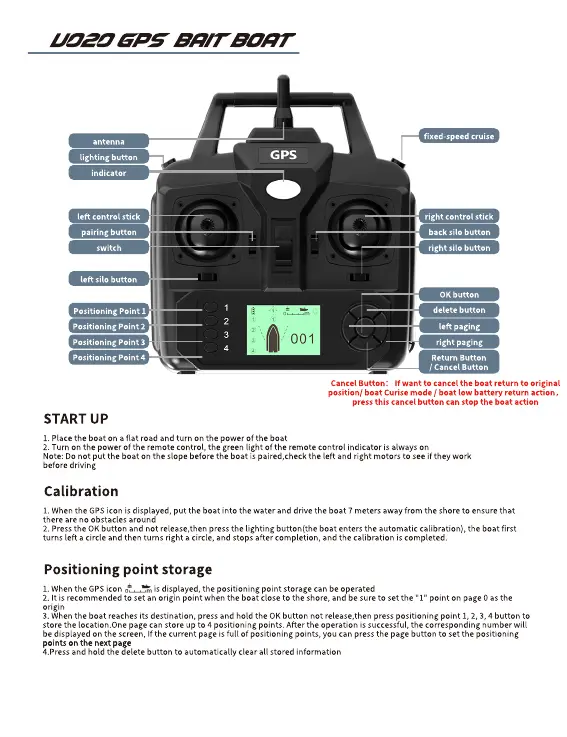
Positioning Point 3
Positioning Point 2
Positioning Point 1
switch
pairing button
left silo button
left control stick
antenna
lighting button
indicator
Positioning Point 4
right paging
left paging
delete button
OK button
right silo button
back silo button
right control stick
fixed-speed cruise
Return Button
/ Cancel Button
Cancel Button: If want to cancel the boat return to original
position/ boat Curise mode / boat low battery return action,
press this cancel button can stop the boat action
V020 gps bait boat


 To Next Page
 Loading...