3.8 - Tin the end of the power supply cable before you connect it to the battery’s positive (+) terminal. Weld
the end of the cable to the terminal lug that is going to be used for the battery’s positive (+) terminal. Connect
the terminal lug to the battery’s positive terminal.
3.9 - Insert the fuse into the fuse-holder(s), and screw in tightly.
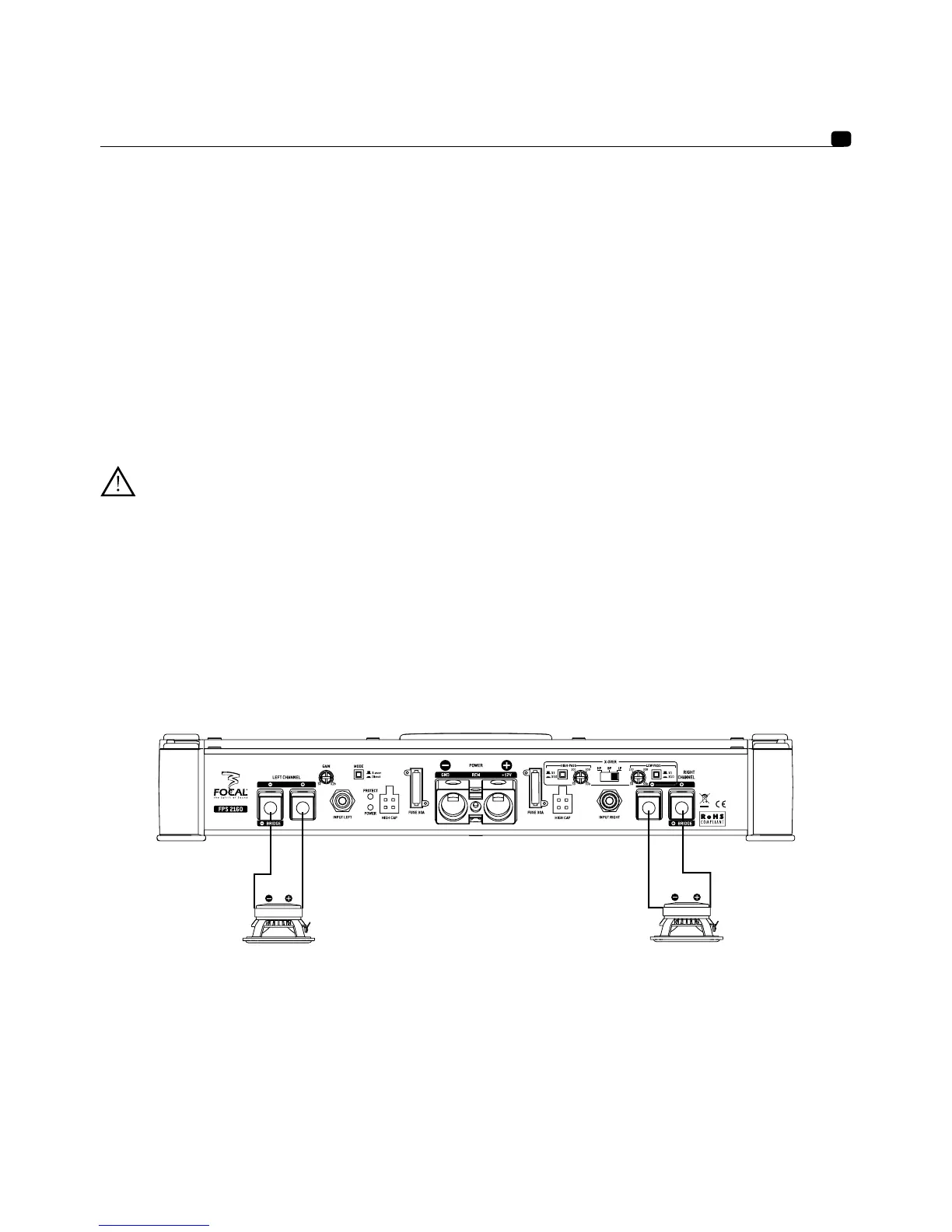
3.10 - Connect the loudspeaker cables to the right and left channel crossover networks, making sure that
the polarities are the same (note: + = cable with a red border if you are using a Focal kit) as those used for
standard wiring set-ups. Focal amplifiers can work in bridged mode (see product specifications page 29 to
know the power delivered in bridged mode) for amplifying subwoofers. To do so, simply connect the positive
(+) speaker cable to the BRIDGE (+) terminal and connect the negative (-) speaker cable to the related
BRIDGE (-) terminal.
CAUTION
When connecting several subwoofers to the same output, check for the amplifier impedance compatibility.
(page 29).
3.11 - The connection phase is now complete. But, you must check if the power supply is correct as well as
the correct operation of the full system (car radio/amplifier/loudspeakers). Set all gains (source, amplifier) to
their minimum. Turn on the different elements. Once all the elements are on, carry out a test at low volume,
adjusting the various gains.



 To Next Page