EasyManua.ls Logo

Focal FPX - Troubleshooting and Maintenance; Interpreting LED Indicators; Problem Diagnosis and Solutions

Focal FPX
18 pages
Print Icon
To Next Page IconTo Next Page
To Previous Page IconTo Previous Page
Loading...
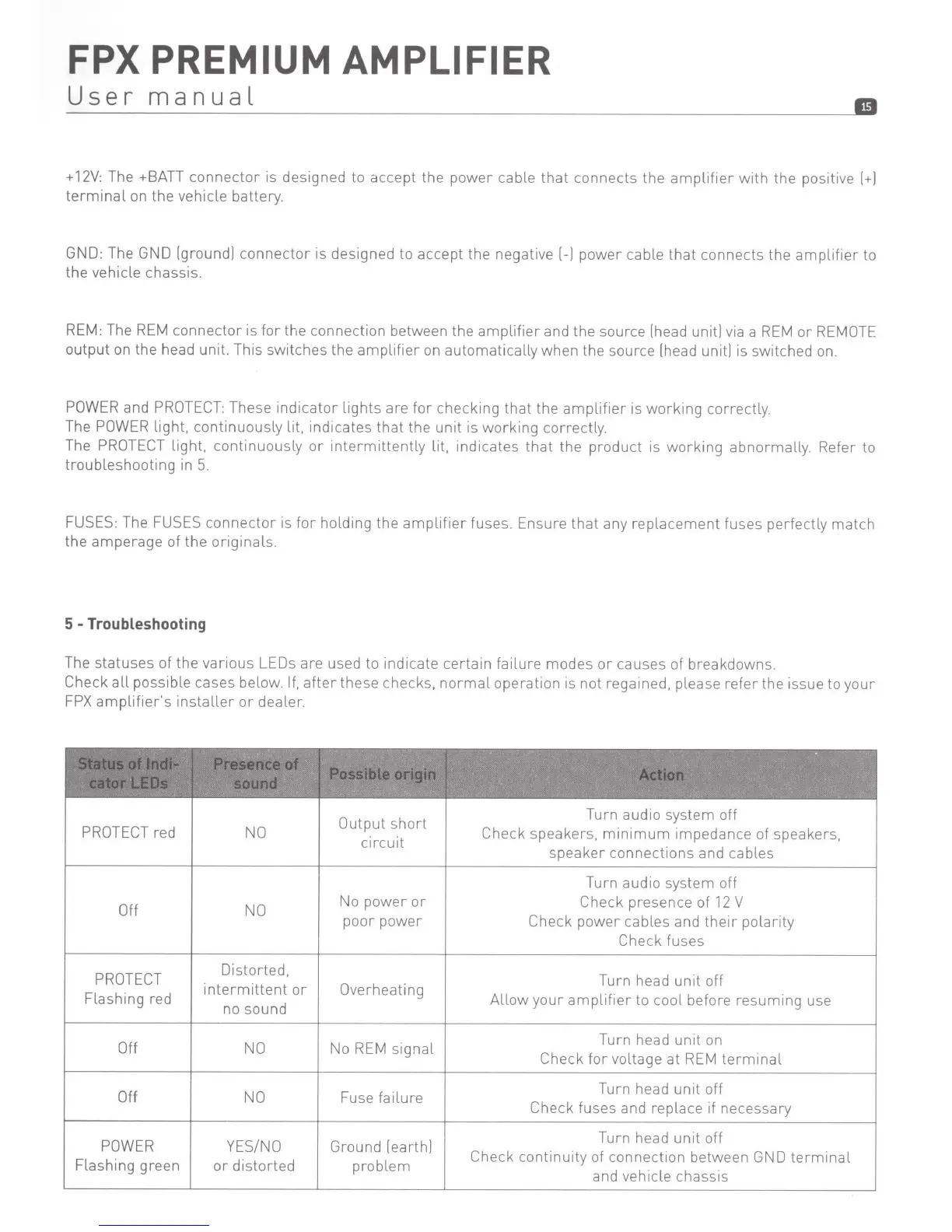
FPX
PREMIUM AMPLIFIER
User
manual
II
+
12V:
The +BATT
connector
is designed to accept the
power
cable
that
connects the
amplifier
with
the
positi
ve
l+l
terminal
on
the
vehicle battery.
GND: The GND (ground]
connector
is designed to accept the
negative(-]
power
cable
that
connects the
amplifier
to
the vehicle chassis.
REM: The
REM
connector
is
for
the connection between the
amplifier
and the source (head unit] via a
REM
or
REMOTE
output
on the head unit. This
switches
the
amplifier
on
automatically
when the source (head unit] is switched on.
PO
W
ER
and
PROTECT:
These
indicator
lights
are
for
checking
that
the
amplifier
is
working
correctly.
The POWER
light,
continuously
lit, indicates
that
the
unit
is
working
correctly.
The
PROTECT
light,
continuously
or
interm
itten
tly lit, indicates
that
the
product
is
working
abnormally. Refer to
troubleshooting
in
5.
FUSES:
The
FUSES
connector
is
for
holding
the
amplifier
fuses. Ensure
that
any repl
acement
fuses perfectly
match
the
amperage
of
the
originals.
5 -Troubleshooting
The
statuses
of
the
various
LEOs
are used to indicate
certain
failure
modes
or
causes of breakdowns.
Check
all
possible cases below.
If,
after
these checks,
normal
operation
is
not regained, please
refer
the issue to
your
FPX
amplifier's
installer
or
dealer.
'
'
.,
:
..
. .
Output
short
Tu
rn audio system off
PROTECT
red
NO
circuit
Check speakers,
minimum
impedance of speakers,
speaker
connect
ions and cables
Turn audio system off
Off NO
No
power
or
Check
presence of
12
V
poor
power
Check
power
cables and
their
polar
ity
Check
fuses
PROTECT
Distorted,
Turn head
unit
off
Flashing red
intermittent
or
Overheating
Allow
your
amplifier
to
cool
before
resuming
use
no sound
Off
NO
No
REM
signal
Turn head
unit
on
Check
for
voltage
at
REM
terminal
Off
NO
Fuse
failure
Turn head
unit
off
Check
fuses and replace if necessary
POWER
YES/NO
Ground (earth]
Turn head
unit
off
Flashing green
or
distorted
problem
Check
continuity
of
connection between GND
terminal
and vehicle chassis

Related product manuals