23
ST6
Professional Analogue Monitoring System - User Manual
EN
H
I J K L
G
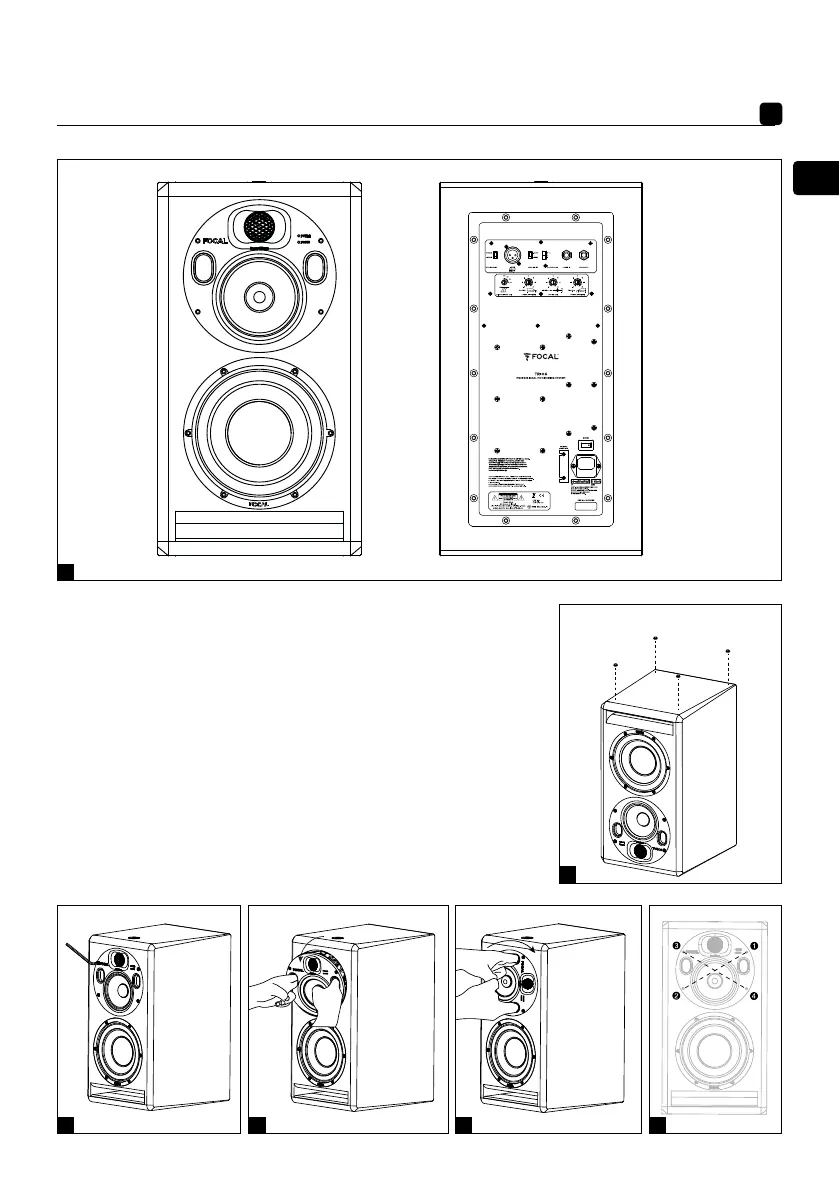
1. Audio signal input connector
2. Automatic stand-by switch
3. Input sensitivity switch
4. Focus mode input
5. Focus mode output
6. Crossover control
7. Power switch - On/Off
8. Voltage selector
9. Fuse box/mains socket
10. Focus mode switch
11. On/off mode
indicator
POWER LED:
- on (continuous green)
- stand-by (continuous red)
- protection (flashing red)
12. Focus mode indicator
LED FOCUS:
- FOCUS 1 (continuous green)
- FOCUS 2 (continuous orange)
1
3
10
4 5
6
2
7
8
9
11
12



 To Next Page