1. Open up the cover under the keyboard and insert AA alkaline battery x 4 into
1. Open up the cover under the keyboard and insert AA alkaline battery x 4 into
the chamber (please equip correctly according to polarity), then close the
the chamber (please equip correctly according to polarity), then close the
2. Plug the USB receiver into the USB port of your computer
2. Plug the USB receiver into the USB port of your computer
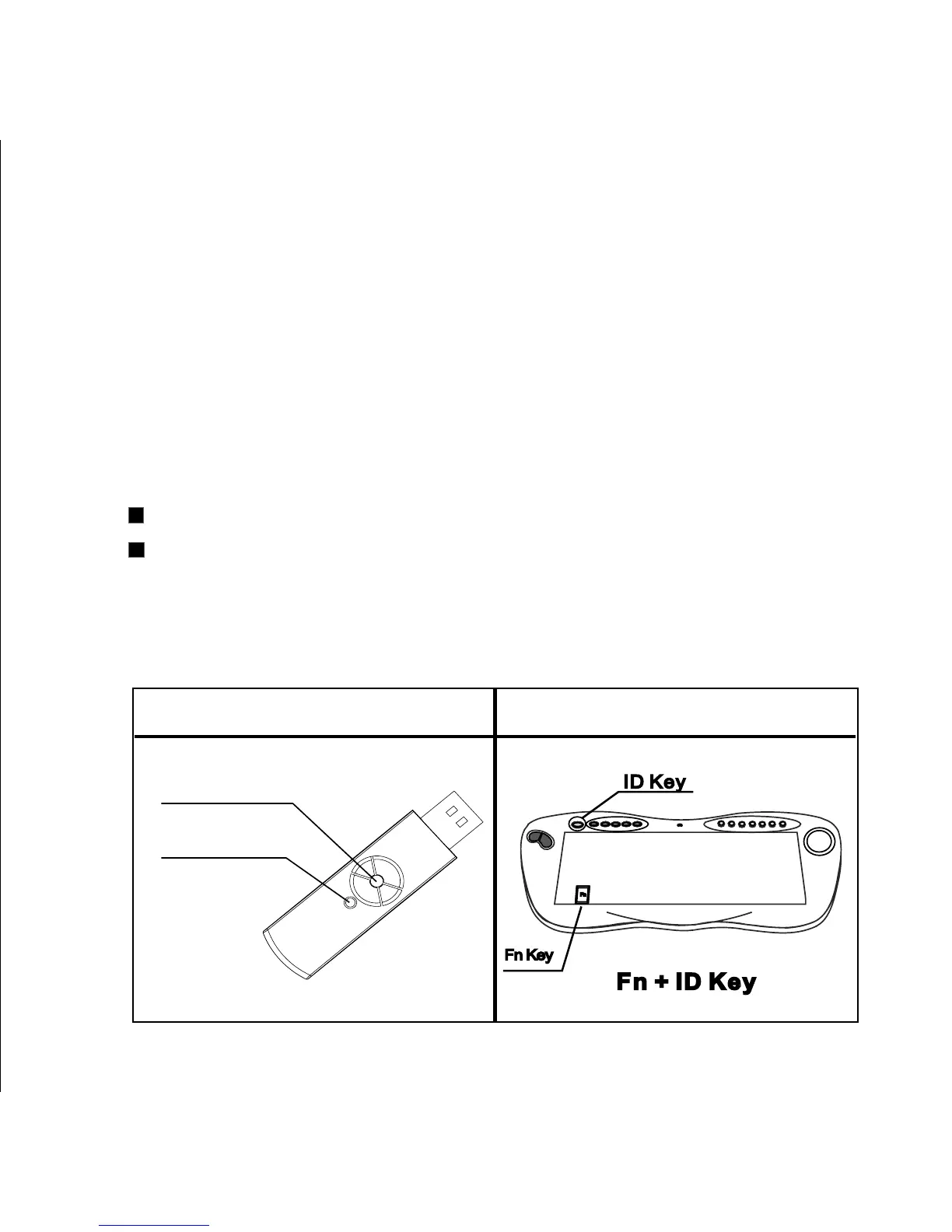
a. Press the ID button on the USB receiver (Figure 1), the device is searching
a. Press the ID button on the USB receiver (Figure 1), the device is searching
for ID when the LED is blinking..
for ID when the LED is blinking..
b. Check the printing under ID key ,
b. Check the printing under ID key ,
push the key of ‘ID’ and release.
Printed ‘(Fn+) ID‘ : Keep the key of ‘Fn’ pressed and then push the
key of ‘ID’ in 2 seconds, then release these two keys
c. Check the LED status on the USB receiver; The setting is done
successfully when the LED on the USB receiver stops flashing.
Figure A
Figure B
LED
ID button


 To Next Page