08
C. SETTING FAHRENHEIT OR CELSIUS
To change between °C and °F, press and
buttons simultaneously.
NOTE: Choosing °F results in a 12 hour clock.
Choosing °C results in a 24 hour clock.
D. SETTING THE TIME
1. Press and buttons simultaneously.
Day flashes.
2. Press or button to select a number to
correspond with the day of the week (e. g.
= Monday, = Tuesday, = Wednesday,
= Thursday, = Friday, = Saturday,
= Sunday).
3. Press and buttons simultaneously.
Hour flashes.
4. To select hour press or button.
5. Press and buttons simultaneously.
Minutes flash.
6. To select minutes press or button.
7. To confirm press and buttons
simultaneously or wait.
E. CHILD PROOF
ON:
To activate press and buttons
simultaneously. displayed and the
handset is rendered inoperable, except for the
off function.
OFF:
To deactivate press and buttons
simultaneously. disappears.
F. MANUAL MODE (handset)
BEFORE OPERATING
1 Make sure MANUAL knob on the GV60 valve is in the ON,
full counterclockwise
position.
2. Place the ON/OFF switch (if equipped) in the I (ON) position.
NOTICE
TO TURN ON FIRE
When pilot ignition is confirmed, motor turns automatically to maximum
flame height.
WARNING
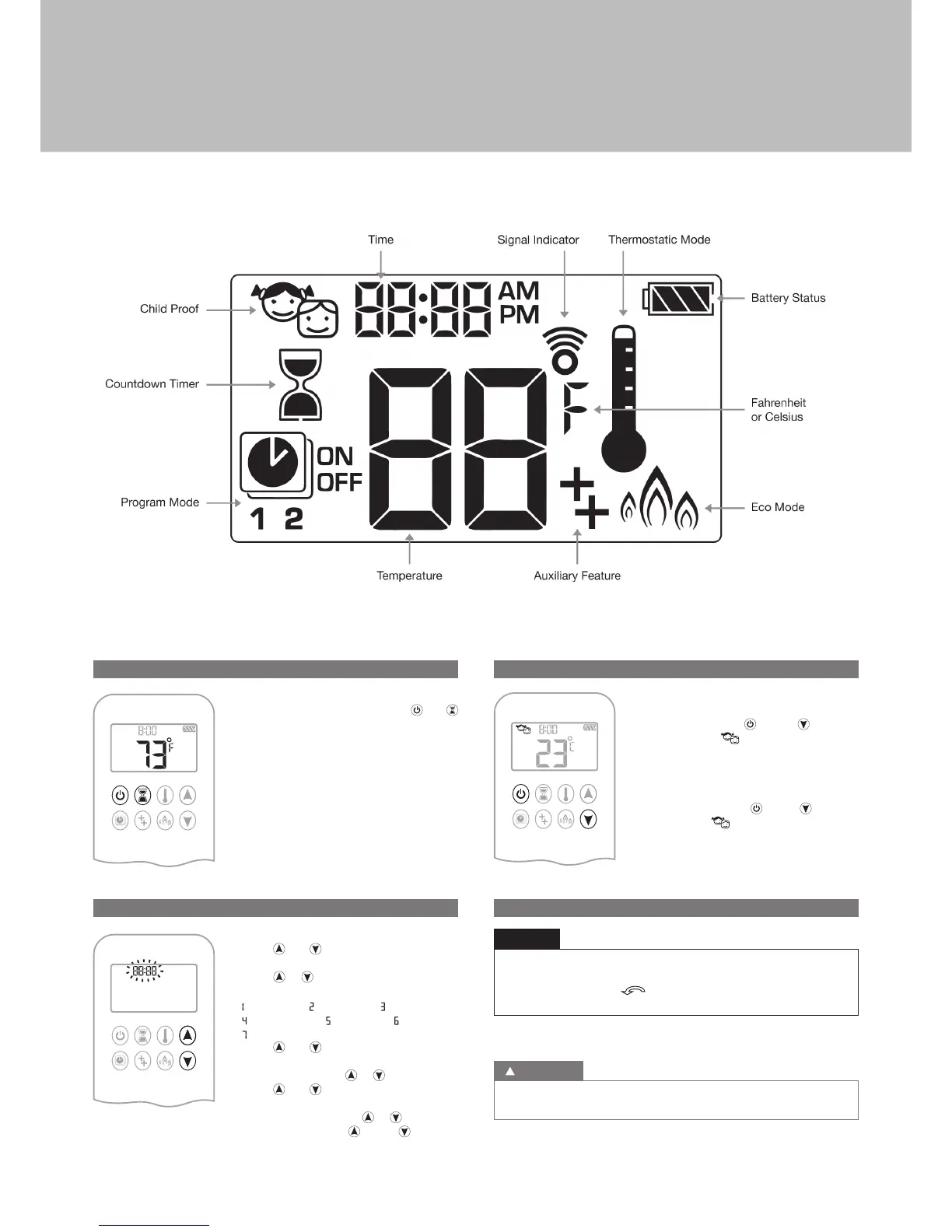
Figure 01: 8-symbol Display
User instructions


 To Next Page