EasyManua.ls Logo

Fodenn IPC-BT35 - User Manual

Fodenn IPC-BT35
9 pages
Print Icon
To Next Page IconTo Next Page
Loading...
1 / 9
Fodenn Electronic Technology Co.,Ltd
Add: 3rd floor, Building B, Runchang industrial park, Zhonghao 2 road,
Bantian street, Longgang district, Shenzhen
Tel0755-86329789 Fax0755-83689236 Emailoversea1@fodenn.com
Model Number: IPC-BT35
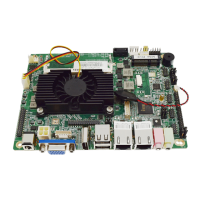
Thank you for using our motherboard model number IPC-BT35, this motherboard made by
Fodeen with strict requirements, superior in quality,good stability and excellent performance.
This manual include introduction of the motherboard and paramater definition.
Note:Take esd precautions before unpacking,do not
fall or press.
This model motherboard is 6 seris 8USB,Dual display,Dual network.
Question and Answer IconNeed help?

Do you have a question about the Fodenn IPC-BT35 and is the answer not in the manual?

Overview

This document describes the IPC-BT35 motherboard, manufactured by Fodenn Electronic Technology Co., Ltd. The motherboard is designed with strict requirements, aiming for superior quality, good stability, and excellent performance. It features a compact Mini-ITX form factor, making it suitable for various embedded applications.

Function Description

The IPC-BT35 motherboard serves as a core component for embedded systems, offering a comprehensive set of features for connectivity, display, and storage. It supports multiple display outputs, various serial communication interfaces, USB connectivity, and network capabilities, making it versatile for industrial control, digital signage, and other specialized applications. The board also includes provisions for fan control and system monitoring.

Important Technical Specifications

  • Form Factor: Mini-ITX, with dimensions of 154.8mm x 117.4mm.
  • CPU: Integrated Intel BayTrail J1900 2.42GHz 2M quad-core processor.
  • Chipset: Intel BayTrail J1900.
  • RAM: Supports DDR3 SO-DIMM with a maximum capacity of 4GB.
  • Display Chip: Integrated Intel® HD Graphics.
  • Onboard LAN: Realtek RTL8111E Gigabit Ethernet controller with wake-up function. It features two RJ-45 LAN interfaces with LED indicator lights.
  • Rear I/O Ports:
    • 2 x USB2.0 ports
    • 1 x VGA Port
    • 1 x HDMI Port
    • 1 x Video Input
    • 1 x Video Output
    • 1 x DC Input Port
  • Internal Connectors:
    • 1 x Memory slot
    • 1 x SATA connector
    • 1 x MINI PCIE Port
    • 1 x MINI SATA port (Backend)
    • 1 x SIM slot
    • 1 x INVERT Port
    • CPU/SYS fans port
    • CMOS Remove Pin
    • 6 x 9PIN RS-232 Pins (COM1/2/3/4/5/6)
    • 1 x 4PIN RS485/422 Pin (Optional)
    • 1 x GPIO Pin
    • 1 x LVDS Pin
    • 1 x EDP Pin
    • 1 x IDE_PWR Pin
    • 3 x USB 2.0 Pins
    • Video F_AUDIO Pin
    • System Panel F_PANEL Pin
  • BIOS: 32MB AMI BIOS with plug and play support, ACPI 1.1 power management, and wake-up function.
  • Operating Temperature: -40℃ to 60℃.
  • Storage Temperature: -25℃ to 70℃.
  • Operating Humidity: 5% to 95% (No Condensation).
  • OS Support: Windows XP, Win7, Win8, Linux.

Usage Features

The IPC-BT35 motherboard offers flexible configuration options for various applications:

  • Display Output: It supports four different signal output modes (VGA, HDMI, LVDS, EDP) which can be arbitrarily combined into two groups for synchronous or asynchronous dual display.
    • LVDS Display Output (30-PIN): Provides a detailed pin definition for LVDS display connections. Power control for LVDS is available through LVDS_PWR1 (3-PIN) for +3.3V/+5V and LVDS_PWR2 (3-PIN) for +12V. Note that if LVDS_PWR2 is set to 12V, the jumper cap on LVDS_PWR1 must be removed.
    • EDP Display Output (30-PIN): Offers a comprehensive pin definition for EDP display connections, including VCC, GND, data lines (TX0-TX3), AUX, HPD, and backlight control (BKON, BKCTL).
    • INVERT (6-PIN): LVDS Invert parameter definition, including +12V, PWM, and backlight adjustment.
  • Serial Communication: Multiple RS-232 ports (COM1-COM6) are available, configurable for different voltage settings (+5V or +12V) via jumper settings on JC11, JC12, JC21, and JC61. RS485/422 communication is also supported via J1_485/J2_485 and J1_422, configurable for COM2.
  • USB Connectivity: In addition to the rear I/O USB ports, there are internal F_USB1, F_USB2, and F_USB3 (9-PIN) connectors for additional USB 2.0 expansion.
  • Audio: A Video F_AUDIO Pin is available for audio output.
  • Keyboard/Mouse: A JPS2 (7-PIN) connector provides dedicated pins for keyboard and mouse data and clock signals.
  • GPIO: A JGPIO (10-PIN) connector offers general-purpose input/output pins for custom control and sensing.
  • System Fan/CPU Fan: Dedicated 3-PIN connectors for SYS_FAN and CPU_FAN allow for cooling management.
  • Storage: The motherboard includes three memory pair interfaces: two standard MINI_PCIE 26-PIN slots (one on the front, one on the back) and a standard SATA 2 pair of interfaces. This facilitates the use of SSDs and general hard drives. An IDE_PWR (4-PIN) connector provides power for hard disks (+5V, +12V). A SATA1 (7-PIN) connector is available for hard disk signal interface.
  • SIM Card Slot: A SIM card slot is included to support 3G module functions, enabling wireless connectivity.
  • Front Panel Control: An F_PANEL (9-PIN) connector allows connection to the host switch controller, including HDD LED, PWR LED, RESET switch, and PWR switch.

Maintenance Features

  • ESD Precautions: Users are advised to take ESD (Electrostatic Discharge) precautions before unpacking the motherboard to prevent damage.
  • CMOS Clear: The CLR_CMOS (3-PIN) jumper allows users to clear the data in CMOS, including system settings, passwords, date, and time. To clear CMOS, turn off the computer, unplug the power cord, and then short-circuit pin 2 and pin 3 on CLR_CMOS for five seconds. If clearing CMOS after a BIOS refresh, the system must be started and then shut down before performing the clear operation.
  • Physical Handling: Avoid dropping or pressing the motherboard to prevent physical damage.

Fodenn IPC-BT35 Specifications

General IconGeneral
BrandFodenn
ModelIPC-BT35
CategoryMotherboard
LanguageEnglish