User Manual
The wireless on-ear headphone HP1 is your perfect companion to listen to music and for
phone calls.
Package contents
• Fontastic
®
Headphone HP1
• Micro-USB charging cable
• 3,5mm jack cable
• This user manual
If any of the above pieces is missing, please pack the product again and return to dealer.
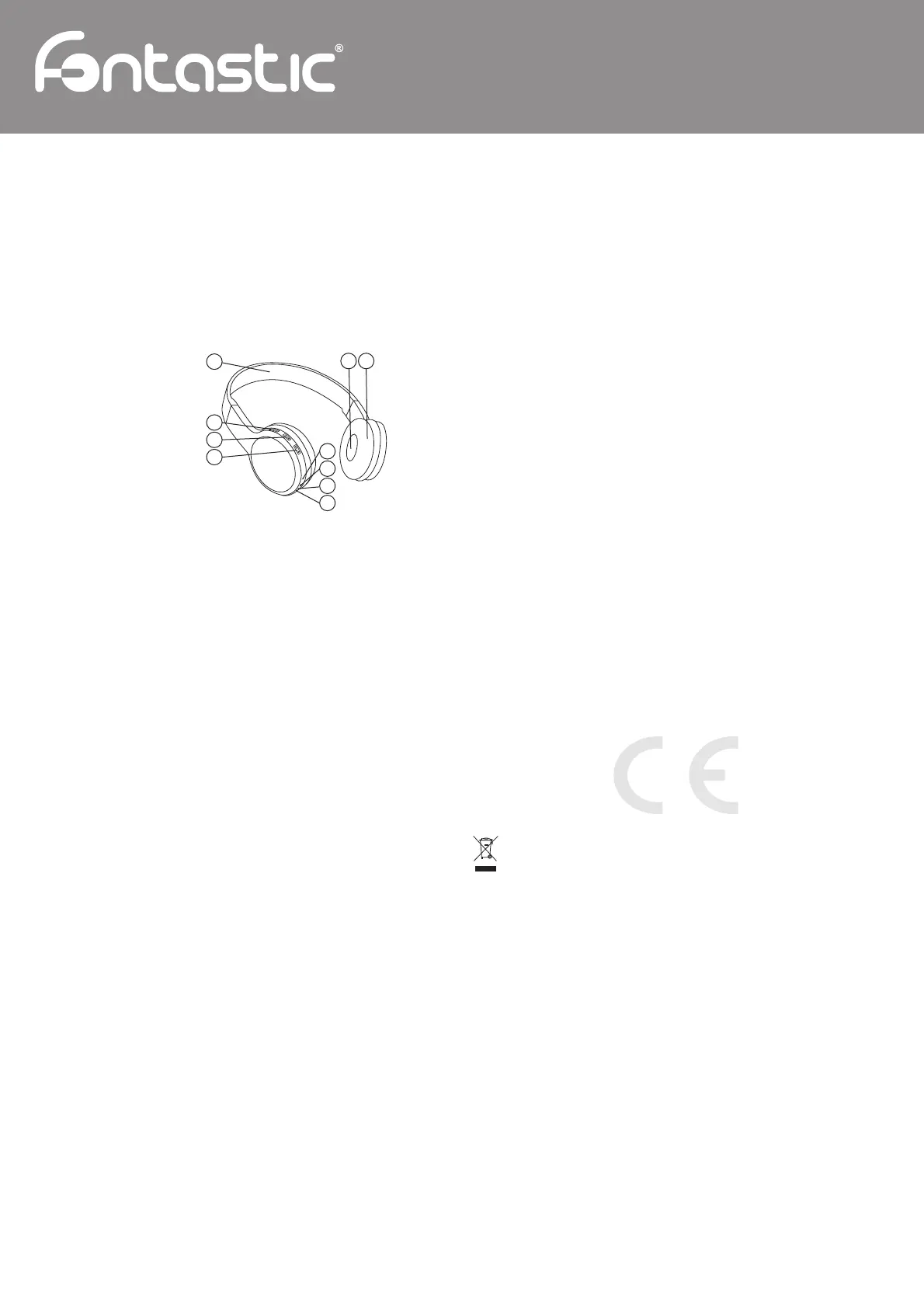
Overview
1. Headband
2. Speaker
3. Ear cushions
4. Micro USB connector
5. LED indicator
6. Line-in connector
7. Microphone
8. Volume – button
9. Multifunction button
10. Volume + button
LED functions
Connected Blue fl ashes every 5 seconds
Not connected Blue fl ashes quickly
Incoming call Blue light goes on permanently
Charging Red light goes on permanently
Pairing Blue fl ashes quickly
Getting Started
Charging the battery
The Fontastic
®
HP1 is equipped with an internal rechargeable lithium-polymer battery.
Connect the HP1 with the micro USB cable which is included in the package contents.
The cable can be connected to a computer or a standard USB power supply.
The red led of the HP1 lights during the charging process. The typical charging time is 2-3
hours. At full charge, the red LED goes off. The cable can now be disconnected from the
Fontastic
®
HP1. A Low Battery condition is indicated by a acoustic signal.
Note: Charge HP1 for at least 3-4 hours before initial use.
Switching On /Off
To switch on, press the multifunction button for 3 seconds, the blue LED fl ashes quickly.
To switch off, press the multifunction button for 3 seconds, the blue LED goes off.
Pairing
HP1 must be paired with a Bluetooth
®
device before use. This is a two part process; one part
is carried out on the headphone and the other is carried out on the other Bluetooth
®
device.
Note: Please note that different mobile phones may require different pairing methods.
1. In the off state, press and hold the multifunction button for 3 seconds to turn on.
Keep the button pressed and wait until the blue LED fl ashes quickly.
This indicates the pairing mode.
2. Use your Bluetooth
®
enabled device to search for Bluetooth
®
audio devices.
3. The Bluetooth
®
device should indicate that it has found „HP1“.
4. Confi rm pairing with HP1. Enter „0000“ if you are asked for a pairing code.
If you are unsure about the pairing procedure of your Bluetooth
®
device, please check your
device manual. When using a Bluetooth
®
transmitter without display, set it to pairing mode
and wait a few seconds until the connection with HP1 is established.
Note: If the connection is lost or the transmitter is temporarily disconnected, briefl y press the
multifunction button. HP1 will then try to restore the connection.
Music playback
Start music playback on the Bluetooth
®
source which is paired with the HP1. The music is
transferred to the HP1. Stop the music playback on the Bluetooth
®
source to interrupt the
streaming. You can use the HP1 as a wired headphone without Bluetooth
®
function with the
3.5mm jack cable that is included in the package content. For that purpose connect the cable
with the HP1 and the desired device and start music playback.
Music control
To play or stop music playback, briefl y press the multifunction button.
To skip to the previous track, press and hold the volume - button.
To skip to the next track, press and hold the volume + button.
Note: The mobile phone must support the A2DP and AVRCP profi le for music streaming and
control. The buttons have no function when using the wired connection. Use the audio source
to control the music and volume.
Hands-free features
With its built-in microphone and intelligent noise reduction, the HP1 is perfectly suitable for
phone calls.
Answer/end/reject calls
To accept an incoming call, briefl y press the multifunction button.
To end a call in progress, briefl y press the multifunction button.
To reject incoming calls, press and hold the multifunction button for 2 seconds.
Redial
Press the multifunction button twice to redial the last dialled number.
Volume setting
To increase the volume, press and hold the volume + button until the desired volume is
reached.
To decrease the volume, press and hold the volume - button until the desired volume is
reached.
Technical data:
• BT Version 2.1
• Profi les: Headset, Handsfree, A2DP, AVRCP
• Range: aprx. 10m
• Input: 5V DC
• Frequency Response: 20Hz-20KHz
• Impedance: 32 Ohm
• Built-in high performance microphone
• Audio line-in
• Status LED: blue/red
• Micro USB charging port
• Battery type: 160 mAh, Li-Iion
• Operation time: aprx. 5 hrs.
• Weight: 124 g
Safety advice:
• Do not open the device
• Do not hold the device under water
• Keep it safe from humidity
• Do not connect the adapter to the device by using force
• Keep the device away from children
• Disconnect electronic devices from the power when not using them for longer time.
• Do not use the device when it has visible defects.
In case you need technical support, please contact our support-team by e-mail under
service@fontastic.eu.
Registration and Safety
Certifi cation/General Information
We hereby declare, that this device carries the CE mark in accordance with the regulations
and standards. It conforms with the fundamental requirements of the (RED) 2014/53/EC,
EMC directive 2004/108/EC as well as the Low Voltage Directive 2014/35/EC.
Note on environmental protection:
After the implementation of the European Directive 2012/19/EC in the national legal
system, the following applies:
Electrical and electronic devices may not be disposed of with domestic waste.
Consumers are obliged by law to return electrical and electronic devices at the end
of their service lives to the public collecting points set up for this purpose or point of sale.
Details of this are defi ned by the national law of the respective coun-try. This symbol on the
product, the instruction manual or the package indicates that a product is subject to these
regulations. By recycling, re-using the materials or other forms of utilising old devices, you
are making an important contribution to protecting our environment.
Wireless Headphone HP1
GB
1
2
4
5
6
7
8
9
10
3
Improvement and changes of the technical specifi cations and other data’s could be made without prior notice / Fontastic, by D-Parts Mobilphon & Zubehör GmbH ● Birkenweiherstr, 16 ● 63505 Langenselbold, Germany / V2_03_17


 To Previous Page
 Loading...