1
5
42 3
6
7
9
8
1 2
GB GB
User Manual
Thank you for choosing this Fontastic
®
product.
Please read this user manual carefully and comply with
the safety instructions.
Package Contents
● 2 x wireless headset SOCA
● Storage and charging case
● USB Type-C™ cable
● 3 pairs of earbuds (small, medium & large)
● User manual
Overview:
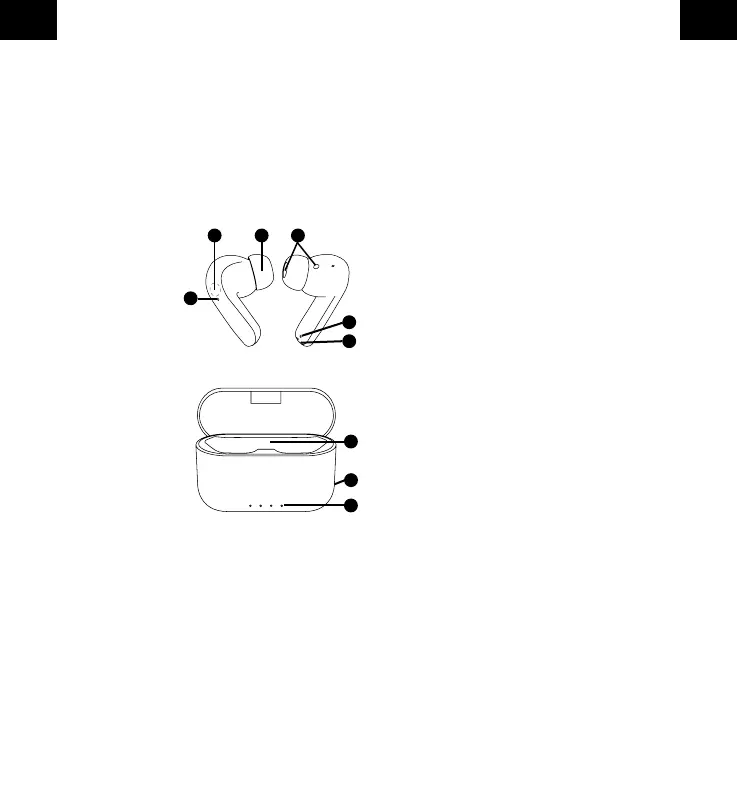
1. Status LED
2. Multimultifunction sensor
3. Earbuds
4. Speaker
5. Microphone
6. Charging Pins
7. Headset insertion
8. USB Type-C™ charging port
(on the rear side)
9. Charging LED
Getting Started
Charging the headset
Insert the headset into the charging
case. By closing the charging case, the headsets get in
contact and are charged in the case.
The LED‘s (1) of the headsets light up red during the
charging process. When fully charged, the LED‘s (1)
turns o.
Charging the case
Connect the USB Type-C™ cable, included with the
headset, to the charging case and to a power supply
or USB port on a computer to charge the battery of the
case. 4 LED lights display the charging status of
the battery as 25%, 50%, 75% and 100%
respectively.
Switching On/O
Switch on: Tap and hold the multifunction sensor (2) for
about 2-3 seconds.
Switch o: Tap and hold the multifunction sensor (2) for
about 5-6 seconds.
Note: Both headsets switch on and o automatically
when they are removed or inserted from the case.
When SOCA is switched on, the white LED (1) ashes
until it is connected. During this time it will try to connect
to the last connected device.
Pairing
The SOCA Headset has to be paired with a Bluetooth
®
device before use. The headsets LED will blink white
when it‘s ready to pair.
1. Take out the Headsets from the charging case. They
will automatically power on and pair with each other.
Now one of them switches to pairing mode to
connect to the Phone.
2. Search for “SOCA” on your Bluetooth
®
device and
select it to pair the headset with your device.
When properly connected, the LED
blinks white and turns o after pairing has been
sucessful.
Note: If the Headste does not nd a Bluetooth® capable
device, it switches itself o after approx. 3 minutes.
Note:
- When the headset is placed in the charging case, the
connection is interrupted. As soon as the headset is
removed, the headset automatically reconnects.
- If the connection is interrupted, the multifunction
sensor must be pressed to reconnect.
Music Control
All control commands are executed with the
multifunction sensor (2).
Play/Pause: Tap the multifunction sensor on one of the
two heasdsets once.
Skip Backwards: Tap the multifunction sensor of the
left head 2 times.
Skip Forwards: Tap the multifunction sensor of the right
headset 2 times.


 To Next Page