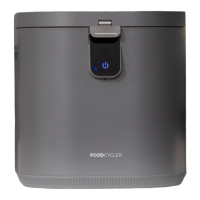
The FoodCycler™ is an energy-efficient household electric appliance designed to transform food waste and leftovers into a nutrient-rich soil amendment. This aerobic process significantly reduces food waste volume by up to 90%, producing a garden-ready supplement that nourishes plants. The unit is intended for home and office use only.
Function Description:
The FoodCycler™ operates through a three-phase cycle: drying, grinding, and cooling. Agitators within the grinding bucket pulverize and aerate food waste, reducing its volume and creating a dry biomass. The intense aeration, heating, and pulverization accelerate the composting process, completing it within 4-8 hours, significantly faster than traditional composting methods which can take weeks or months. This accelerated process also ensures that meat, dairy, bones, and processed foods can be safely added to the cycle, as the heat generated is sufficient to eliminate bacteria, potential pathogens, and even weed seeds. The resulting by-product, referred to as "foodilizer," is rich in micro and macro nutrients and organic biomatter, making it beneficial for optimal vegetation growth.
Important Technical Specifications:
- Product Name: FoodCycler FC-30
- Model Number: FC-30 / FC-30E
- Processing Mode(s): Drying, Grinding, Cooling
- Max Wattage: 500W
- Power Input (FC-30): 110-120V 60 Hz
- Power Input (FC-30E): 220-240V 50/60Hz
- Energy Usage (Running): Approximately 0.8 kWh per cycle
- Energy Usage (Standby): 2 kWh per month
- Processing Time: 4-8 hours
- Capacity: < 2.5L
- Waste Volume Reduction: 80-90%
- Color: Grey
- Weight (Out of Box): 19 lbs, 13 ounces (9 kgs)
- Dimensions (Out of Box): (W)11″ x (D)12.6 x (H)14.2" (28cm x 32cm x 36cm)
Usage Features:
The FoodCycler™ is designed for ease of use.
- Unit Setup: The unit comes with the waste bucket, carbon filters, and lid correctly placed. Users need to remove filter caps from inside the bucket, peel off any filter stickers (if present), and install the filter caps on top of the filters before first use. The back panel is removable for filter access.
- Running a Cycle:
- Remove the bucket from the unit to add food waste, preventing spills into internal components.
- Add food waste to the bucket, ensuring it does not exceed the internal fill-line and is not packed down to avoid jams.
- Insert the filled bucket into the unit, aligning the placement arrow on the bucket lid with the arrow at the back of the unit cavity.
- Close the unit lid by turning it counterclockwise until the arrow aligns with the locked symbol.
- Plug the unit into a properly grounded outlet.
- Press the Start button once to power on (blue light), and again to begin the cycle. If the power light is already on, press once to start.
- Pause Feature: The unit can be paused during the "Drying" cycle to add more food waste. This may extend the overall cycle time but ensures complete dehydration.
- Food Waste Guidelines: The unit performs best with a variety of food wastes. High-fiber items like parsley and asparagus should be chopped to prevent jams. Avoid high concentrations of starches, condiments, nut butters, jams, and high-sugar fruits. Hard bones (pork, lamb, beef), pits, candy, gum, nuts, hard shells, oil, and flammable materials should not be cycled. Non-organic materials like glass, metal, or wood are also prohibited.
- By-product Use: The "foodilizer" can be used as a soil amendment or homemade fertilizer. Recommended ratio is 1 part "foodilizer" to 10 parts soil (1:15 for cycles with meat products). It should be mixed into the soil, not left on the surface, and applied 1-4 weeks prior to planting for best results. It can also be disposed of in green bins or garbage cans, reducing landfill volume and transport emissions.
- Storage: The unit should be stored indoors in an area with a power outlet and sufficient space, at least 6 inches from walls for ventilation. It should be on a flat, dry surface, away from heat sources, and not exposed to outdoor elements or freezing temperatures.
Maintenance Features:
- Carbon Filter Replacement: The FoodCycler™ uses carbon filters to mitigate odors. The "Change Filter" light indicates replacement is due every 3-4 months or approximately 500 cycle hours. To replace:
- Open the unit's back panel.
- Remove filter caps.
- Remove used filters by turning counterclockwise.
- Install new filters (removed from packaging) by turning clockwise.
- Replace filter caps on top of new filters.
- Reset the filter light by pressing and holding the small round button in the upper, inner lip of the back cavity until a beep is heard.
- Bucket Cleaning: The bucket is designed to self-clean during cycles. Residue is normal. If a jam occurs and the grinding arm cannot rotate, remove contents and soak the bucket overnight with boiling water and mild soap.
- Filter Life Extension: Running cycles with citrus rinds can help mitigate filter odors. Including coffee grounds in regular cycles can also help keep the bucket clean and extend filter life.
- Troubleshooting:
- Flashing Power Light: Indicates the lid is open/unlatched or the cycle is paused. Ensure the lid is closed and locked. If food waste prevents closing, remove some. If the light persists, contact customer care.
- Flashing Drying Light (and Beeping): Indicates an overloaded unit. Remove blockage, ensure grinding arm rotates, and resume cycle.
- All Cycle Lights Flashing Together or Grinding/Cooling Light Flashing: Indicates internal component malfunction. Stop use and contact customer care.
- Stuck in Power Mode (Not Running): Ensure the unit is plugged in, powered on (first press), and the cycle started (second press). If issues persist, attempt a manual reset.
- No Power: If the unit has no lights or sounds when plugged in and attempts to power on, contact customer care.
- Manual Reset Instructions:
- Plug in the unit.
- Insert the bucket and secure the lid to the "locked" position.
- Press and hold the Start button for 3+ seconds until 3 beeps are heard. Release; the unit will shut off.
- Unplug and wait 2 minutes.
- Plug back in and wait 20 seconds.
- Press and release the Power/Start button once. If nothing happens, press and release a second time.

 Need help?
 General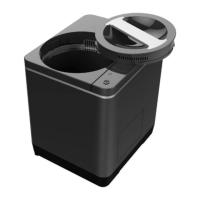

 To Next Page