EasyManua.ls Logo

Force ORBITER - User Manual

Force ORBITER
4 pages
Print Icon
To Next Page IconTo Next Page
Loading...
INSTRUCTION MANUAL
Question and Answer IconNeed help?

Do you have a question about the Force ORBITER and is the answer not in the manual?

Summary

Safety Precautions

General Safety Warnings

Essential safety guidelines for operating the Orbiter, including blade proximity, usage environment, and supervision.

Operating the Orbiter

Starting and Launching

Instructions on how to power on the Orbiter, hold it correctly, and release it for flight.

Stopping and Restarting

Procedures for stopping the Orbiter's flight using the remote and resuming play.

Powering Off and Charging

Guidance on switching the Orbiter OFF after use and preparing it for charging.

Orbiter Usage and Charging

Correct Launching Technique

Advice on holding the Orbiter upright during launch to ensure stable flight.

Charging Process

Steps for charging the Orbiter, including power switch, cable connection, and indicator lights.

Charging Precautions

Important warnings against overcharging and leaving the Orbiter unattended while charging.

Summary

Safety Precautions

General Safety Warnings

Essential safety guidelines for operating the Orbiter, including blade proximity, usage environment, and supervision.

Operating the Orbiter

Starting and Launching

Instructions on how to power on the Orbiter, hold it correctly, and release it for flight.

Stopping and Restarting

Procedures for stopping the Orbiter's flight using the remote and resuming play.

Powering Off and Charging

Guidance on switching the Orbiter OFF after use and preparing it for charging.

Orbiter Usage and Charging

Correct Launching Technique

Advice on holding the Orbiter upright during launch to ensure stable flight.

Charging Process

Steps for charging the Orbiter, including power switch, cable connection, and indicator lights.

Charging Precautions

Important warnings against overcharging and leaving the Orbiter unattended while charging.

Overview

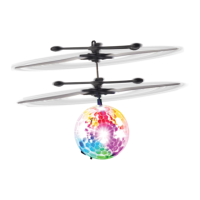
The Force1 Orbiter is an indoor flying toy designed for ages 8 and up, requiring adult supervision. It features a colorful LED light-up ball at its base and two sets of spinning blades above, giving it the appearance of a disco ball helicopter. The Orbiter is controlled by an induction system and a remote control for on/off functions.

Function Description:

The Orbiter is a mini-helicopter-style toy that flies upwards and is designed to be controlled by hand gestures due to its induction receiver. When turned on, its blades spin automatically, causing it to lift off. The colorful LED lights illuminate and reflect during flight, adding to its visual appeal. The remote control is used solely to turn the Orbiter on and off, not to control its flight direction.

Important Technical Specifications:

  • Power Source: The Orbiter is powered by a built-in rechargeable battery.
  • Charging: It charges via an included USB cable.
  • Charging Time: Approximately 20 minutes.
  • Flying Time: Approximately 5 minutes per full charge.
  • Remote Control Battery: The remote control uses one CR1220 button battery (built-in).
  • Components:
    • 2 x Orbiter units
    • 2 x Remote Control units
    • 2 x USB Cables
    • 1 x Instruction Manual

Usage Features:

  • Starting the Orbiter:
    1. Locate the small black ON/OFF switch on the bottom of the Orbiter and flip it to the "ON" position.
    2. The LED lights will turn on.
    3. Hold the Orbiter in a straight-up position.
    4. The blades will start spinning automatically within 2-3 seconds.
    5. Release the Orbiter from your hand, and it will fly upwards.
  • Stopping the Orbiter:
    1. Aim the remote control directly at the Orbiter.
    2. Press the "ON/OFF" button on the remote. The Orbiter will stop flying but remains "ON" internally.
    3. If the Orbiter is flying with no objects directly beneath it, pressing the "ON/OFF" button will cause it to return to the ground.
  • Restarting Flight: To play again after stopping, simply press the "ON/OFF" button on the remote once more.
  • Correct Launch Technique: When launching, hold the Orbiter upright, keeping fingers away from the spinning blades. Launching it at an angle will cause it to fly in the direction it's tilted.
  • Safety Precautions:
    • Keep fingers away from blades at all times.
    • For indoor use only.
    • Do not launch at people or animals.
    • Keep away from face, eyes, and hair; tie hair back or wear a hood/hat to prevent entanglement.
    • Ensure people around you are aware you are playing with the toy.
    • Keep eyes on the toy at all times during flight.
    • Always turn the Orbiter "OFF" when not in use or when charging.
    • Only use the included USB cable for charging.
    • Adult supervision is required for children playing with this toy.

Maintenance Features:

  • Charging the Orbiter:
    1. Turn the power switch on the bottom of the Orbiter to "OFF."
    2. Connect the USB cable to the Orbiter's charging port and plug the other end into a USB port.
    3. A red light will indicate charging. The red light will turn off once the Orbiter is fully charged.
    4. Do not overcharge the Orbiter. Remove it from the charger once fully charged and do not leave it charging unattended.
  • Storage: Always turn the Orbiter "OFF" when not in use.
  • User Manual: Keep the instruction manual as it contains important information regarding the toy's operation and safety.

The Force1 Orbiter provides a fun, interactive flying experience with its induction control and vibrant LED lights, making it an engaging toy for its target age group, provided all safety guidelines and usage instructions are followed.

Force ORBITER Specifications

General IconGeneral
BrandForce
ModelORBITER
CategoryLighting Equipment
LanguageEnglish