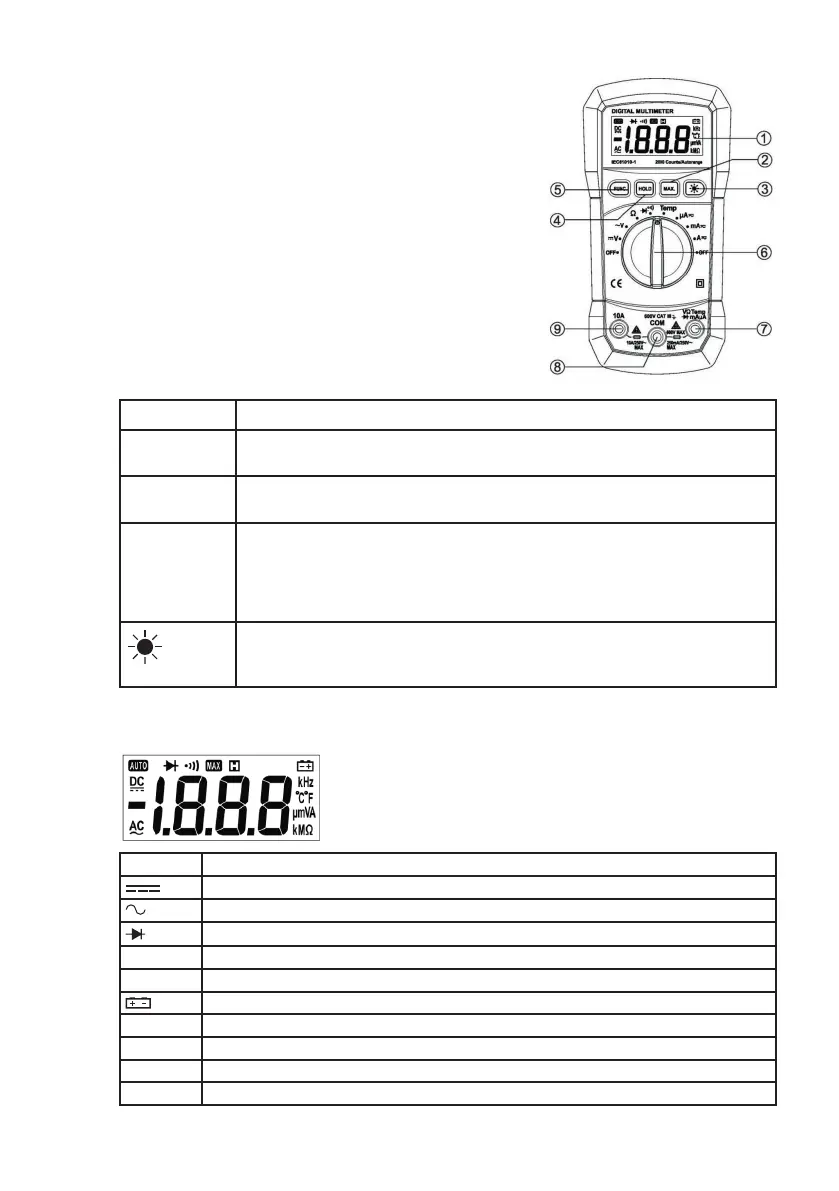
3. Explanation of controls and indicators
3.1. Meter illustration
1. LCD display
2. “MAX” push button
3. “BACK LIGHT” push button
4. ‘HOLD” push button
5. “FUNC” Push button
6. Rotary Switch (Knob)
7. “V/Ω/uA/mA/Temp”Input terminal
8. “COM” input terminal
9. “10A” input terminal
3.2. Functional push button
Push button Function
Func “FUNC” key is the function select key that acts with trigger. Use the key as
switch of DC/AC current, Diode/Continuity and
0
C /
0
F.
HOLD Press “HOLD” to enter and exit the hold mode in any mode. That act with
trigger.
MAX This key is act with trigger. Press this key once, the maximum value is holding
(Will displays ‘MAX’ symbol in the LCD). After pressing the key, A/D will keep
working, and the display value are always up dated and kept the maximum
value.
NOTE: The actual gained value is not the peak value.
This key is used control Backlight. This key is act with trigger. When press
and hold the key over 2 sec, will enable Backlight. Press the key again , the
backlight will disable.
3.3. Display indicators
Indicator Meaning
DC voltage or current
AC voltage or current
Diode
MAX Maximum value
HOLD Data hold
Low battery indicator
kMΩ Ω KΩ MΩ is unit of resistance
°C / °F The unit of temperature (0°C: Centigrade; 0F: Fahrenheit)
µmVA mV ,V is unit of voltage μA, mA, A is unit of current
- Indicate negative reading



 To Next Page