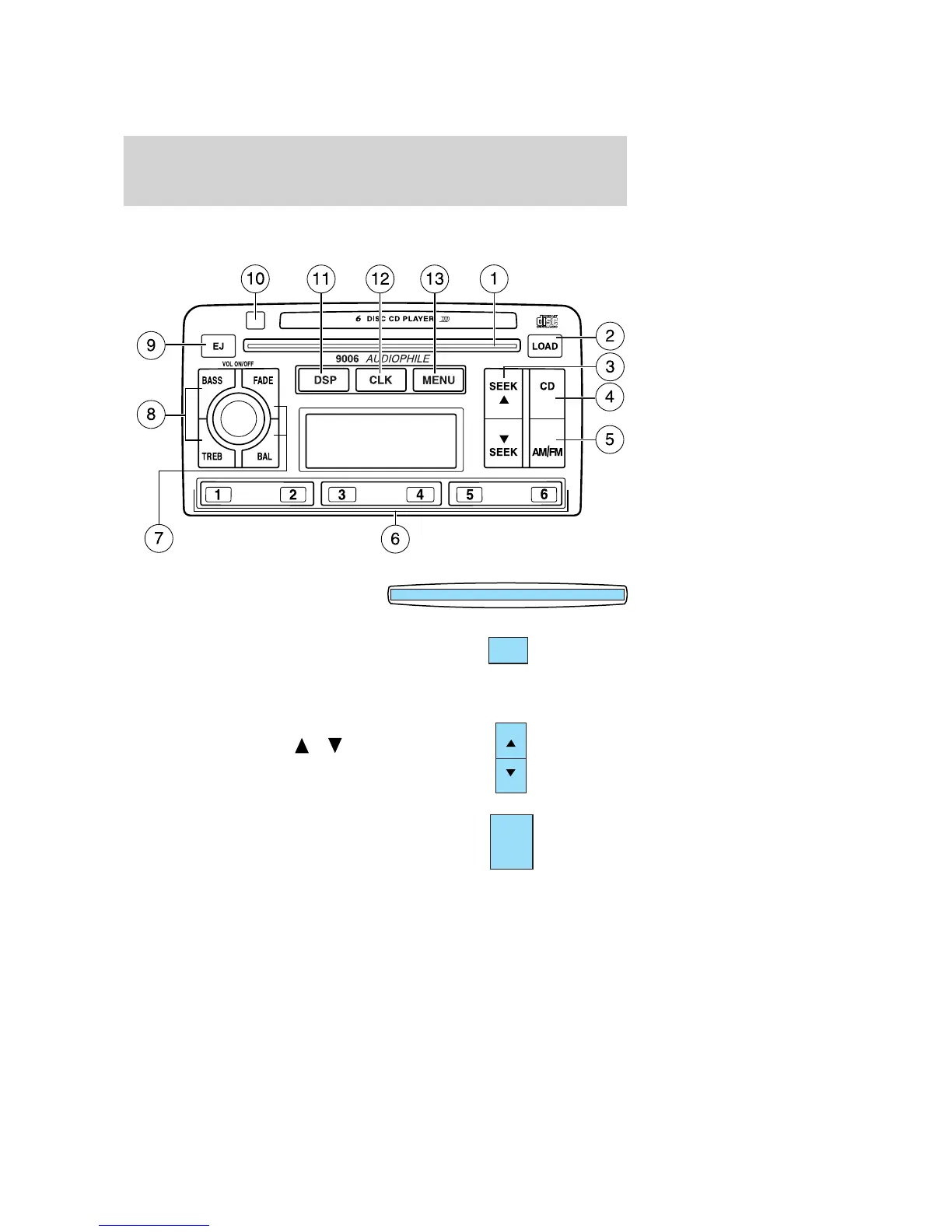
9006 AM/FM SOUND SYSTEM WITH 6–DISC IN DASH CHANGER
(IF EQUIPPED)
1. CD Door: Insert the disc with
the playing side down and printed
side up.
2. Load: Press to load a CD. WAIT
will appear in the display then
change to INSERT. Insert the CD.
LOAD and a disc icon will flash in the display. Repeat this step to load
up to 6 CDs.
3. Seek (reverse/fast forward):
Press and release SEEK
/ for
previous (reverse) / next (fast
forward) strong station or CD track.
4. CD: Press to engage CD mode.
CDs and tracks are selected and
played chronologically. Disc one will
follow disc six. Press the AM/FM
control to restore radio reception
without ejecting the disc.
LOAD
SEEK
SEEK
CD
2004 Focus (foc)
Owners Guide (post-2002-fmt)
USA English (fus)
Entertainment Systems
23





 To Next Page