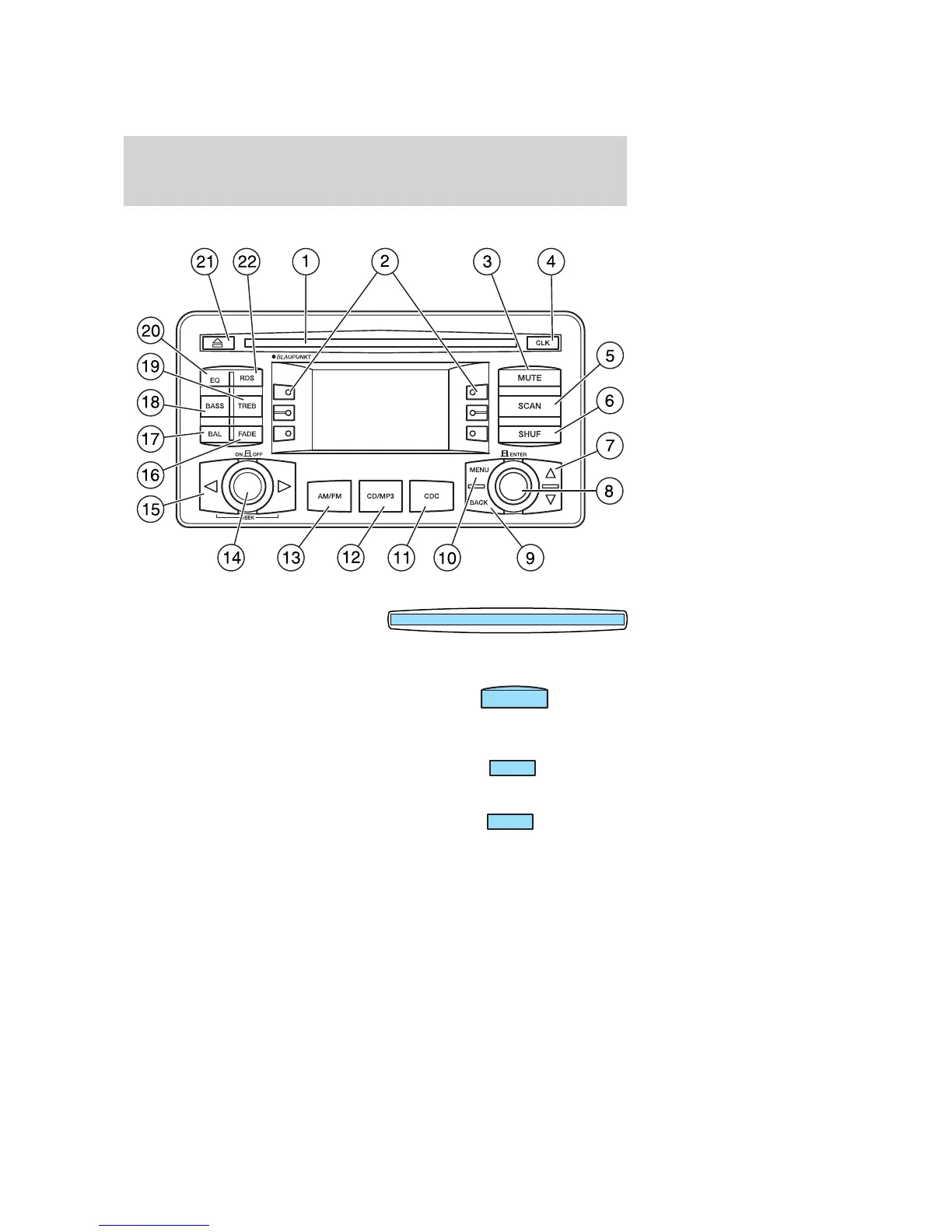
IN-DASH CD/MP3 SOUND SYSTEM (IF EQUIPPED)
1. CD door: Insert a CD or MP3
label side up.
2. Soft keys: Press to make various selections in the audio menus.
3. Mute: Press to mute the playing
media. Press again to return.
Turning the volume knob will also
disable the mute feature.
4. Clock: Press to alternate the
display between clock and audio
information.
5. Scan: Radio and CD: Press to
hear a brief sampling of all radio
stations or CD tracks. Press again to
stop.
MP3: Press once for a brief sampling of the tracks on the currently
selected MP3 directory. SCN ALB appears at the bottom of the display.
MUTE
CLK
SCAN
2004 Focus (foc)
Owners Guide (post-2002-fmt)
USA English (fus)
Entertainment Systems
27












 To Next Page