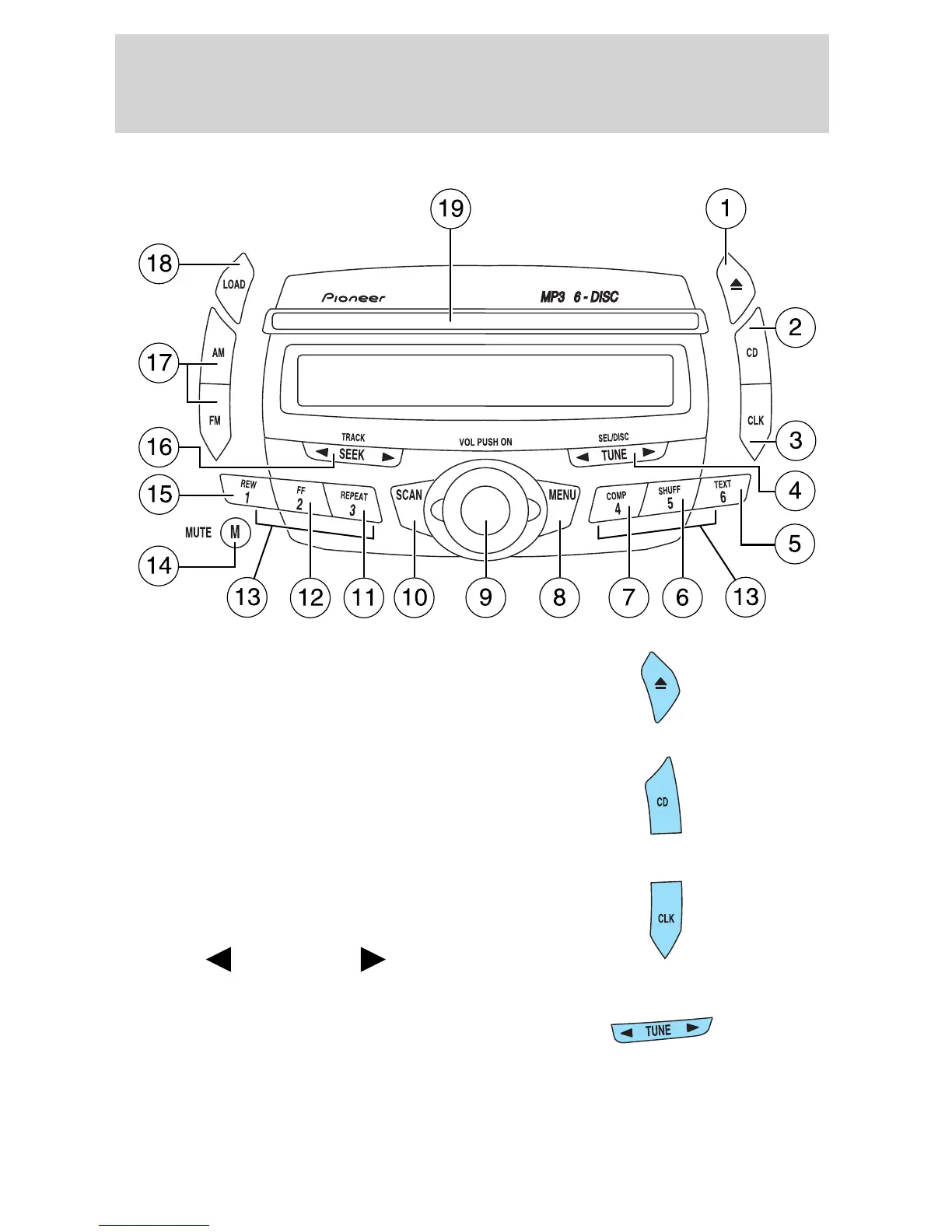
ADRENALIN CD/MP3 AUDIO SYSTEM — (IF EQUIPPED)
1. EJ (Eject): Press to eject a CD.
Press EJECT and a memory preset
to eject a specific disc. Press and
hold to eject all loaded discs.
2. CD: Press to enter CD mode. If
there is no disc in the system, insert
a CD label side up. If a CD is
already inserted, press CD to begin
CD play.
3. CLK (Clock): Press CLK until
SELECT HOUR /SELECT MINUTE
is displayed. Press TUNE to
decrease
or increase the
hours/minutes.
4. TUNE: Press to manually go up
or down the radio frequency, or to
access another CD. Also use in
menu mode to select various settings.
2005 Explorer Sport Trac (p27)
Owners Guide (post-2002-fmt)
USA (fus)
Entertainment Systems
28












 To Next Page