AUDIO SYSTEMS
AM/FM stereo (if equipped)
Display preference: You can select Clock mode, which displays the
time, or Frequency mode, which displays the current radio frequency, to
appear in the radio display. Press CLK repeatedly to toggle between
Clock and Frequency modes. If clock mode is selected and a radio
function is pressed (i.e. SEEK, TUNE, Memory Presets), the radio
information will display momentarily and then again display the time.
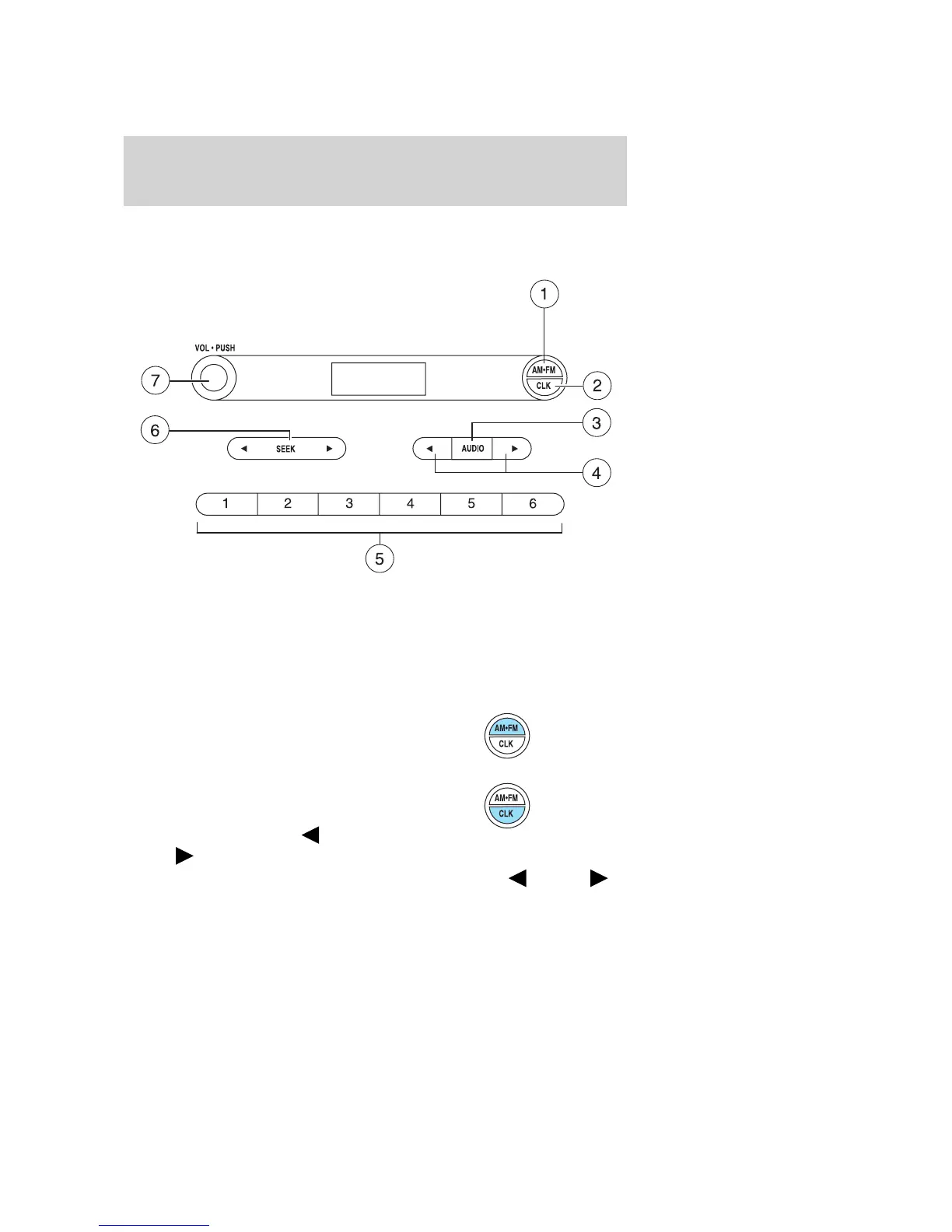
1. AM/FM: Press to select
AM/FM1/FM2 frequency bands.
2. CLK —To set the time: Ensure
that your audio system is turned off.
Press and hold CLK until the hours
flash in the display. Press
AUDIO to adjust the hours.
Press and hold CLK again until the minutes flash. Press
AUDIO
to adjust the minutes.
2007 Ranger (ran)
Owners Guide (post-2002-fmt)
USA (fus)
Entertainment Systems
19



 To Next Page
 Loading...