To aid in side window defogging/demisting in cold weather:
1. Select
.
2. Select A/C.
3. Adjust the temperature control to maintain comfort.
4. Set the fan to the highest speed.
5. Direct the outer instrument panel vents toward the side windows.
To increase airflow to the outer instrument panel vents, close the vents
located in the middle of the instrument panel.
Touchscreen features (if equipped)
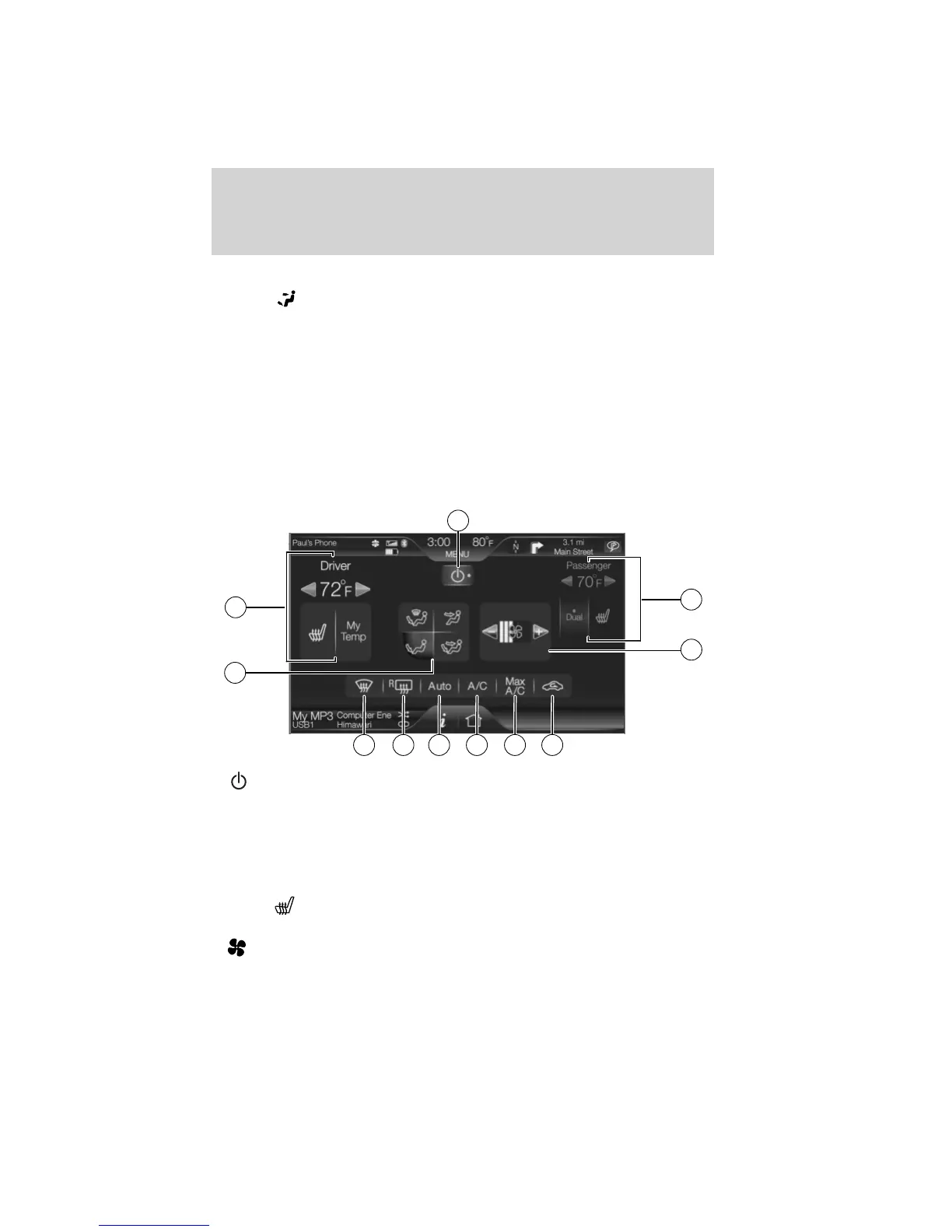
Press the lower right corner on the touchscreen to access these features.
1.
(Power): Press to activate/deactivate the climate control system.
When the system is off, outside air is prevented from entering the
vehicle through the vents.
2. Passenger settings:
• Press DUAL to turn on passenger side temperature control.
• Press the red arrow to increase the temperature and press the blue
arrow to decrease the temperature.
• Press
to control the heated seat (if equipped). Refer to Heated
seats in the Seat and Safety Restraints chapter.
3.
(Fan speed): Press to + to increase or – to decrease fan speed.
1
11
2
10
3
9
8
7
6
5
4
Climate Controls
65
2011 Edge (edg)
Owners Guide, 2nd Printing
USA (fus)












 To Next Page