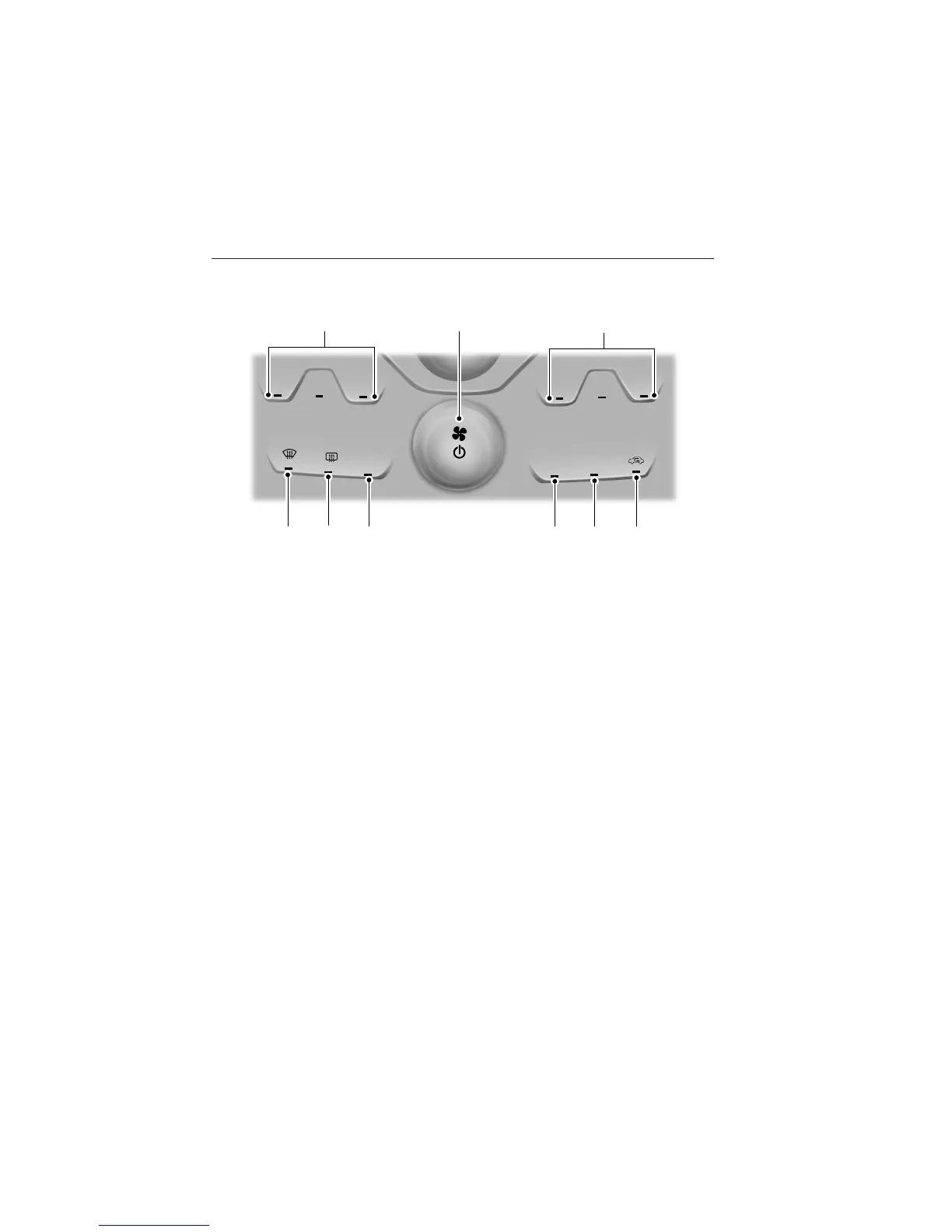
DUAL AUTOMATIC TEMPERATURE CONTROL SYSTEM
(WITH MyTemp)
Note: You can switch temperature units between Fahrenheit and Celsius.
Refer to Menu features in the MyFord Touch or MyLincoln Touch chapter.
A. MyTemp: Allows you to quickly adjust to a frequently used setting
with a single touch.
Press + and - to increase and decrease the temperature.
Touch and hold MyTemp to save the current temperature. To access the
setting again, touch the MyTouch indicator again.
B. Power/Fan speed control: Press to turn the system on and off. When
the system is off, outside air is prevented from entering the vehicle.
Turn to increase or decrease the fan speed.
C. DUAL: Allows the passenger to set their temperature independent of
the driver temperature.
D. Recirculated air: Press the button to switch between outside air and
recirculated air. When the LED on the button is lit, the air currently in
the passenger compartment is being recirculated. Using recirculated air
can reduce the time needed to cool the interior and reduce unwanted
odors from entering your vehicle.
Note: Recirculated air engages automatically when MAX A/C is selected
or can be turned on manually in any airflow mode except Defrost.
E. MAX A/C: Distributes recirculated air through the instrument panel
vents to cool the vehicle. This position is more economical and efficient
than normal A/C.
R
MAX
A/C
A/C
TEMP
AUTO
M
Y
-
+
DUAL
-
+
I G
B
H
E
DF
A
C
Climate Control 155
2013 Explorer (exp)
Owners Guide gf, 2nd Printing
USA (fus)












 To Next Page