12 13
*if equipped*if equipped
FEATURES
CONVENIENCE
REMOTE CONTROL
FRONT WINDOWS*
You can open the front windows for a
short time a er you unlock your
vehicle with the remote control. A er
you unlock your vehicle, press and hold
the remote control unlock button to
open the windows. Release the button
once movement starts. Press the
remote control lock or unlock button
to stop movement.
110-VOLT AC POWER POINT*
The power point on the rear of the
center console can be used for electric
devices that require up to 150 watts.
When the indicator light on the power
point is:
On: The power point is working, the
ignition is on or the vehicle is in
accessory mode.
O : The power point is o , the
ignition is o or the vehicle is not in
accessory mode.
Flashing: The power point is in
fault mode.
POWER LIFTGATE
Your li gate has an automatic open
and close feature. To open remotely,
press twice on your remote control
within three seconds. You can also
operate the li gate by pressing the
button on the instrument panel.
To close the li gate, press and
release the li gate control button on
the li gate.
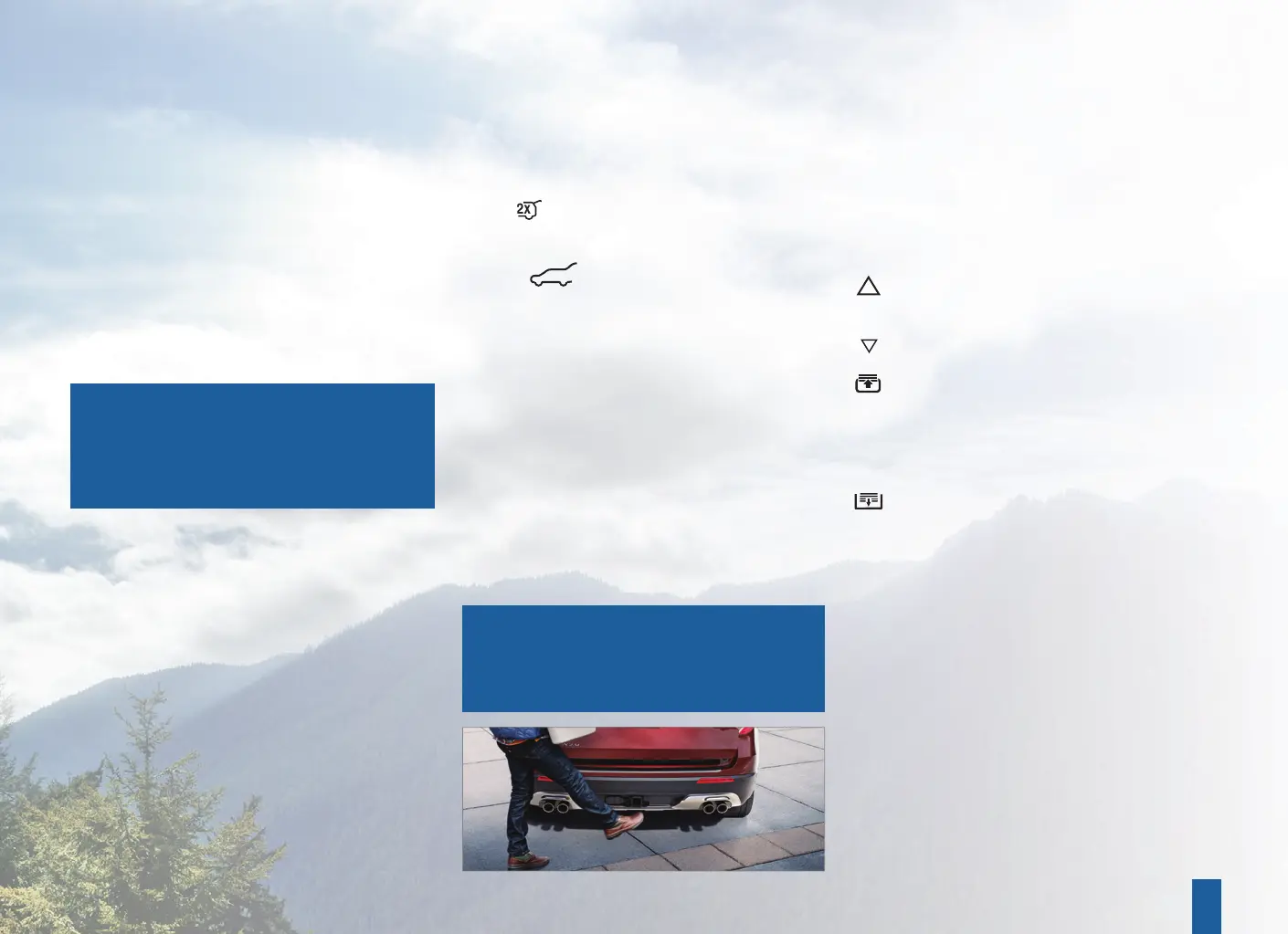
HANDS-FREE LIFTGATE OPERATION*
1. Make sure you have your intelligent
access key within 3 feet (1 meter) of
the li gate.
2. Move your foot under and back
from the rear bumper, similar to a
kicking (front-to-back) motion.
Do not move your foot sideways or the
sensors may not detect the motion.
MOONROOF*
The moonroof controls are on the
overhead console and have a one-touch
open and close feature. To stop the
movement during one-touch operation,
press the control a second time.
Press and release to open
the moonroof.
Press and release to vent or close
the moonroof.
Press and release to open the
sunshade. The sunshade opens
automatically with the moonroof.
You can also open the sunshade
with the moonroof closed.
Press and release to close
the sunshade.
INTELLIGENT ACCESS*
REMOTE ENTRY ICONS
Press once to lock all doors. Press
again within three seconds to
confi rm that you locked all doors.
Press once to unlock the driver
door. Press again within three
seconds to unlock all doors.
Press to activate the panic alarm.
Press again or switch the ignition
on to deactivate.
Press twice within three seconds
to open the li gate.
Car fi nder: Press twice within three
seconds to locate your vehicle.
The horn sounds and the direction
indicators fl ash.
INTELLIGENT ACCESS*
You can unlock and lock the vehicle
without taking the key out of your
pocket or bag when your intelligent
access key is within 3 feet (1 meter) of
your vehicle.
To unlock, touch the unlock sensor
on the back of the door handle for a
brief period and then pull on the door
handle, being careful to not touch the
lock sensor at the same time or pull the
door handle too quickly.
To lock, touch the door handle lock
sensor on the door for approximately
one second, being careful to not touch
the unlock sensor on the back of the
door handle at the same time.
REMOTE START*
Remote start allows you to start the
engine from outside your vehicle.
To start, press
and then press
twice within three seconds. Before
driving your vehicle, you must press
the push button ignition switch on
the instrument panel while applying
the brake pedal. You can also turn
your vehicle o from outside a er a
remote start by pressing
once. If
your vehicle is equipped with remote
feedback, an LED on the key provides
status feedback of remote start or
stop commands. A solid green light
means the remote start or extension
was successful, while a blinking red
light means the remote start or stop
has failed. A solid red light means that
the remote stop was successful and
the engine is o . When the system is
waiting for a status update from the
vehicle, you will see a blinking
green light.
NOTE: The intelligent access transmitter
also contains a mechanical key blade
that you can use to unlock the driver
door, if necessary.
NOTE: To operate this feature,
accessory delay must not be active.
You can switch this feature on and o
in the information display, or see an
authorized dealer.
NOTE: In vehicles that have the towing
package, kick your foot between the
trailer hitch and the exhaust system.
Do not kick under the trailer hitch.


 To Next Page
 Loading...











