4 / QUICK REFERENCE GUIDE 2016 TAURUS / 5
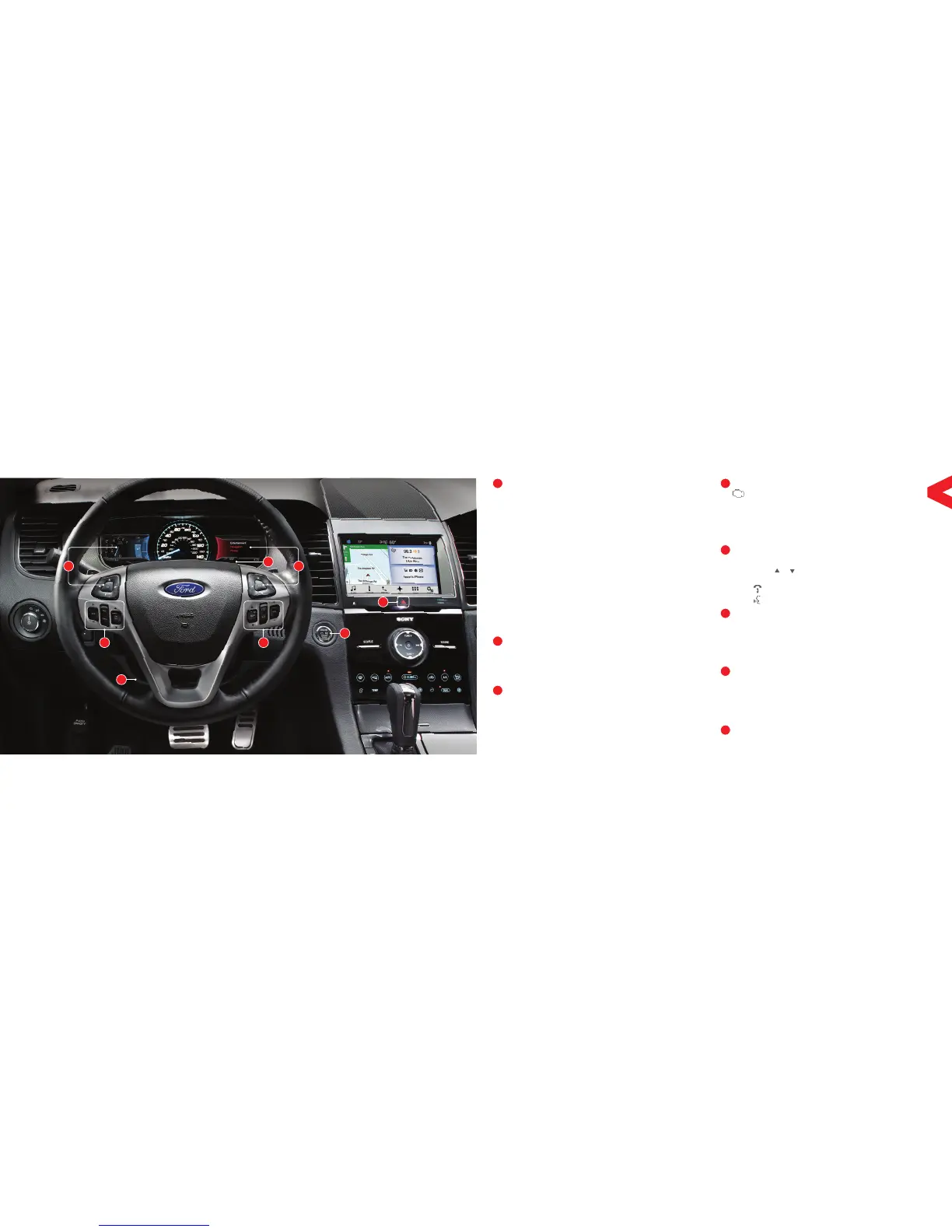
CRUISE CONTROL
To set your cruise control speed:
A. Press and release ON.
B. Drive to the desired speed.
C. Press and release SET + or SET -, then take
your foot o the accelerator pedal.
Aer you set your speed, you can press and hold
SET + or SET � to adjust cruise speed incrementally.
Release the control when you reach the desired
speed. To disable, press down and release OFF.
ADAPTIVE CRUISE CONTROL*
When your cruise control is active, press the GAP control
up or down to select a proper distance between you
and the vehicle in front of you in the same lane. Select
from one of four gap settings. Refer to the Cruise Control
chapter in your Owner’s Manual for more information.
POWER TILT and TELESCOPE STEERING
COLUMN* and ADJUSTABLE PEDALS*
Two separate controls allow you to tilt and telescope
the steering column, and adjust the accelerator
and brake pedals to your desired position.
LEFT VEHICLE INFORMATION DISPLAY*
Use the le-hand, 5-way controls located on
your steering wheel to scroll through important
vehicle information. You can also personalize
various vehicle settings to match your preferences.
Refer to the Information Displays chapter in
your Owner’s Manual for more information.
SERVICE ENGINE SOON LIGHT
Lights briefly when you switch on the ignition. If
it remains on or is blinking aer you start the engine,
the On-Board Diagnostics (OBD-II) system has
detected a problem. Drive in a moderate fashion
(avoid heavy acceleration and deceleration) and
contact your authorized dealer as soon as possible.
STEERING WHEEL CONTROLS
Press VOL + or � to adjust volume levels.
Press SEEK or to access the next or previous radio
station preset, CD track or preset satellite radio channel*.
Press to access SYNC
®
phone features.
Press to access voice recognition.
RIGHT VEHICLE INFORMATION DISPLAY*
Displays various information about your vehicle systems.
Use the right-hand, 5-way controls located on your
steering wheel to scroll through, highlight and make
minor adjustments within a selected menu. Refer
to your SYNC Supplement for more information.
PUSH BUTTON START*
Allows you to start your vehicle by pressing the START
STOP button, while fully pressing down on the brake
pedal. Press the button again to switch the engine o.
Note: Your intelligent access transmitter* must
be inside the vehicle for the engine to start.
HAZARD WARNING CONTROL
Instrument Panel














 To Next Page