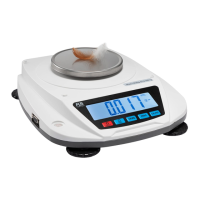
This document serves as an operation manual for the FORELIBRA TCS series electronic counting scales, providing essential information for setup, operation, and maintenance.
Function Description
The FORELIBRA TCS series electronic counting scales are precision weighing instruments designed for accurate counting and weighing operations. They are equipped with features for basic weighing, taring, piece counting, and alarm functions for both weight and quantity. The scales are intended for indoor use and require careful handling to maintain their precision.
Important Technical Specifications
The TCS series offers two models, TCS1505 and TCS301, with varying maximum weighing capacities and precision levels:
- Model TCS1505:
- Max weigh scope: 15kg
- Value of scale division: 0.5g
- Repeatable tolerance: ± 1g
- Linear tolerance: ± 1g
- Model TCS301:
- Max weigh scope: 30kg
- Value of scale division: 1g
- Repeatable tolerance: ± 2g
- Linear tolerance: ± 2g
Common specifications for both models include:
- Stable time: ≈2s
- Pre-heat time: 10-30 minutes
- Operation temperature: 0±40°C
- Pan diameter: 285 x 240 mm
- Net weight: ≈3kg
- Gross weight: ≈4kg
- Power: AC: 110V; DC:4V 4Ah
The scales feature a "Precision level" indicator, denoted by "III", suggesting a certain class of accuracy.
Usage Features
The operation of the TCS series scales involves several key functions accessible via dedicated keys:
- Numeric keys (0-9): Used for setting numeric data.
- Decimal point key ('.'): Used to set the decimal position for tare weight and sample weight.
- SAMPLE key: Used for inputting sample numbers, sample weights, or limit numbers for checking, primarily for parts counting.
- WT SET key: Toggles between normal counting and check operation.
- CHECK SET key: Used for setting check quantity and weight.
- CHECK CLEAR/PRINT key: A long press clears check presets, while a short press is used for printing.
- TARE key: Reduces the gross weight on the pan, setting it as tare weight.
- ZERO key: Captures the current reading as the zero point of the scale.
- M+ key: Accumulates sub-total piece counts. It can also be used to alternate between normal counting and memory data recalling.
- M- key: Clears all data in the Grand-Total.
- CE key: Clears all settings.
Getting Started:
To begin, turn on the instrument using the power switch. The display will show a down count (e.g., 999999...) as the unit updates. It is crucial to allow the unit to warm up for 30 minutes to ensure optimal performance. The manual also advises recharging the scale before its first operation and warming it up for over 5 minutes.
Taring (Zeroing):
All models support taring up to their total weight capacity. There are two methods for taring:
- Press button tare: Place the sample receptacle on the pan, then press the TARE key. The display will show '0', and an indicator (✓) will point to the WEIGHT display.
- Clearing tare weight: Remove the receptacle from the pan, then press the TARE key to return the WEIGHT display to zero.
Counting Function:
The scale offers two methods for piece count setting:
- PIECE COUNT setting (with samples):
- Place the desired sample pieces (e.g., 20 pieces) on the pan (sample size can be changed).
- Input the quantity of samples using the numeric keys.
- Press the SMPL key. The averaged piece weight will be calculated automatically, allowing for bulk counting.
- PIECE WEIGHT setting (if piece weight is known):
- Set the piece weight data using the numeric keys and decimal point key. The number will flicker in the PIECE WEIGHT display.
- Press the WT key to confirm the piece weight setting.
- Press the CE key to cancel the piece weight setting.
PIECE WEIGHT too light alarm:
If the averaged piece weight or set piece weight is insufficient for accurate counting, the scale will indicate this by pointing to "LS" and "AS". While the scale can still be used, counting errors may occur.
Accumulation Function:
The M+ key allows for accumulating sub-total piece counts. Each new accumulation requires returning to zero and obtaining new piece counts. The M+ key also serves to switch between normal counting and recalling memory data. The M- key is used to delete all data from the Grand-Total.
Alarm Functions:
The scale supports both weight and quantity alarms.
Basic Parameter Settings for Hi-Low Limitation (for distributors only):
Press and hold the "CHECK SET" key until a "bi-bi" sound is heard. Use "CHECK SET" to confirm and proceed to the next step.
- ITEM 1 (Weight / count): Use "ZERO" to choose between weight alarm or count alarm.
- ITEM 2 (H-L): Indicates the alarm position.
- ITEM 3 (Stable): "On" means the alarm triggers when the value is stable; "Off" means the alarm triggers even if the value is not stable.
- ITEM 4 (bLy): "ON" turns on red and yellow backlights for alarm mode; "OFF" turns off alarm backlights.
Hi-low limitation settings (end user operation):
After basic settings, press "CHECK SET". The display will show "10.00g" and "Lin-hi". Input the desired high point value. Then, press "CHECK SET" again to set the low point value (e.g., "9.00g" and "Lin-hi"). It is important that the "Hi value must be bigger than low value." To clear or change values, use the "CE" key.
Program Settings:
Access program settings by entering the password "415". Use the "CHECK SET" key to enter and confirm, and the "SAMPLE" key to choose or move to the next step.
- diu-Fun_01 (Division): Options include 1, 2, 5, 10, 20, 50.
- Pnt-Fun_02 (Decimal point): Options include 0, 0.0, 0.00, 0.000, 0.0000.
- CAP-Fun_03 (Capacity): E.g., if capacity is 30kg, it shows 30.000.
- CAL-Fun_04 (Calibration): Only for distributor use.
- Lit-Fun_07 (Backlight switch): Options are 0 (always has backlight), 1 (no backlight), 2 (backlight during operation).
- bud-Fun_08 (Baud rate): Options include 2400, 4800, 9600, 19200 (9600 is recommended for connecting to a printer and PC).
- odE-Fun_09 (Print mode): Options include 0 (no), 1 (manual), 2 (automatically), 3 (continuous), 4 (NLP manual), 5 (hi-low print).
- tPE-Fun_10 (Communicate protocol): Options from 0-10, compatible with main products in the market. Contact the distributor for more information.
Calibration:
To calibrate, enter Program settings, select "CAL-Fun-04" using the SMPL key, then press CHECK SET. Use SMPL to set the number to 1, then press CHECK SET. The LCD will display "inPut". Use numeric keys to set the calibration weight (e.g., 1000g). Press CHECK SET. When the number is stable, the LCD will display the calibration weight (e.g., 1000). Place the 1000g mass weight on the pan. Once stable, press CHECK SET to complete calibration.
Recharge:
When the figures on the display keep "shinning" after turning on or during use, it indicates that the battery power is not full and it's time to recharge. The scale can continue to operate for about ten hours in this state. If the message "LoBAt" appears in the piece weight window, it means the battery is exhausted. Turn off the power switch immediately and recharge the battery to prolong its life. A full recharge takes 6-8 hours.
Maintenance Features
- Care: The scale is a precision instrument and requires good care.
- Load Cell Protection: Place objects on the pan softly to avoid damaging the load cell, as excessive impact can be detrimental.
- Battery Maintenance: To ensure the scale operates formally, recharge the battery in time.
For any questions, customers can contact sales@njbonitalab.com or reach out via Whatsapp/Wechat at +8613951079382.

 Need help?

 To Next Page
 General