4
Thank you for buying the Forever brand product. Before use, read this instruction manual and
keep it for future reference. Do not open the device on your own – any repairs should be carried
out by a serviceman. Only use original parts and accessories supplied by the manufacturer. The
device should not be exposed to direct sunlight, re or other heat sources. We hope that Forever
will meet your expectations.
IMPORTANT! The device requires installation of a SIM card with an active call making/an
-
swering service, with no PIN lock. It is recommended to deactivate voicemail. When sending
information regarding location, the watch will require access to mobile Internet, therefore, you
should buy at least 1 GB package. Use of the watch may be associated with fees for using the
network and calls, in accordance with the operator’s tari.
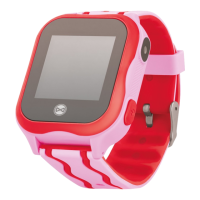
Description:
1. Touch screen
2. Back button
3. On / SOS button / return to the home screen / screen lock
SIM card installation: Ensure that the device is o, then open the SIM card slot with a scre
-
wdriver included in the set. Insert your nanoSIM card into the slot, so that the chip of the SIM c ard
is facing up towards the screen of the watch.
Charging: Connect the device with the charging cable included in the set. Ensure the device
and cable connectors are connected and then connect the USB cable to the power source. The
charging animation will be displayed on the screen.
Forever KidsCare / Forever Care application installation: Download the “Forever Care”
application for iOS or “Forever KidsCare” for Android and install it on your phone.
Account and watch registration in the application: In the registration window, enter or
scan the watch code (REG CODE) located on the package bottom and by the watch. Enter your
e-mail address, name and password. Then, select the language of the application and the area
in which the watch will be used.
Download full Instruction manual: www.manual.forever.eu/KW310








 To Next Page