EasyManua.ls Logo

Fortress Technologies FWAD10M13 - User Manual

Default Icon
37 pages
Print Icon
To Next Page IconTo Next Page
Loading...
Before operating or installing the unit, please read this manual thoroughly and
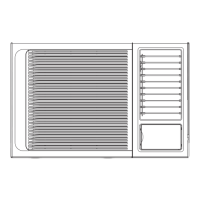
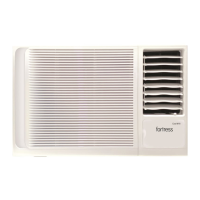
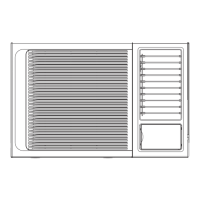
Window Air Conditioner
User Manual
Model
FWAD08M13 FWAD10M13
FWAD13M13 FWAD19M13
retain it for future reference.
Question and Answer IconNeed help?

Do you have a question about the Fortress Technologies FWAD10M13 and is the answer not in the manual?

Summary

Safety Instructions: Symbols and Warnings

Symbol Meanings

Explains the meaning of symbols used in the safety instructions section.

Critical Warnings

Lists hazards that may cause death or serious injury to users.

Safety Cautions: Injury and Property Damage Prevention

Injury and Property Damage Precautions

Lists precautions to prevent personal injury or damage to property.

Operational Safety Guidelines

Pre-Operation Safety Checks

Safety guidelines to follow before operating the air conditioner.

Usage Safety Precautions

Safety measures to observe during the air conditioner's operation.

Cleaning and Maintenance Safety

Safety instructions for performing cleaning and maintenance tasks.

Safe Operating Temperature Ranges

Specifies the temperature limits for safe cooling operation.

Parts Description

Main Unit Components

Identifies and illustrates the primary parts of the air conditioner.

Included Accessories

Lists and shows the accessories supplied with the product.

Operation Instructions: Control Panel and Vent

Control Panel Overview

Provides a visual guide to the air conditioner's control panel buttons.

Vent Control Adjustment

Explains how to adjust the vent for optimal airflow and ventilation.

Operation Instructions: Modes and Settings

Power and Mode Selection

How to turn the unit on/off and select operating modes like AUTO, COOL, FAN, DRY.

Temperature and Fan Speed Adjustment

Guide to setting desired temperature and fan speed.

Swing and Timer Functions

Explanation of the swing feature and setting timers for operation.

Operation Instructions: Mode Details and Error Codes

Detailed Mode Operations

Specific operational details for DRY, COOL, AUTO, and SLEEP modes.

Failure Indicator Codes

Interprets error codes displayed by the unit for troubleshooting.

Remote Control Operation

Remote Control Usage Guidelines

Important precautions and distance limits for remote control use.

Remote Control Button Functions

Detailed explanation of each button's function on the remote.

Remote Control Display and Airflow Adjustment

LCD Display Indicators Explained

Describes the symbols and indicators shown on the remote control's LCD screen.

Control Panel Cover Access

Instructions for opening and closing the front control panel cover.

Manual Airflow Direction Control

How to manually adjust the vertical airflow direction using louvers.

Air Filter Maintenance

Operating Without Air Filter Warning

Caution against operating the unit without the air filter installed.

Air Filter Removal and Cleaning

Step-by-step guide for removing, cleaning, and drying the air filter.

Drainage System Setup

Back Drainage Configuration

Instructions for connecting the drain hose for back drainage.

Bottom Drainage Configuration

Instructions for connecting the drain hose for bottom drainage.

Installation Location and Safety Precautions

Selecting the Optimal Installation Location

Guidelines for choosing the best placement for the air conditioner.

Installation Site Safety Considerations

Important safety notes related to the installation environment.

Installation: Cabinet and Wall Mounting

Unit Installation into Cabinet

Steps for fitting the air conditioner unit into its external cabinet.

Unit Installation into Wall

Procedures for mounting the unit directly into a wall opening.

Wall Mounting Clearance Requirements

Specifies minimum distances required between the unit and walls for proper installation.

Installation Procedure Steps

Step 1: Front Panel and Filter Removal

Instructions for removing the front panel and air filter.

Step 2: Frame Removal

Guide on how to detach the unit's frame.

Step 3: Unit Chassis Installation

Steps for securing the main unit chassis and mounting brackets.

Step 4: Frame Reinstallation

Instructions for reattaching the unit's frame correctly.

Step 5: Filter and Panel Reassembly

Final steps to install the air filter and front panel.

Troubleshooting Common Problems

Normal Operational Sounds Explained

Describes typical noises heard during normal unit operation.

Troubleshooting: Unit Not Working

Steps to resolve issues where the air conditioner fails to operate.

Troubleshooting: Poor Cooling

Steps to diagnose and fix problems with insufficient cooling.

Troubleshooting: Unit Freezing

Steps to address issues causing the unit's coils to freeze.

Technical Specifications

Unit Capacities, Dimensions, and Wiring

Details BTU ratings, physical dimensions, and required wiring specifications.

Warranty and Important Notices

Warranty Coverage and Claims

Outlines the 3-year warranty terms, coverage, and claim process.

Warranty Limitations and Exclusions

Lists conditions that void the product warranty.

Service and Support Contact

Provides contact information for warranty service and support.

Important Company Disclaimers

General legal notices regarding company liability and product use.

Summary

Safety Instructions: Symbols and Warnings

Symbol Meanings

Explains the meaning of symbols used in the safety instructions section.

Critical Warnings

Lists hazards that may cause death or serious injury to users.

Safety Cautions: Injury and Property Damage Prevention

Injury and Property Damage Precautions

Lists precautions to prevent personal injury or damage to property.

Operational Safety Guidelines

Pre-Operation Safety Checks

Safety guidelines to follow before operating the air conditioner.

Usage Safety Precautions

Safety measures to observe during the air conditioner's operation.

Cleaning and Maintenance Safety

Safety instructions for performing cleaning and maintenance tasks.

Safe Operating Temperature Ranges

Specifies the temperature limits for safe cooling operation.

Parts Description

Main Unit Components

Identifies and illustrates the primary parts of the air conditioner.

Included Accessories

Lists and shows the accessories supplied with the product.

Operation Instructions: Control Panel and Vent

Control Panel Overview

Provides a visual guide to the air conditioner's control panel buttons.

Vent Control Adjustment

Explains how to adjust the vent for optimal airflow and ventilation.

Operation Instructions: Modes and Settings

Power and Mode Selection

How to turn the unit on/off and select operating modes like AUTO, COOL, FAN, DRY.

Temperature and Fan Speed Adjustment

Guide to setting desired temperature and fan speed.

Swing and Timer Functions

Explanation of the swing feature and setting timers for operation.

Operation Instructions: Mode Details and Error Codes

Detailed Mode Operations

Specific operational details for DRY, COOL, AUTO, and SLEEP modes.

Failure Indicator Codes

Interprets error codes displayed by the unit for troubleshooting.

Remote Control Operation

Remote Control Usage Guidelines

Important precautions and distance limits for remote control use.

Remote Control Button Functions

Detailed explanation of each button's function on the remote.

Remote Control Display and Airflow Adjustment

LCD Display Indicators Explained

Describes the symbols and indicators shown on the remote control's LCD screen.

Control Panel Cover Access

Instructions for opening and closing the front control panel cover.

Manual Airflow Direction Control

How to manually adjust the vertical airflow direction using louvers.

Air Filter Maintenance

Operating Without Air Filter Warning

Caution against operating the unit without the air filter installed.

Air Filter Removal and Cleaning

Step-by-step guide for removing, cleaning, and drying the air filter.

Drainage System Setup

Back Drainage Configuration

Instructions for connecting the drain hose for back drainage.

Bottom Drainage Configuration

Instructions for connecting the drain hose for bottom drainage.

Installation Location and Safety Precautions

Selecting the Optimal Installation Location

Guidelines for choosing the best placement for the air conditioner.

Installation Site Safety Considerations

Important safety notes related to the installation environment.

Installation: Cabinet and Wall Mounting

Unit Installation into Cabinet

Steps for fitting the air conditioner unit into its external cabinet.

Unit Installation into Wall

Procedures for mounting the unit directly into a wall opening.

Wall Mounting Clearance Requirements

Specifies minimum distances required between the unit and walls for proper installation.

Installation Procedure Steps

Step 1: Front Panel and Filter Removal

Instructions for removing the front panel and air filter.

Step 2: Frame Removal

Guide on how to detach the unit's frame.

Step 3: Unit Chassis Installation

Steps for securing the main unit chassis and mounting brackets.

Step 4: Frame Reinstallation

Instructions for reattaching the unit's frame correctly.

Step 5: Filter and Panel Reassembly

Final steps to install the air filter and front panel.

Troubleshooting Common Problems

Normal Operational Sounds Explained

Describes typical noises heard during normal unit operation.

Troubleshooting: Unit Not Working

Steps to resolve issues where the air conditioner fails to operate.

Troubleshooting: Poor Cooling

Steps to diagnose and fix problems with insufficient cooling.

Troubleshooting: Unit Freezing

Steps to address issues causing the unit's coils to freeze.

Technical Specifications

Unit Capacities, Dimensions, and Wiring

Details BTU ratings, physical dimensions, and required wiring specifications.

Warranty and Important Notices

Warranty Coverage and Claims

Outlines the 3-year warranty terms, coverage, and claim process.

Warranty Limitations and Exclusions

Lists conditions that void the product warranty.

Service and Support Contact

Provides contact information for warranty service and support.

Important Company Disclaimers

General legal notices regarding company liability and product use.

Fortress Technologies FWAD10M13 Specifications

General IconGeneral
BrandFortress Technologies
ModelFWAD10M13
CategoryAir Conditioner
LanguageEnglish

Related product manuals