EasyManua.ls Logo

Foscam FosBaby - User Manual

Foscam FosBaby
81 pages
Print Icon
To Next Page IconTo Next Page
Loading...
V1.0
User
User
Manual
Manual
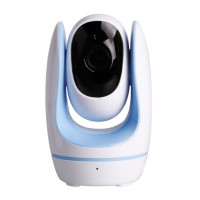
HD Wireless Baby Monitor
FosBaby

Other manuals for Foscam FosBaby

Question and Answer IconNeed help?

Do you have a question about the Foscam FosBaby and is the answer not in the manual?

Summary

Security Warning

1 Overview

1.1 Key Features

Lists the main functionalities and technical capabilities of the HD Wireless Baby Monitor.

2 Access the FosBaby

2.1 Access the FosBaby in WLAN

Guides users on how to connect to and access the FosBaby camera within a local wireless network.

2.2 Access the FosBaby in WAN

Details the steps for accessing the FosBaby camera remotely over the internet using WAN IP or DDNS.

3 Surveillance Software GUI

3.2 Setup Wizard

Guides users through the initial setup process for camera name, time, and network configuration.

4 Advanced Settings

4.2 Basic Settings

Covers essential camera configurations such as name, time, user accounts, and multi-device settings.

4.3 Network

Manages network configurations including IP, DDNS, Wireless, UPnP, and Port settings for connectivity.

4.4 Video

Allows configuration of video stream settings, on-screen display, and privacy zones for optimal viewing.

Summary

Security Warning

1 Overview

1.1 Key Features

Lists the main functionalities and technical capabilities of the HD Wireless Baby Monitor.

2 Access the FosBaby

2.1 Access the FosBaby in WLAN

Guides users on how to connect to and access the FosBaby camera within a local wireless network.

2.2 Access the FosBaby in WAN

Details the steps for accessing the FosBaby camera remotely over the internet using WAN IP or DDNS.

3 Surveillance Software GUI

3.2 Setup Wizard

Guides users through the initial setup process for camera name, time, and network configuration.

4 Advanced Settings

4.2 Basic Settings

Covers essential camera configurations such as name, time, user accounts, and multi-device settings.

4.3 Network

Manages network configurations including IP, DDNS, Wireless, UPnP, and Port settings for connectivity.

4.4 Video

Allows configuration of video stream settings, on-screen display, and privacy zones for optimal viewing.

Foscam FosBaby Specifications

General IconGeneral
BrandFoscam
ModelFosBaby
CategoryBaby Monitor
LanguageEnglish

Related product manuals