8
2.4GHz and 5GHZ channels. For example, choose SSID:
XXXXXX_2.4G.
Open the Foscam app and sign up for a Foscam account
or sign in if you have one already.
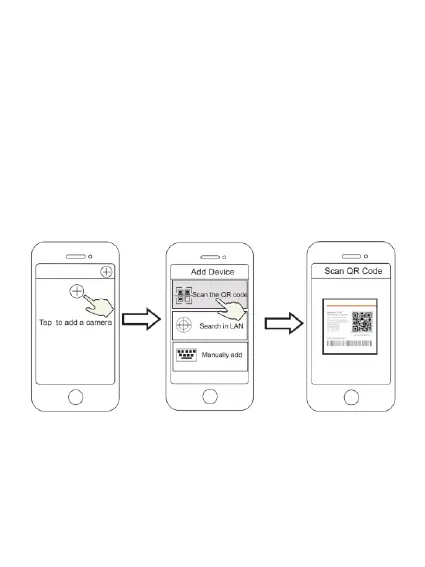
After logging in into Foscam app, select “Tap to add a
camera” or “+” icon in the upper right corner, then select
“Scan the QR code” and scan the QR code that is located
at the bottom of your camera.
In “Wi-Fi Connection”, select “Ready” and enter your Wi-
Fi’s password and then tap “Confirm”, afterwards tap the
“Configure Wi-Fi connection” button.


 To Next Page