EasyManua.ls Logo

Fosi Audio DAC K3 - User Manual

Fosi Audio DAC K3
8 pages
Print Icon
To Next Page IconTo Next Page
Loading...
Fosi Audio DAC K3 User’s Guide
D256
Question and Answer IconNeed help?

Do you have a question about the Fosi Audio DAC K3 and is the answer not in the manual?

Summary

Product Specifications

Input and Output Interfaces

Details the available input and output connection types for audio signals.

Audio Performance Metrics

Covers sampling rates, decoding capabilities, frequency response, and signal-to-noise ratio.

Hardware Components and Capabilities

Lists key internal components like the USB chipset, DAC chip, op-amp, and headphone amplifier specs.

Physical Dimensions and Weight

Provides the product's physical size and weight specifications.

Product Overview and Controls

Front Panel Features

Describes the headphone output, display, and volume control/power switch on the front.

Rear Panel Connections

Details the digital and analog input/output ports located on the back of the device.

Important Usage Notes

Provides critical information regarding the use of Type-C and USB inputs and power connections.

Package Contents

Lists all items included in the product package.

Quick Setup Guide

Plug-and-Play Mode Setup

Step-by-step instructions for connecting and using the DAC in a standard plug-and-play configuration.

Foobar2000 DSD Playback Configuration

Guide for setting up DSD file playback using Foobar2000, including software and driver installation.

Troubleshooting (Q&A)

Spotify Playback Issues

Solutions for problems playing Spotify music in Plug and Play mode.

Foobar2000 DSD File Playback Errors

Troubleshooting steps for issues with playing DSD files in Foobar2000.

Audio Noise Troubleshooting

Guidance on resolving audio noise problems during music playback.

Device Recognition Problems

Solutions for when the computer does not recognize the DAC.

OTG Power-On Issues

Addresses problems with the K3 not powering on when connected via OTG cable.

Warranty and Company Information

Warranty Information

Details the 18-month limited warranty on parts and labor for Fosi Audio products.

About Fosi Audio

Information about Fosi Audio's design philosophy, product quality, and customer engagement.

Overview

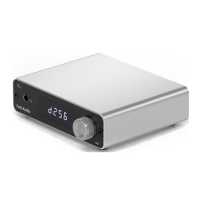
The Fosi Audio DAC K3 is a compact, all-in-one audio decoder designed to deliver high-fidelity sound. It supports a variety of input and output options, making it versatile for different audio setups. The device features a Type-C and USB input, and supports both RCA and AUX analog outputs, as well as optical and coaxial dual digital outputs. At its core, the K3 utilizes the XMOS XU208 USB decoder chip, which enables it to support a 24Bit/384kHz sampling rate and DSD256 hardware decoding, ensuring a live-like sound quality.

Product Specifications:

  • Input Interface: Type-C, USB
  • Output Interfaces: RCA, AUX, Optical, Coaxial
  • Volume Adjustment Mode: High precision volume knob
  • USB Decode Chipset: XMOS XU208
  • D/A Conversion Chip: ES9038Q2M
  • Op Amp: OPA1602 (replaceable)
  • USB Input: 24Bit/384kHz
  • Optical, Coaxial Output: 24Bit/192kHz + DSD64 DOP
  • DSD Hardware Decoding: DSD256
  • Frequency Response: 16-20kHz
  • S/N Ratio: 129dB
  • Headphone Output Impedance: 16ohm-300ohm
  • Headphone Amplifier Thrust: 16ohm/275mW, 64ohm/69mW
  • Headphone Mode: Op amp + transistor
  • Product Size: 105x112x34mm (4.12x4.41x1.34in, including knob, etc.)
  • Product Weight: 265g

Usage Features:

The K3 offers a straightforward plug-and-play experience, particularly with Windows 10. To use it, simply connect the computer to the K3 and power it up. Then, select "Trasam HiFi USB Audio" as the playback device in your sound settings. For maximum sound quality, users can configure the device to output at 24Bit, 384000Hz through the advanced sound properties.

For DSD playback, the K3 supports Foobar2000. Users need to download the Fosi Audio K3 DSD Configuration Kit, which includes the USB Audio Driver, ASIOProxyInstall-0.9.4, and Foobar2000 1.61. After installation, specific DSD playback plugins ("ASIOhost32.exe", "ASIOhost64.exe", "foo_input_sacd.dll", "foo_out_asio.dll") must be copied into the Foobar2000 components directory. Finally, Foobar2000 needs to be configured to use DSD output mode and "ASIO: foo_dsd_asio" as the output device, selecting "Trasam USB Audio Device" as the ASIO driver. A QR code is provided in the manual for easy access to the DSD Configuration Kit and installation video.

Important Notes on Connectivity:

  • The Type-C and USB inputs are designed to connect directly to the audio source and should not be connected to a power adapter.
  • The Type-C and USB inputs cannot be used simultaneously.
  • While the Type-C port supports OTG input, some OTG devices may not provide sufficient power for the K3 to operate. If the K3 does not power on when connected via an OTG cable, this could be the reason.
  • OTG cables typically support one-way data transmission; if the device isn't recognized, try reversing the cable.

Maintenance Features & Troubleshooting:

The K3 is designed for ease of use, but some common issues may arise:

  • Spotify Playback Issues: If Spotify music doesn't play in Plug and Play mode, exit the Spotify app, switch the playback device to the computer's internal sound card, play music to confirm functionality, then switch back to "Trasam HiFi USB Audio."
  • DSD File Playback Issues (Foobar2000): If DSD files don't play, ensure Foobar2000 and its plugins are completely uninstalled and then reinstalled precisely according to the provided video guide. If problems persist, contact after-sales support.
  • Noise During Playback: Try connecting the K3 to a different USB port on your computer, preferably a USB 3.0 port. Keep the device away from other electronic devices to minimize interference. Experiment with different playback software or music files to isolate the issue.
  • Device Not Recognized by Computer:
    • Always use the USB cable supplied with the product.
    • Ensure that the Type-C and USB ports on the K3 are not connected simultaneously.
    • If using an OTG cable, try reversing it as OTG cables often support one-way data transmission.
    • Update your computer's operating system to the latest version and reboot both the computer and the K3.
  • K3 Not Powering On with OTG Cable:
    • Ensure your phone is fully charged.
    • Some OTG devices may not supply enough power; try a different device.
    • Confirm that the Type-C and USB ports on the K3 are not connected at the same time.
    • The Type-C port is for connecting to an audio source, not a power adapter.

Warranty Information:

All Fosi Audio products come with an 18-month limited warranty covering parts and labor from the date of purchase. For any issues, customers are encouraged to contact Fosi Audio.

About Fosi Audio:

Fosi Audio is dedicated to designing and building innovative audio products that prioritize great sound, simple yet elegant designs, high-quality materials, and useful features. They aim to provide products that bring enjoyment to their users.

Contact Information:

  • Website: www.fosiaudio.com
  • Amazon Store: www.amazon.com/fosiaudio
  • Youtube Channel: Fosi Audio
  • Facebook Page: Fosi Audio
  • WhatsApp: +86 17722625601
  • After-sale Service and Technical Support Email: customer@fosiaudioshop.com, fosiaudio@hotmail.com

Fosi Audio DAC K3 Specifications

General IconGeneral
BrandFosi Audio
ModelDAC K3
CategoryMedia Converter
LanguageEnglish

Related product manuals