6 7
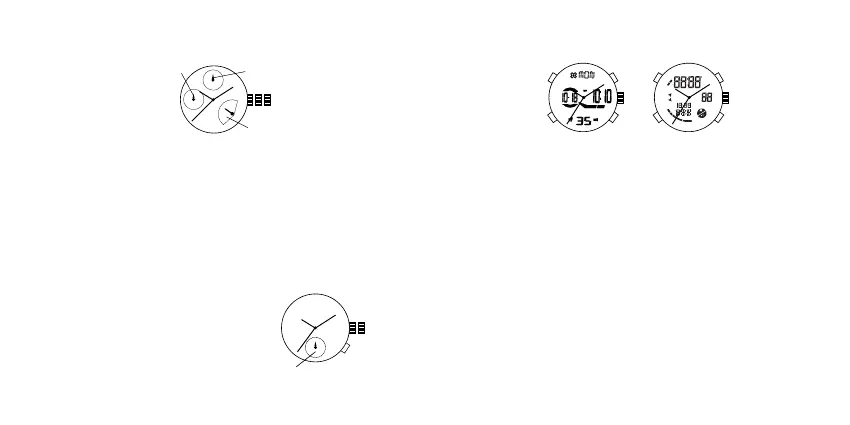
Retrograde 3 Hand Date with Day Indicator JR00
Time, Date and Weekday Setting
1. Pull crown out to position 2 and turn counter-clockwise to set date to previous day.
2. Turn crown clockwise to set weekday to previous day.
NOTE: Weekday indicator will automatically reset to “M” at the end of the weekday cycle.
3. Pull crown out to position 3 and turn clockwise until present date and weekday are displayed. Continue turning
crown to set correct AM/PM time.
4. Return crown to position 1.
NOTE: To ensure accuracy, do not set date and weekday between 10:00 PM and 1:00 AM.
1 2 3
WEEKDAY
DATE
24-HOUR
Time and Calendar Setting
1. Press A for EL.
2. Press and hold C for 2 seconds for the time setting state and you will see the seconds flashing.
3. Press D to reset time to zero.
4. Press B to toggle through the following setting sequence:
Second – Minute – Hour – 12/24-hour format – Month – Day – Year
5. Press D to adjust the flashing item.
6. The day of the week is automatically displayed in accordance with the date (month, day, year).
7. Press C to return to Real Time Mode.
Alarm Mode
1. Press B to change to alarm mode.
2. Press D to turn on/o the Alarm or Chime.
3. Alarm will sound at preset time for 20 seconds.
Alarm Setting
1. In alarm mode, press and hold C for 2 seconds to select “Hour” setting.
2. Press B to select the “Minute” setting.
3. Press D to adjust the flashing item.
Chronograph Mode
1. Press B to change to chronograph mode.
2. Press D to start/stop chronograph.
3. Press C and hold to reset chronograph to zero.
Ana-Digi QFO-017 / Y121E6, QFO-016 / Y121E4
3 Hand Dual Time 9238 / 1980
Time Setting
1. Pull crown out to position 2.
2. Turn crown to advance hour and minute hands.
3. Return crown to position 1.
Dual Time Setting
Press A to advance to desired time.
1 2
A
DUAL TIME
D
C
A
B
D
C
A
B
QFO-017 / Y121E6 QFO-016 / Y121E4













 To Next Page