15
POWER MANAGEMENT
The default cooktop maximum power limit is 7200W. This power limit can be
reduced by the user to 2800W, 3500W or 6000W.
Each time the user tries to increase the power of a cooking zone, the total power
level of the cooktop is calculated. If this total power lever is greater than the
cooktop maximum power limit, the power increase of the cooking zone is not
allowed. An error beep sounds and the cooking zone display shows an ‘r’ for 3
seconds.
SETTING COOKTOP POWER LIMIT
To set a different power limit:
1. Turn the cooktop off and disconnect it from the electrical mains.
2. Reconnect the cooktop to the mains. Press the
key to unlock the cooktop.
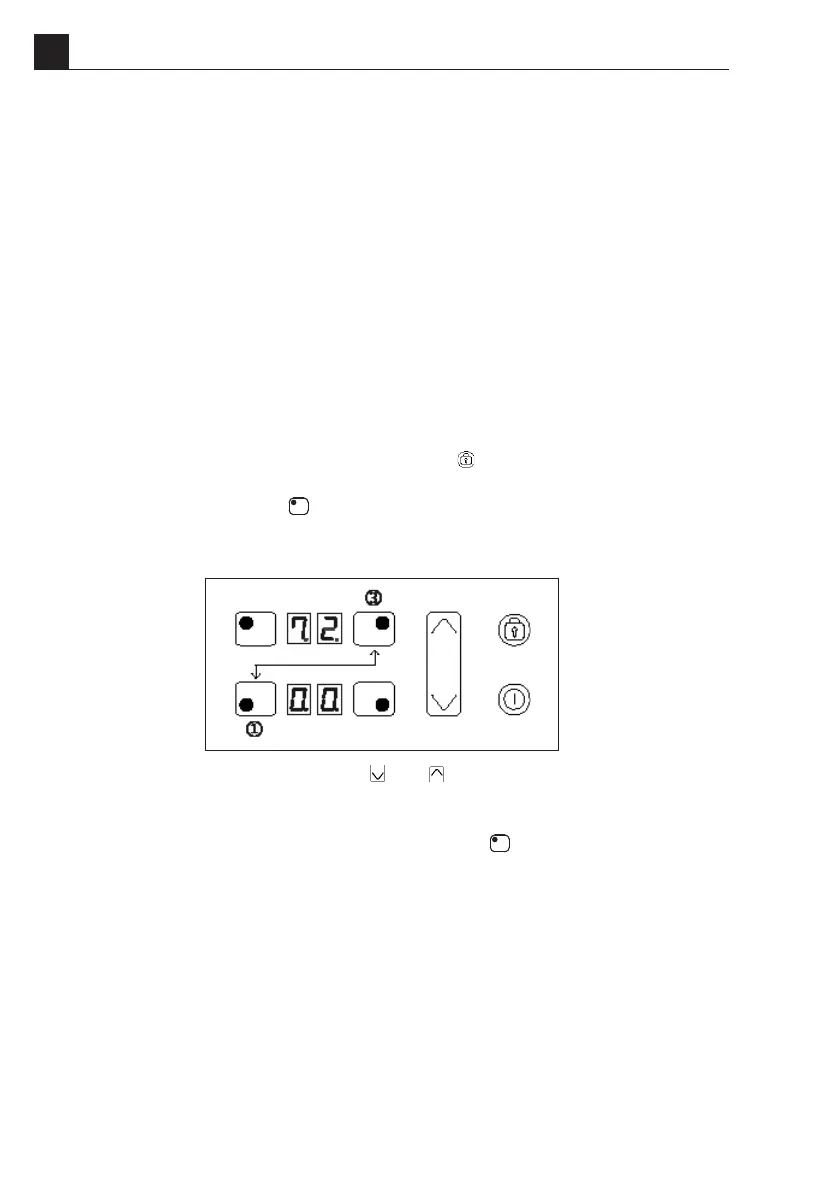
3. Press at the same time the key of the cooking zones 1 and 3 (see Fig.1)
Once this is done, a beep sounds and the actual cooktop maximum power limit
will be shown in the upper cooking zone displays.
4. Select the new power limit using the
and keys. Available congurations are
2800W, 3500W, 6000W or 7200W.
5. To conrm the settings press at the same time the key of the cooking zones
1 and 3 within 60 seconds. If this operation is not executed within this time the
settings will be cancelled.
Fig.1
POWER MANAGEMENT > Setting cooktop power limit
INDUCTION ECO POWER MODELS
EN


 To Next Page