4
Part names and functions
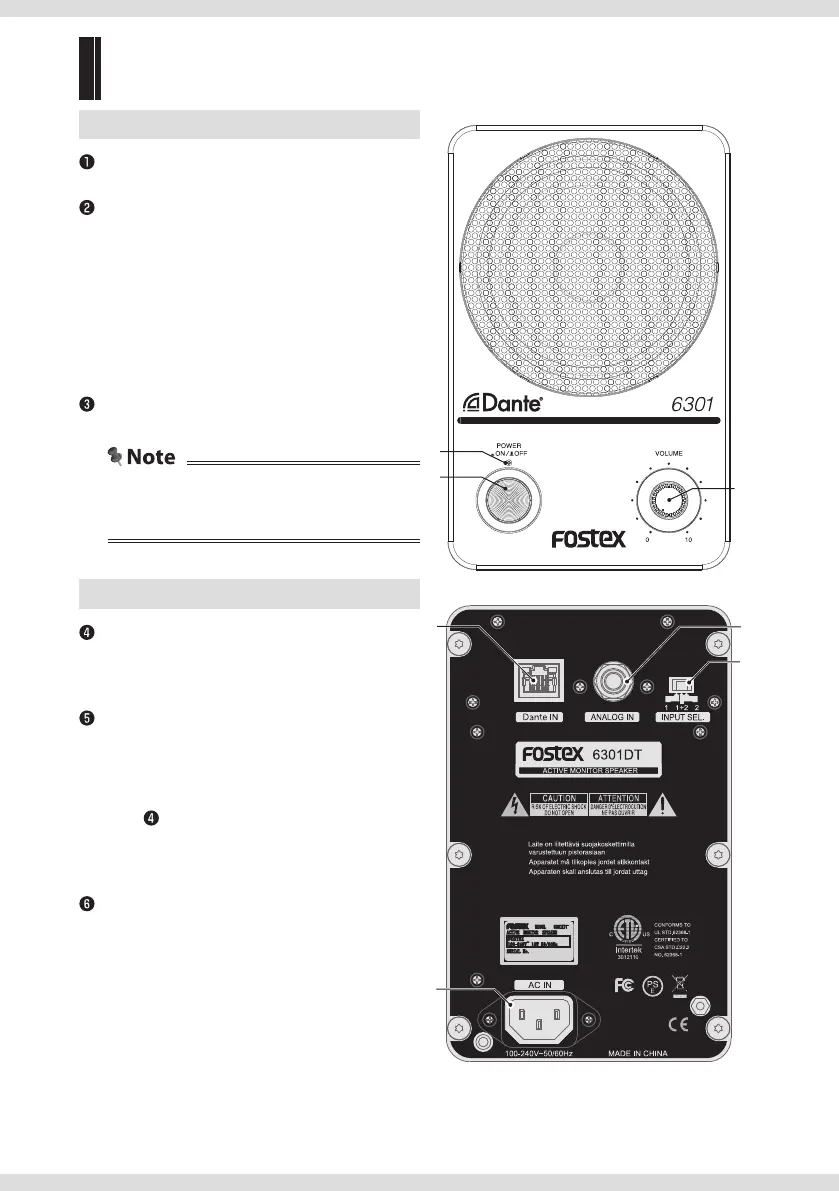
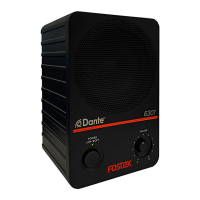
Front
[VOLUME]
Adjusts the volume.
[POWER] indicator
Turns on and o to indicate the status of the unit.
O: Power o
Lit up in red: The power is on but there is no input
signal or the input signal is not locked.
Lit up in green: A device is connected to the [Dante
IN] terminal and locked for the input signals.
Flashing in green: A device is connected to the
[Dante IN] terminal and the unit is locked as clock
master.
[ON/OFF] button
Turns the unit on/o.
• Use a standard AC outlet.
• Disconnect the plug from the outlet when the
unit will not be used for a long time.
Ÿ
!
~
Back
[Dante IN] terminal
Inputs Dante signals.
Connects a LAN cable (RJ45 type). Use an
Ethernet cable with CAT5e or higher.
[ANALOG IN] terminal
Ф6.3 mm (1/4") TS phone unbalanced analog
input terminal.
The input signal to the [ANALOG IN] terminal is
given priority over the input signal connected
to the [Dante IN] terminal. When input plugs
are connected to both input terminals at the
same time, the input signal to the [ANALOG IN]
terminal is output from 6301DT.
[INPUT SEL] switch
Selects the audio channel output from 6301DT
when Dante is being input.
Selects 1ch only (1), 1ch+2ch (1+2), and 2ch only
(2).
⁄ @
¤
#
Fostex_6301DT_62368-1.indb 4Fostex_6301DT_62368-1.indb 4 2020/12/04 13:492020/12/04 13:49


 To Next Page