EasyManua.ls Logo

Fostex 812 - SECTION 5 CONNECTING EFFECTORS

Fostex 812
22 pages
Print Icon
To Next Page IconTo Next Page
To Previous Page IconTo Previous Page
Loading...
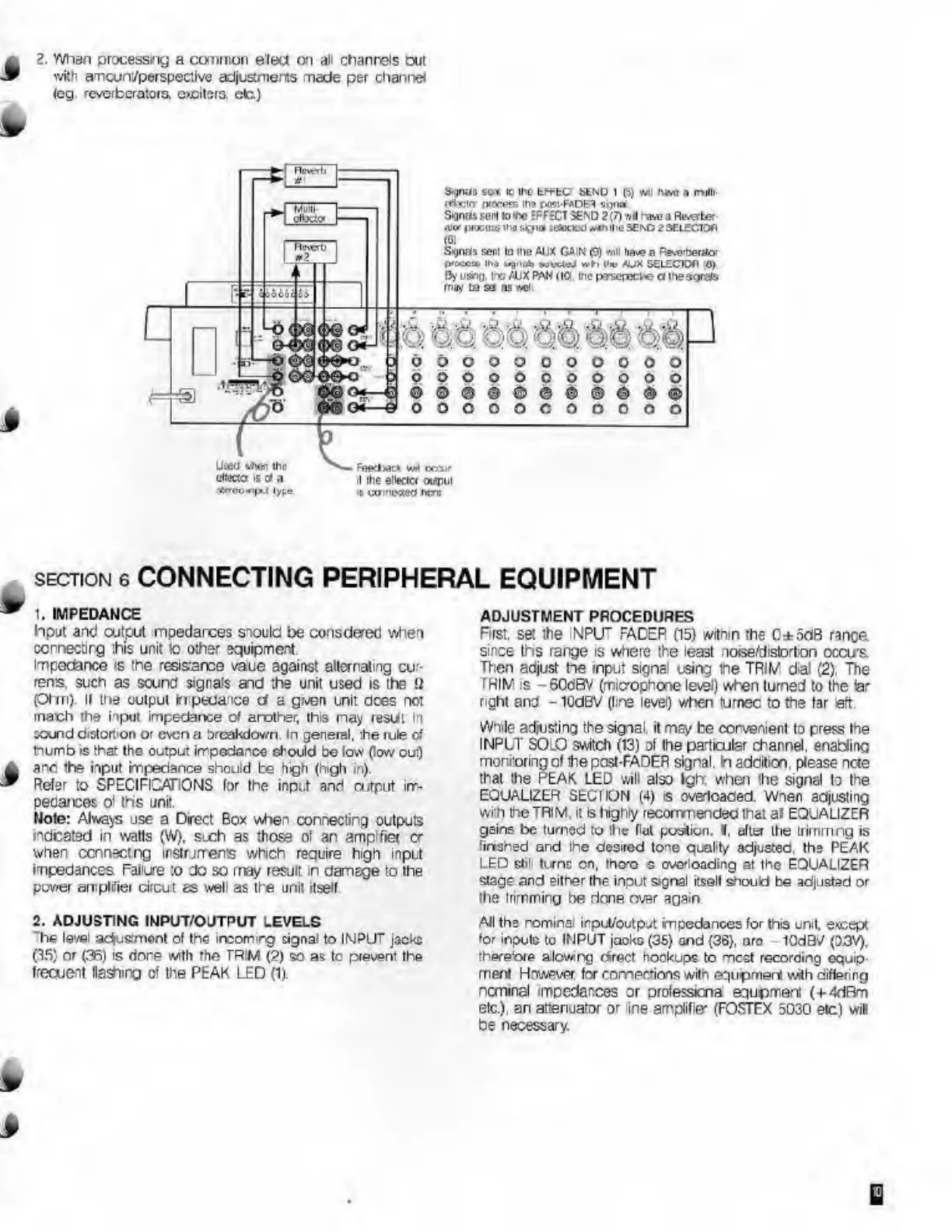
2.
When
processing
a
common
elect
on
all
channels
but
with
amcuni/perspective
adjustments
made
per
channel
(eg
reverberators,
exciters,
cfc)
5-gnas
sc.1
1C
me
EFH-C
StNO
1
(5)
svu
hw
a
mill.
rttricr
procefs
Hi'
post-FADE?
Sijna
&gna$
sem
so
me
EFFECT
S6ND
2(7)
wfl
have
a
Re.«ler
<w
(ikxcw
iho
signal
itfooeo
*«n
Hie
>Ei\D
2
SELECTOfi
(
6
)
Signas
wrl
In
llio
&UX
GAIN
(9)
will
h**-
p
BswbefUo-
the
ixgtieb
wilxtuj
»h
Hhj
AJX
S£L£CIOfl
O)
By
us*t)|.
i
xi
AM
PAN
(IQ.
me
pyserecw?
a
Uieaortfs
may
bo
sa
as
v«l,
u
dbooooooooo
opooooooooo
oooooooooo
Used
»men
ihc
disccr
is
d
a
rftrco-«i|X(
type
feeclw*
w«l
coaif
'I
she
ellectc*
ouipiil
:
coinoxeo
ikjo
section
6
CONNECTING
PERIPHERAL
EQUIPMENT
1.
IMPEDANCE
Input
and
output
mpedarces
should
be
consdered
when
cornectirg
this
unit
to
other
equipment.
Impedance
is
the
resistance
vaue
against
alternating
cur¬
rents.
such
as
sound
signals
and
the
unit
used
is
the
U
pi
m).
II
the
output
ki
peda
ioo
d
a
gven
unit
dees
not
mach
the
hput
impedance
of
arother,
this
nay
result
in
round
distortion
or
even
a
oreakdown.
In
general,
:he
rule
of
tnumb
is
that
the
output
impedance
should
be
low
(low
out)
anc
the
input
impedance
should
be
high
(high
in).
Refer
to
SPECIFICATIONS
for
the
input
and
output
im¬
pedances
oi
ths
unit.
Mote:
Always
use
a
Direct
Box
when
connecting
outputs
indicated
in
watts
(W),
sLch
as
those
of
an
amplfiet
cr
when
connect
ng
instruments
which
require
high
input
impedances
Failure
:o
do
so
may
result
in
damage
to
the
power
amplifier
circut
as
well
as
the
unit
itself
2.
ADJUSTING
INPUT/OUTPUT
LEVELS
'he
level
aefusment
ol
the
incormrg
signal
to
INPUT
jocko
(35)
or
(36)
is
done
with
rhe
TR
W
(2)
so
as
tc
prevent
the
frecuent
Hashing
of
the
PEAK
LED
(1).
ADJUSTMENT
PROCEDURES
First,
set
the
NPIT
FADER
(15)
within
the
C±odB
range
since
ths
range
is
where
the
least
loise/distorton
occu's.
Then
adjust
he
input
signal
using
the
TRIfi/
dial
(2).
The
TRIM
is
-60dBV
(microphone
level)
when
turned
to
the
iar
right
and
-
ICdBV
(lire
level)
when
furnec
to
the
Iar
eft.
While
adjusting
the
signal,
it
may
be
corvenienl
to
press
the
INPUT
SOLO
switch
(13)
of
the
particular
channel.
enabling
monitoring
of
the
post-FADER
signal.
In
addition,
please
ncte
that
the
PEAK
LED
will
also
Igh;
when
the
signal
to
the
EQUALIZER
SECIION
(4)
is
oveloaded.
Wnen
adjusting
with
the
TRIM,
it
S
highly
recommended
that
al
EQUALIZER
gains
be
turned
to
the
licit
portion.
1
,
after
the
trirnmng
is
finshed
and
the
desired
tone
quality-
adjusted,
the
PEAK
LED
still
turns
on,
them
s
overloading
at
the
EQUALIZER
stage
and
either
the
input
signal
itself
should
be
adjusted
or
the
trimming
be
done
ovar
again
All
ths
nominal
inpul/output
impedances
for
this
unit
except
for
inputs
to
INPUT
jacks
(35)
and
(36),
ore
10dBV
(D.3V).
there-ore
allowing
drect
hookups
to
most
recording
equip¬
ment
Hnwever.
for
connections
with
equlpmer*
with
differing
ncminal
impedances
or
professicna
equpment
(+4dRm
etc.),
an
attenuator
or
ine
amplifie'
(FOSTEX
5030
etc)
will
be
necessary.
B

Related product manuals