EasyManua.ls Logo

Fostex 812 - Front Panel Controls (1-12)

Fostex 812
22 pages
Print Icon
To Next Page IconTo Next Page
To Previous Page IconTo Previous Page
Loading...
SECTION
3
GUIDE
TO
COMPONENTS
4
The
numbers
in
()
indicate
the
bcaticn
of
tie
component.
FRONT
PANEL
1.
PEAK
LED
This
LED
turns
on
when
the
input
signal
to
INPUT
jacks
(35)
and
(36)
or
to
Hie
TAPE
IN
jack
(36)
is
overloaded
(+
13dB).
if
the
LCD
tends
to
turn
on
frequently,
adjust
the
TRIM
(2)
or
tho
EQUALIZER
GAIN
(-1)
unti
an
appropriate
level
is
reached.
For
details,
refer
to
pa.
ADJUSTING
IN¬
PUT/OUTPUT
LEVELS.
2.
INPUT
TRIM
This
krob
trims
the
pro
amplifier
gain
ci
the
incoming
sig¬
nal
Irom
INPUT
jacks
(35)
and
(36).
The
TRIM
responds
to
a
wide
range
from
-60dBV
(microphone
level)
to
-
ICdEV
(line
level)
Please
note
that
the
input
eve!
horn
the
TAPE
IN
jack
(38)
can
net
be
adjusted.
a
INPUT
SELECTOR
(INPUT/TAPE)
This
selects
the
signal
to
be
sent
to
toe
INPUT
FADER
(15).
INPUT<
I):
The
sound
source
coming
irro
INPUT
jacks
(35)
and
(36)
is
selected
(Used
mainly
when
record¬
ing).
TAPE(
-
):
The
scxino
source
coming
into
TAPE
IN
jack
(33)
6
selected
(Used
mainly
when
mixing
down).
4.
EQUALIZER
SECTION
This
section
adpsts
the
tone
quality
of
the
sound
signal
selected
hy
the
INPUT
SELECTOR
(3)
Fcr
further
details,
refer
to
pg.
r
HE
PARAMETRIC
ECUALIZER.
5.
EFFECT
SEND
1
This
knob
aejusts
the
output
level
of
tho
pcst-FADER
sig¬
nal
(the
signal
after
adjusted
by
INPUT
FADER
(15))
before
being
sen:
to
the
EFFECT
SEND
1
buss.
Tne
signal
is
sen
to
the
EFFECT
SEND
1
buss
via
the
SEND
1
MASTER
LEVEL
knob
(21)
and
is
culputted
from
tie
EFFECT
SEND
1
jack
(5G)
and
may
be
sent
to
effectors
for
processing.
6.
EFFECT
SEND
2
SELECTOR
(AUX/POST)
This
selector
is
effective
only
when
the
AJX
SELECTOR
(8)
is
set
to
TAPE
(is.
is
depressed),
it
sslects
the
signal
to
be
sent
to
EFFECT
SEND
2
(7).
3
CST(I):
The
post-
FADER
sgnal
is
selected.
AUX(«):
The
signal
from
the
TAPE
IN
jack
(38)
alter
being
adjusted
by
AUX
GAIN
(9)
is
selected.
Note
that
when
:he
AUX
SE_ECTOR
(8)
is
set
to
POST
Hus
sclecto-
has
no
eTect
anC
thus
the
signal
sent
to
the
EFFECT
SEND
2
(7)
will
bo
POST
7.
EFFECT
SEND
2
Inis
knot
adjusts
the
outout
level
of
the
signal
being
sent
to
Ihe
EFFECT
SEND
2
buss.
From
hu
e
the
signd
then
is
sent
to
the
SEND
2
MASTER
LEVEL
knob
[22)
and
outputted
from
tne
EFFECT
SEND
2
jack
(49)
and
used
for
effect
processing.
a
AUX
INPUT
SELECTOR
(POST/TAPE)
Tins
selects
'.fie
signal
to
be
sent
to
the
AUX
GAIN
(9).
POST(l.):
Tho
post
FADER
signal
is
oaloctcd.
TAPE(-):
Tine
incoming
signal
to
tne
TAPE
IN
jack
(38)
is
selected.
Usually,
if
one
warts
rt
process
an
effect
usng
the
posf-
FADER
signal
via
the
AUX
GAIN
(9).
POST
is
selected
If
one
wants
to
monitor
the
output
from
the
recorder
while
mixing-down.
TAPE
is
selected.
9.
AUX
GAIN
A
This
knob
adjusts
tne
level
of
the
sicmal
selected
by
the
AUX
SE.ECTOR
(8)
and
sent
to
the
AUX
buss.
The
func¬
tion
of
tnis
krob
varies
depending
on
the
status
of
the
AUX
SELECTOR
(8).
FOST:
serves
as
a
stereo
itpu:
type
EFFECT
SEND.
TAPE,
selves
as
a
monitor
volume
control
cf
the
recorder
output
coming
intoTA^E
IN
jack
(30).
The
signal
which
is
sent
to
tho
AUX
buss
passos
through
tho
AUX
MASTER
LEVEL
knob
(23)
ard
is
outputted
from
the
48.
AUX
OUT
jack
and
nay
ha
used
as
an
input
signal
to*
stereo-input
effectas.
10.
AUX
PAN
This
pan
adjusts
the
Left-Right
balance
of
the
signal
be¬
ing
serf
to
the
AUX
hiss
from
AUX
GAIN
(9)
When
the
AUX
SELECTOR
(3)
s
in
the
POST
position,
it
may
be
used
for
setting
the
L-R
baiarce
for
the
EFFECT
SEND
signal.
When
in
the
TAPE
position,
it
may
be
used
for
setting
the
perspective
of
the
record©
output
monitor
g
signal.
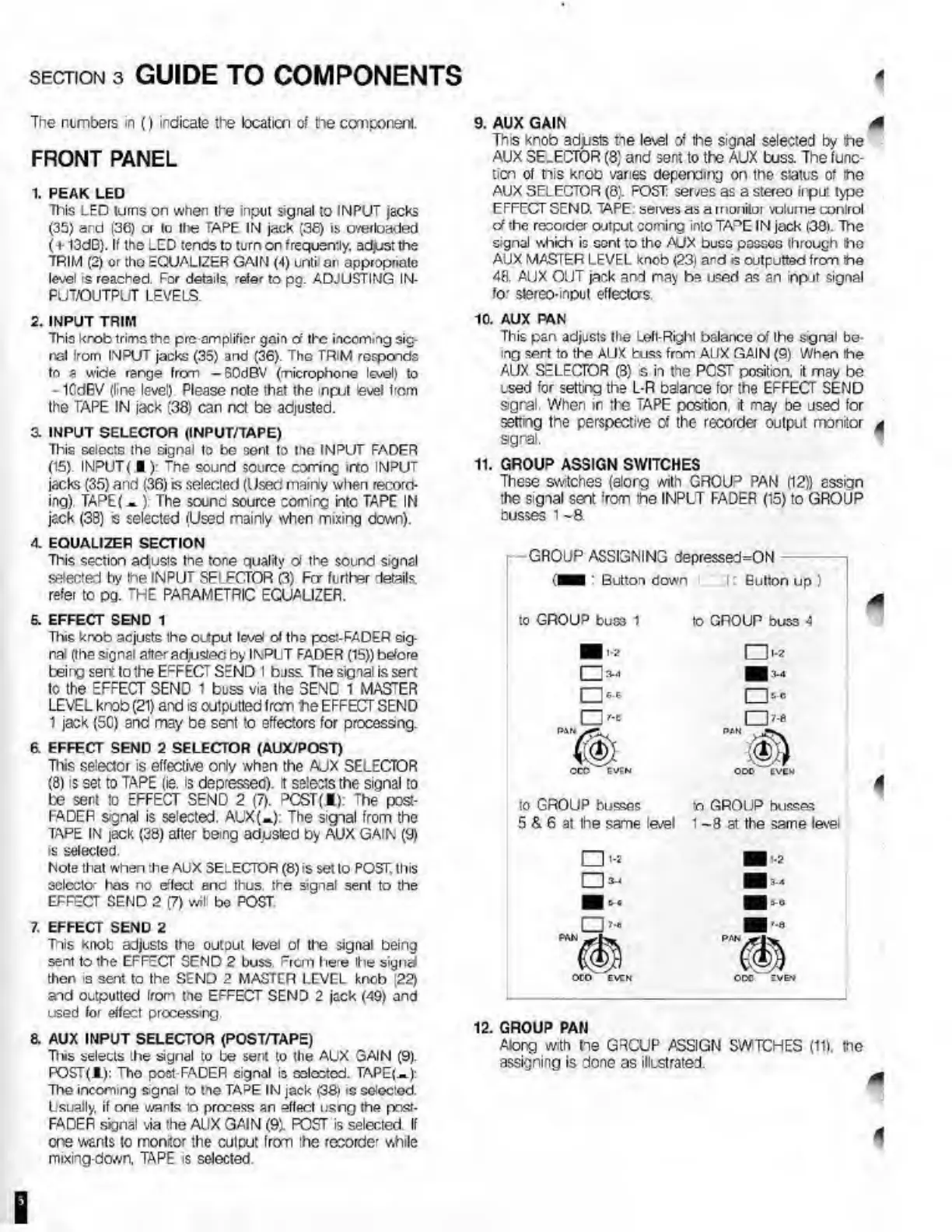
11.
GROUP
ASSIGN
SWITCHES
These
switches
{alorg
with
GROUP
PAN
(12))
assign
ihe
signal
sent
!
rom
the
INPUT
FADER
(15)
to
GROUP
busses
1
-8
-
GROUP
ASSIGNING
depressed=ON
'[H
:
Button
down
:
Eulton
up
)
to
GROUP
buss
1
U
1-2
I
13-4
«
O’
P*N
CCO
EV?N
to
GROUP
buss
!>J
:<-4
«
rtu
:<?
ODD
EVEN
to
GFfOUP
busses
-o
GROUP
busses
5
&
6
at
Ihe
same
level
1
~8
at
the
same
level
4
PAN
[Vfifl
i.
•»
I
I
»•»
OTO
EVEN
I
'-2
I
I
9-0
I'.a
PAN
OCC
EVEN
12.
G
ROUP
PAN
Along
with
he
GRCUP
ASSIGN
SWTCHES
(11).
the
assigning
is
done
as
illustrated.
4

Related product manuals