EasyManua.ls Logo

Fostex G16 - Page 42

Fostex G16
124 pages
Print Icon
To Next Page IconTo Next Page
To Previous Page IconTo Previous Page
Loading...
confirm
that
even
if
rotating
the
PITCH
CON.
KNOB,
the
PITCH
value
on
the
display
never
varies.
4)
Adjust
R87
on
the
DD
CAPSTAN
PCB
assy
so
that
the
PITCH
value
on
the
display
shows
0.0
(
-0.0
is
no
good).
5)
Turn
the
FRONT/REAR
SW
to
FRONT.
Then,
rotate
and
fix
the
PITCH
CON.
KNOB
at
the
center
position.
6)
Adjust
R101
on
the
CONTROLLER
PCB
(there
is
a
holl
provided
on
the
back
side
of
the
Controller
to
rotate
the
pot)
so
that
PITCH
value
shows
0.0
.
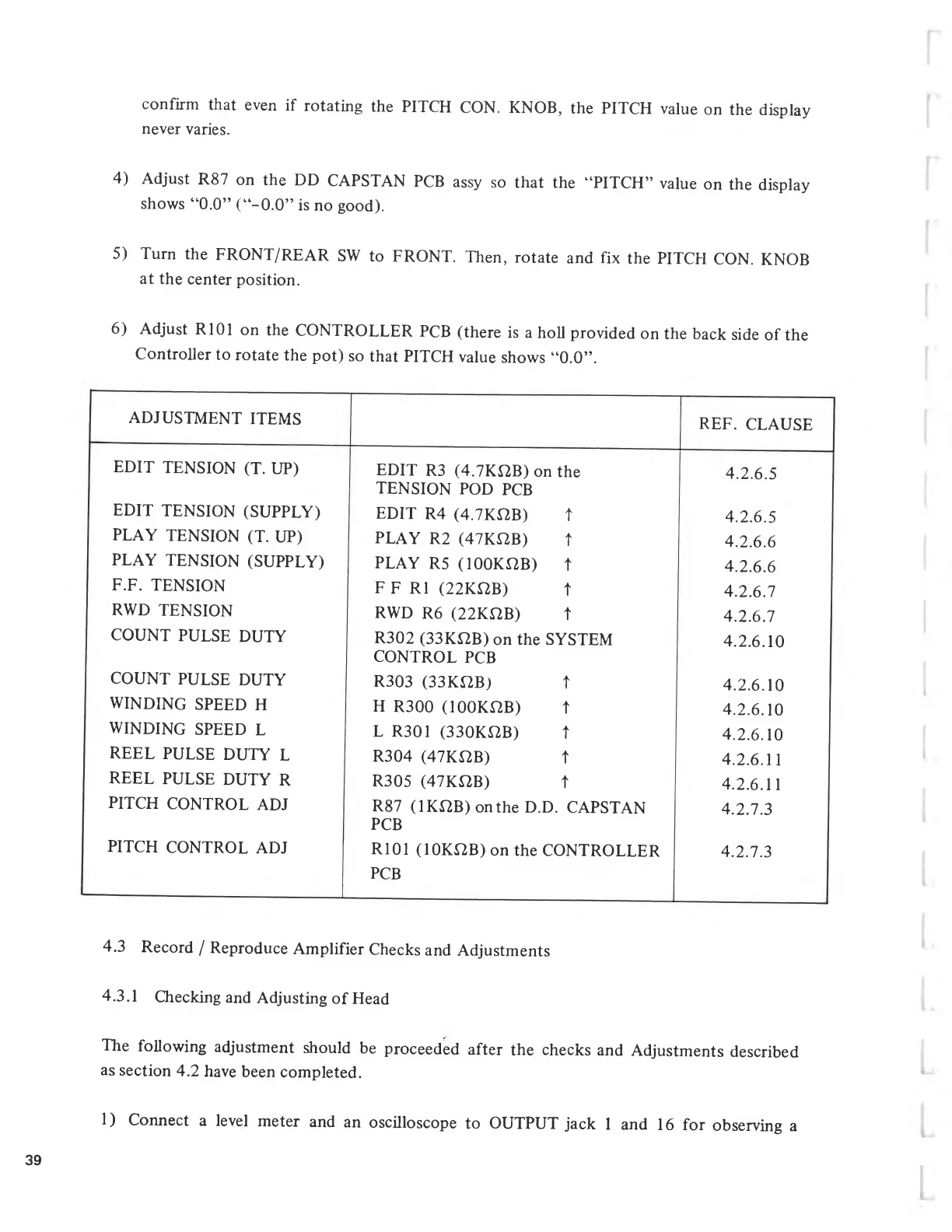
ADJUSTMENT
ITEMS
REF.
CLAUSE
EDIT
TENSION
(T.
UP)
EDIT
R3
(4.7KÌ2B)
on
the
TENSION
POD
PCB
4.2.6.5
EDIT
TENSION
(SUPPLY)
EDIT
R4
(4.7KÌ2B)
t
4.2.6.5
PLAY
TENSION
(T.
UP)
PLAY
R2
(47KÌ2B)
t
4.2.6.6
PLAY
TENSION
(SUPPLY)
PLAY
R5
(100KÌ2B)
t
4.2.6.6
F.F.
TENSION
F
F
Rl
(22KUB)
t
4.2.6.7
RWD
TENSION
RWD
R6
(22KÌ2B)
t
4.2.6.7
COUNT
PULSE
DUTY
R302
(33KÌ2B)
on
the
SYSTEM
CONTROL
PCB
4.2.6.10
COUNT
PULSE
DUTY
R303
(33KÌ2B)
t
4.2.6.10
WINDING
SPEED
H
H
R300
(100KÌ2B)
t
4.2.6.10
WINDING
SPEED
L
L
R301
(330KÌ2B)
t
4.2.6.10
REEL
PULSE
DUTY
L
R304
(47KÌ2B)
t
4.2.6.11
REEL
PULSE
DUTY
R
R305
(47KÌ2B)
t
4.2.6.11
PITCH
CONTROL
ADJ
R87
(1KÌ2B)
on
the
D.D.
CAPSTAN
PCB
4.2.7.3
PITCH
CONTROL
ADJ
R101
(10KÌ2B)
on
the
CONTROLLER
PCB
4.2.7.3
4.3
Record
/
Reproduce
Amplifier
Checks
and
Adjustments
4.3.1
Checking
and
Adjusting
of
Head
The
following
adjustment
should
be
proceeded
after
the
checks
and
Adjustments
described
as
section
4.2
have
been
completed.
1)
Connect
a
level
meter
and
an
oscilloscope
to
OUTPUT
jack
1
and
16
for
observing
a
39

Related product manuals