EasyManua.ls Logo

FOTILE EMS9026 - Troubleshooting and Warranty; Malfunction Troubleshooting; Warranty Terms and Service

FOTILE EMS9026
24 pages
Print Icon
To Next Page IconTo Next Page
To Previous Page IconTo Previous Page
Loading...
RANGE
HOOD
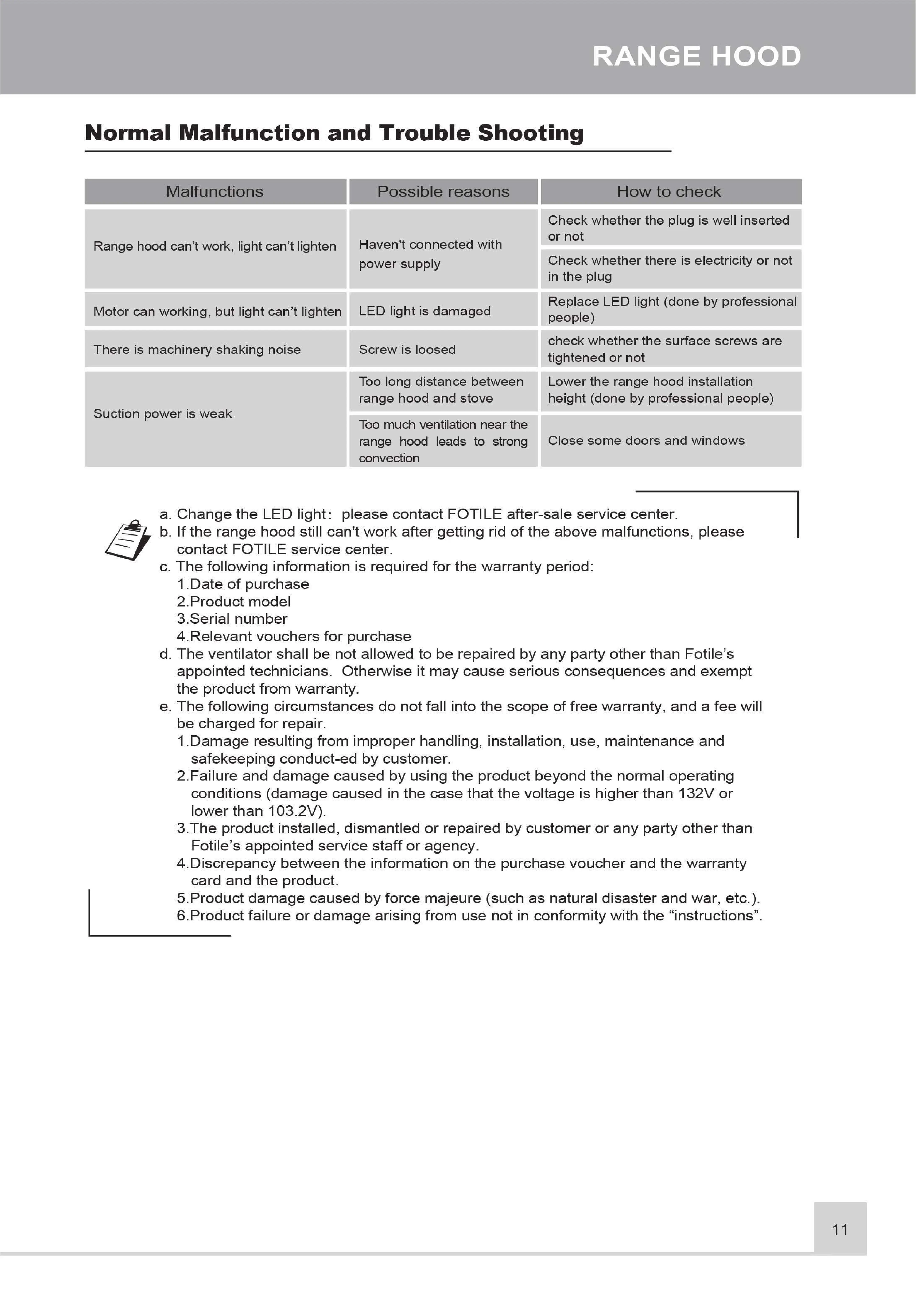
Normal
Malfunction
and
Trouble
Shooting
Check
whether
the
plug
is
well
inserted
7.
Firstly,
press
down
the
unpack-
ing
and
washing
key
to
descend
the
butterfly
wing
plate
to
the
lowest
position,
grasp
the
front
edge
of
the
plate
with
both
Range
hood
can't
work,
light
can't
lighten
~
Haven't
connected
with
or
not
hands,
turn
over
downward,
power
supply
Check
whether
there
is
electricity
or
not
make
the
plate
buckle
to
divorce,
turn
over
a
certain
angle
downward
and
take
down
the
butterfly
in
the
plug
wir?g
plate.
Secondl;_/,
move
the
bucl_(le
of
the
outside
screen
and
take
dowr_1
the
outside
screen.
-
o
o
Replace
LED
light
(done
by
professional
Thirdly,
hold
up
the
inside
screen
with
the
left
hand,
use
the
cross
screwdriver
to
open
with
the
Motor
can
working,
but
light
can’t
lighten
LED
light
is
damaged
people)
right
hand
the
two
screws
used
to
fix
the
inside
screen
,
and
take
down
the
inside
screen.
_ _
~
check
whether
the
surface
screws
are
There
is
machinery
shaking
noise
Screw
is
loosed
tightened
t
8.
Use
the
cross
screw-
9.
Use
the
cross
screw-
\ghtened
orho
driver
to
open
the
two
driver
to
open
the
Too
long
distance
between
Lower
the
range
hood
installation
screws
used
to
fix
the
screws
of
the
connect-
range
hood
and
stove
height
(done
by
professional
people)
/
i
Suction
power
is
weak
:
Iaz
OL.ger
CO\;fir,
E;:nd
i
Ing
rag
(tW:t.
OT
bOtz
=
Too
much
ventilation
near
the
are
down
e
ran
SIAes
Tespectively,
an
range
hood
leads
to
strong
Close
some
doors
and
windows
oyter
cover
and
the
disassemble
the
lifting
convection
trim
cover.
poker;
10.
Use
the
cross
screwdriver
to
_
_
.
a.
Change
the
LED
light:
please
contact
FOTILE
after-sale
service
center.
open
the
five
screws
in
the
:
.
:
.
.
b.
If
the
range
hood
still
can't
work
after
getting
rid
of
the
above
malfunctions,
please
fan
frame
(one
on
both
contact
FOTILE
service
center.
sides
respectively;
three
on
c.
The
following
information
is
required
for
the
warranty
period:
the
top,
open
the
four
1.Date
of
purchase
2.Product
model
_
3.Serial
number
cover,
and
disassemble
the fan
cover
plate.
4
Relevant
vouchers
for
purchase
d.
The
ventilator
shall
be
not
allowed
to
be
repaired
by
any
party
other
than
Fotile’s
appointed
technicians.
Otherwise
it
may
cause
serious
consequences
and
exempt
the
product
from
warranty.
e.
The
following
circumstances
do
not
fall
into
the
scope
of
free
warranty,
and
a
fee
will
be
charged
for
repair.
12
Screw
down
the
locknuts
1.Damage
resulting
from
improper
handling,
installation,
use,
maintenance
and
clockwise.
and
take
down
safekeeping
conduct-ed
by
customer.
2
Failure
and
damage
caused
by
using
the
product
beyond
the
normal
operating
conditions
(damage
caused
in
the
case
that
the
voltage
is
higher
than
132V
or
lower
than
103.2V).
3.The
product
installed,
dismantled
or
repaired
by
customer
or
any
party
other
than
Fotile’s
appointed
service
staff
or
agency.
4
Discrepancy
between
the
information
on
the
purchase
voucher
and
the
warranty
card
and
the
product.
5.Product
damage
caused
by
force
majeure
(such
as
natural
disaster
and
war,
etc.).
5
a.Please
cut
off
the
power
first
before
cleaning
and
replacing
components
so as
not
to
\
6.Product
failure
or
damage
arising
from
use
not
in
conformity
with
the
“instructions”.
screws
on
both
sides,
open
the
screw
on
the fan
11.
Use
the
cross
screwdriver
to
open
the
screws
on
the
air
inlet
ring.
the
impeller.
get
an
electric
shock.
b.Please
wipe
surface
of
range
hood
(surface
of
air
inlet
net
and
back
of
smoke
baffle
shield)
and
close
smoke
baffle
shield
after
using
range
hood
every
time.
c.Use
type
lamp
is
self-ballasted
fluorescent
reflector
lamp
-
Integral
induction
type
ballast.
1.Max
wattage:
2W
2
Voltage
range:
9~10V
3.Dimensions:
width
7
7/8"(199.3mm)/depth
1"(24mm)/height
2"(49.4mm)
10
11

Related product manuals